Could you try one more change? To create a u-turn just in front of the resident only gate. I assume that, according to the aerials, there is not enough place to turn back, but at least in such case the route would lead the visitors outwards trough the public gate?
That would likely do the trick & work quite well for visitors on the related segments just on the inside of tenant only gates.
Sent from my HTC One using Tapatalk
Yes, I am sure that should take care of the routing, I think it would be OK for visitors to make U-turns at residents only gates, after all, that is in any case the only real option if a visitor do find himself at one of these gates with the routing from Waze, so it would be better if Waze do a U-turn instruction instead of a routing through the gate.
I will do the change and test again.
Kyle, agreed from myself, but suggest that we just consider the U-turn option before finalizing it.
Regards,
Igmar
Hi,
Just some feedback on the U-turn option.
After adding a U-turn on Darlington, before the resident gate, here, I noticed the following:
- Waze does not route through the gate at all, even if one is on Darlington rd (without the u-turn Waze would route through the residents gate if one is already on Darlington rd).
- Waze does not actually give an instruction to make a U-turn, it only stops the Waze indicated route just before the gate. I am not sure if this is the “normal” way for Waze to handle u-turns, perhaps someone can explain how Waze should handle a u-turn, as i am not familiar with how Waze should do it…
It seems that the u-turn does work, by preventing routing for normal traffic through the gate (even when one is already on the last road section before the gate), but I would have liked to see a definite instruction from Waze to perform a u-turn, instead of just “ending” of the Waze route, and assuming that the user would interpret this as a u-tun instruction.
Regards,
Igmar
I’ve just tested the routing (on a client) from Darlington Rd. While headed towards East, I was routed “the usual way” through visitors gate and Lynburn RD (LiveMap seems to have some problems ATM wit the two deepest zooms’ tiles). But after I’ve turned myself back and “drove” a bit towards West, the client suddenly routed me through the private gate, directly onto the Meiring Naudé Road, even without having to place a stop point inside the triple segment and got no U-turn back? :?
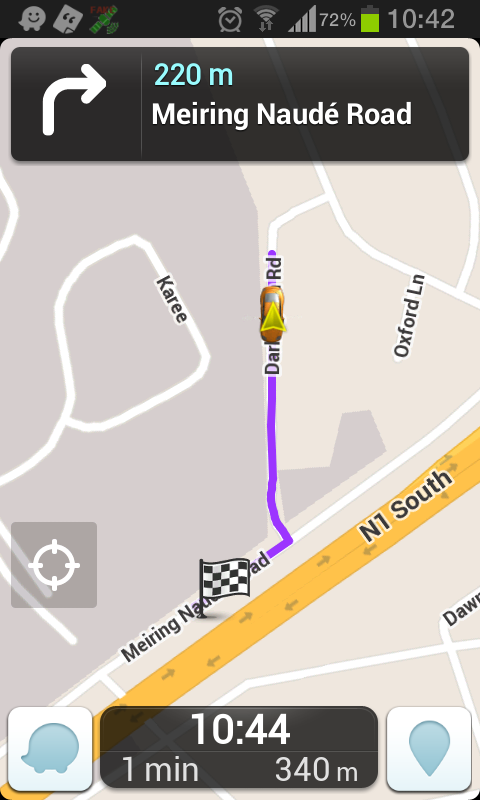
As to the U-turn instructions - no, Waze still does not support it at all and its presence in the route is … confusing 
Hi,
I tested a few more times. Waze client also routed me through the gate once, but most of the time it handles the u-turn as a u-turn. It assume the times when Waze routes through the gate may be a glitch, as it does what it should with the u-turn most of the time.
I agree, the u-turn is confusing, but only because of the way the Waze client handles u-turns. It would be much better if the client could issue a proper u-turn instruction where u-turns are placed.
If we accept that this is the way that Waze handles u-turns, then I think it is still better to place a u-turn at “resident only” gates, versus not placing it. With the addition of a u-turn, at least the route stops before the gate most of the times, and users should interpret this as a u-turn. If no u-turn is placed, the Waze client routes through the “residents only” gate when one is on the last segment before the gate.
Any thoughts?
Regards,
Igmar
I would say that a slightly confusing u-turn routing is better than waze trying to route thru a gate that’s not going to open.
Hi everyone…
Someone brought this thread to my attention, so I thought I would cross-post here. There is a section in the Wiki on this topic already that deals with “Private Installations.”
This includes large private installations like government or military bases as well as smaller private communities. It is slowly evolving as different conversations occur. The thread that prefaced that wiki page is here: https://www.waze.com/forum/viewtopic.php?f=129&t=41985.
The current conversation seems to be around private communities that have different gates – some for residents only and some for visitors and residents. How does one optimally route visitors versus residents? The solution cannot be complete and probably has to be chosen using local preference.
Could someone post an example of this private-nonprivate-private triple heart bypass thingy, please? :o I think I understand but would like to see it on a map, just to make sure. Thanks.
Hi David. You can see an example of that particular one if you click this link.
The two separate private segments are the 2 that are selected in this link.