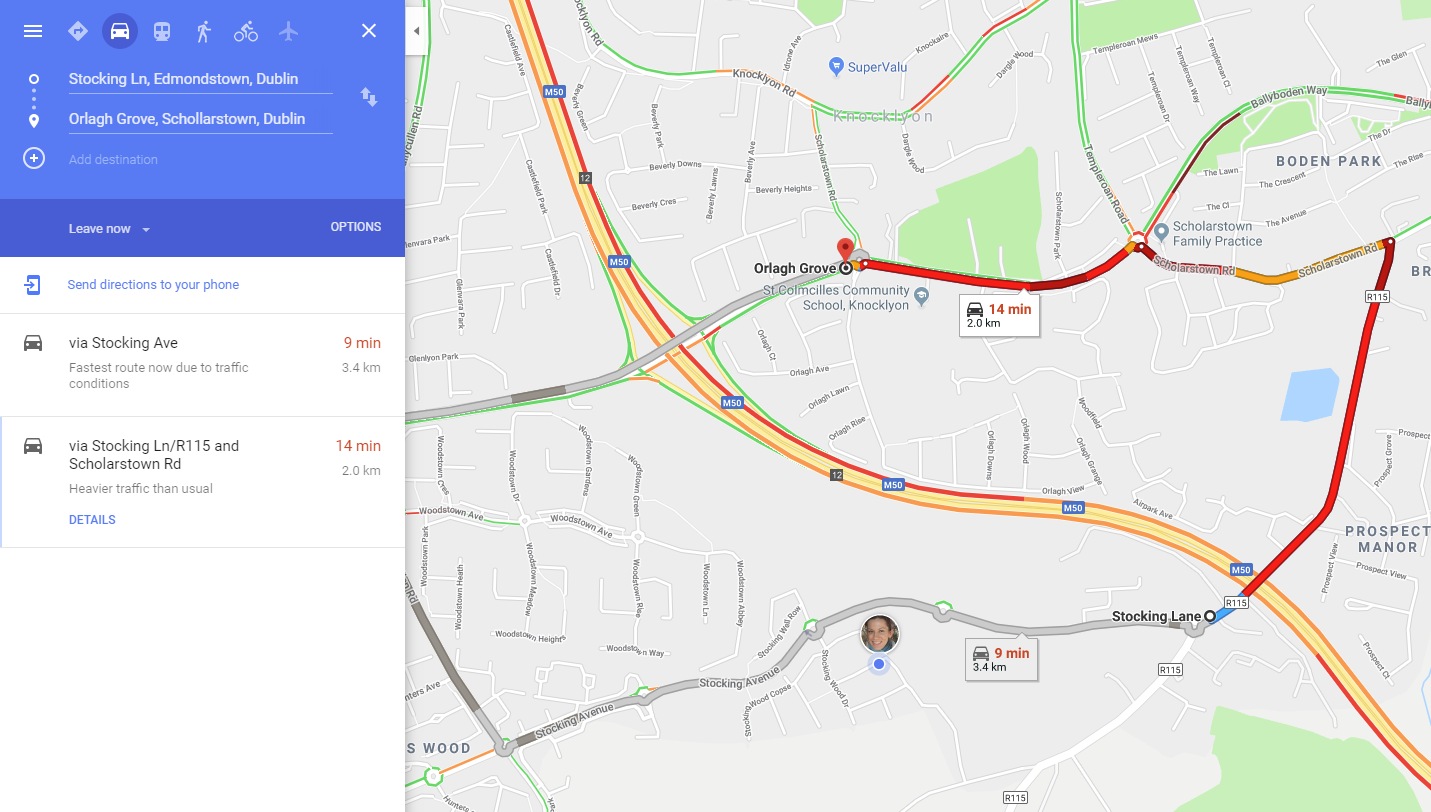
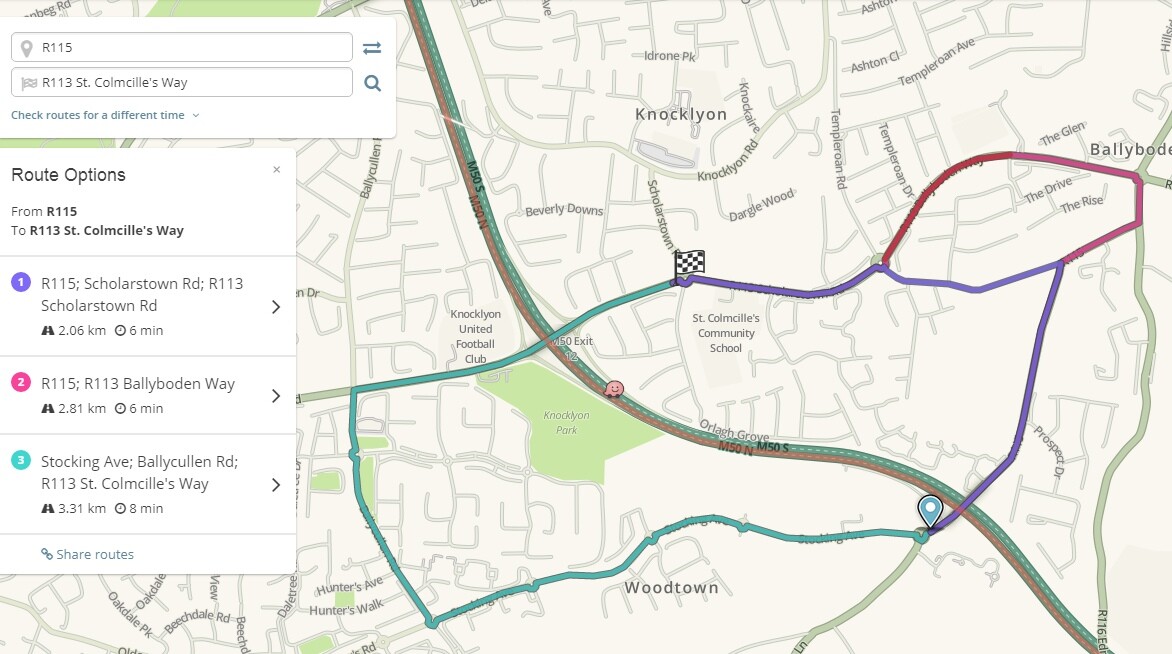
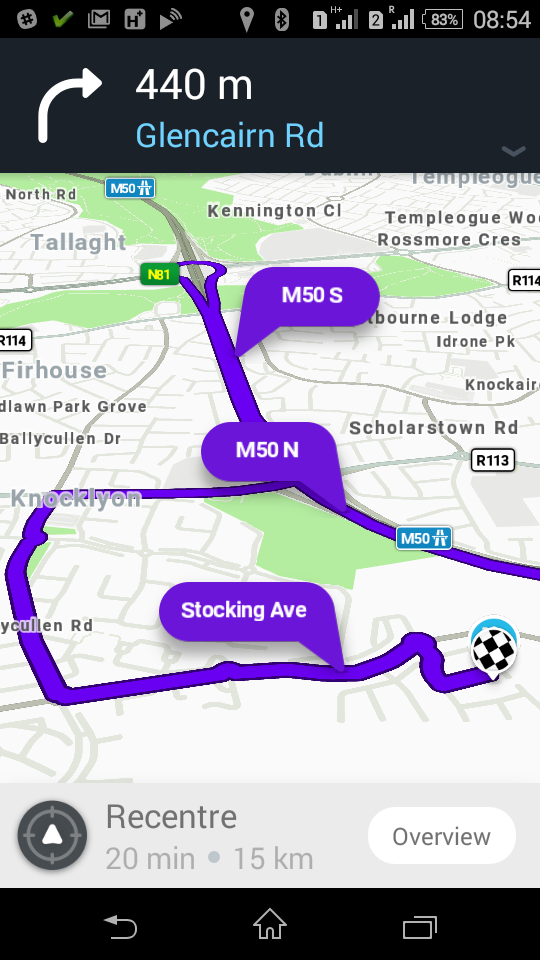
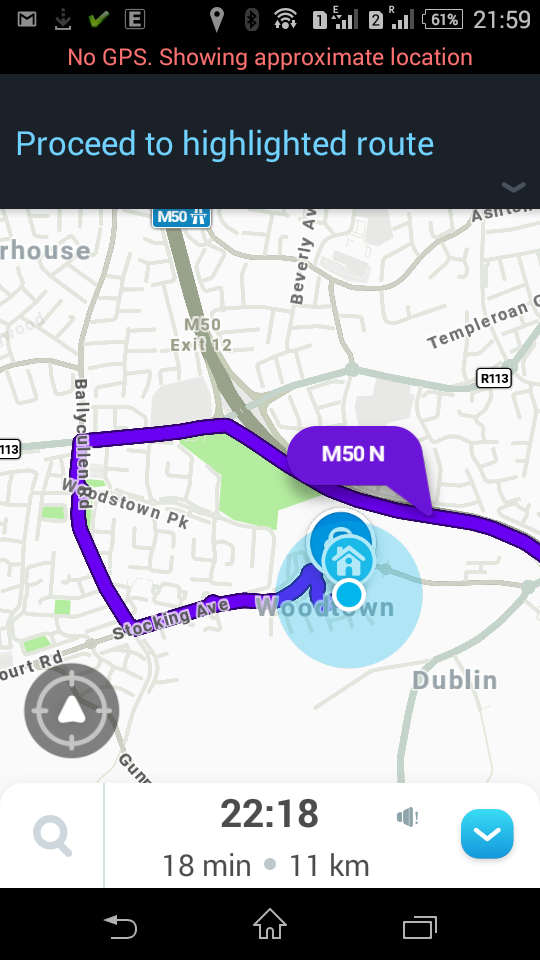
Another example of traffic missing in Waze.
Date/time: April 17, 2018 08:10 am UTC+1.
Google ETA: 14 min. Waze ETA: 6 min. Start/end points.
Here two segments of Scholarstown Rd have the same name on both Google and Waze map, so my theory about different road names may not hold here. But one of the segments has actually two names on Google map, English ‘Scholarstown Rd’ and Irish ‘Bóthar Bhaile Scallart’. May be the Irish one is used to correlate roads.
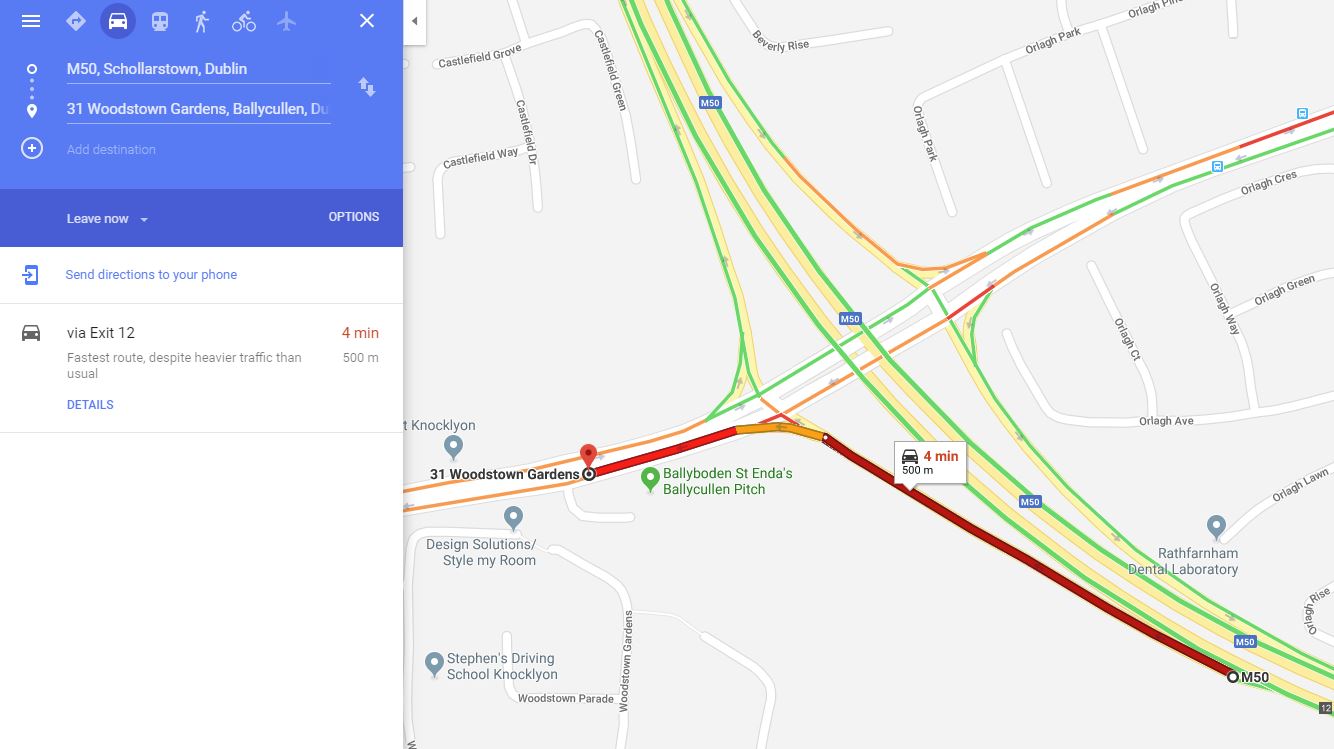
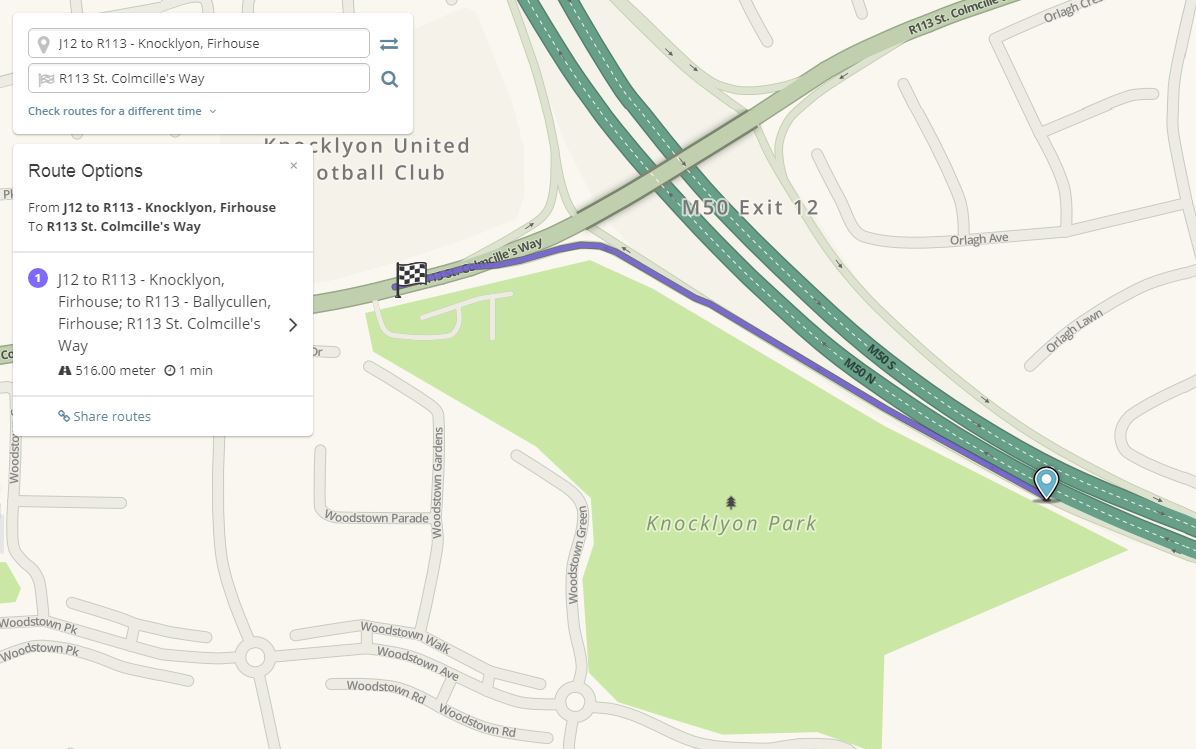
Another example of traffic missing in Waze.
Date/time: April 18, 2018 7:26 pm UTC+1. Start/end points.
Road names are different on Google and Waze in this example.
Also I noticed that the exits from M50 are never red/yellow in Waze, even such heavily congested as the one above. It again can be explained by the road name differences in Google and Waze. In Google the exits are unnamed or have name “M50”. In Waze all exits have names like “J12 to R113 - Knocklyon, Firhouse”.
Thanks for these examples, Alex. I haven’t heard back from Waze HQ yet, but I’ve pointed them at this thread and I’m reminding them every few days. I will let you know as soon as I hear anything.
I really really hope they don’t just use road names for matching - that would be crazy. We usually name roads in order to give sensible directions to users (like “J12 R113 > Knocklyon, Firhouse”).
David, thanks for pushing this issue with Waze HQ.
In the meantime I fixed some street names in Waze (R115 Stocking Ln, R115 Scholarstown Rd) and trying to fix some in Google Maps (St. Colmcille’s Way and Ballycullen Rd) to make the names the same and to check whether it fixes the issue with missing traffic. I will re-check traffic in Waze next week.
Agree. Hopefully it’s something that can be easily fixed by tweaking some traffic import settings on Waze side.
Unfortunately I don’t see any improvements. Waze still doesn’t show traffic congestion on those “broken” roads and makes too optimistic ETAs during peak hours. I was hoping that we need to wait for some time until something completely updates somewhere in Waze. But now it’s difficult to check the issue because traffic became super light in July and there are no congestions on my daily routes.
But there is another problem that’s opposite and that’s happening on the same roads. When there is a very light traffic, Waze sometimes makes very pessimistic ETAs as if there was a very bad traffic (without actually showing the bad traffic) and sometimes creates super suboptimal routes (see below). For me it looks like an indication of the same problem, namely Waze doesn’t import Google traffic on those “broken” road segments.
BTW, I renamed several segments in Waze and Google to make the names the same but it didn’t help.
I will, of course. Before I do though: can you give me exact times and dates for your example? Waze HQ is in a different country, so from their point of view it might be reasonable that there was a tailback on the Knocklyon/Firhouse exit of the M50 that you showed (as far as I remember there are traffic lights there for traffic turning right).
The more examples and hard data we can provide, the easier it will be for them to investigate.
David, That issue happened on June 22nd 2018 at 8:54am UTC+1.
I see similar issue at the same place every working day at about 9am-9:20am. Waze usually makes ETA about 4 minutes bigger than the actual driving time when the traffic is very light. Sometimes it’s even bigger which leads to those wrong detours.
The wrong ETA happens mostly on these segments.
Once I saw the same weird route at about 4am when the roads were completely empty.
Thanks Alex. I’ve passed on your two posts to Waze HQ. I’m not sure whether it’s an issue with Waze’s use of Google’s traffic data, or an unrelated routing issue, but they’ll look into it now. Watch this space.
Waze just isn’t taking traffic data from Google Traffic. I am forever finding myself driving into traffic jams using Waze, only to find the traffic jams are on Google traffic.
One interesting thing about Waze’s use of traffic data from Google: Waze would prefer to rely on its own data where possible, so (if my memory serves me right) if there are two or more Waze users on a stretch of road, then Waze ignores Google’s information and instead uses the speed data from its own users.
I think there’s a certain amount of sense here, since if Waze can see that there are a couple of users making good progress on a road, then it might be reasonable to assume that any traffic that was there has cleared.
Of course, the risk is that these two users got past just before the traffic suddenly increased (maybe the lights changed or something else happened to stop the traffic for a short while).
My understanding is that Waze uses traffic data from Google only when it has no users of its own to provide that traffic data. On possibility is that Waze’s definition of “heavy traffic” is different to Google’s definition of “heavy traffic”. I don’t think Waze highlights traffic as heavy onscreen unless it’s significantly slower than what’s usual for that road at that time. If it’s always very slow at this particular moment, then from Waze’s point of view it’s just normal and nothing to write home about. Certainly Waze will take the speed at that time into consideration when planning a route, but the road colouring Waze uses just means “this road is even slower than usual”, not “this road is slow” if that road is always slow at that time.
Maybe Google Maps displays a traffic jam when there is a jam, even if there’s always a jam at that particular time, and maybe that’s the reason why we’re seeing a difference. I have no idea how Google Maps decides when to display a traffic jam though.