# New Editor version 2.109
**URL:** https://www.waze.com/discuss/t/new-editor-version-2-109/299715
**Category:** WME Production Version Releases
**Created:** [August 10, 2022, 1:52pm UTC](https://www.waze.com/discuss/t/new-editor-version-2-109/299715 "2022-08-10T13:52:43Z")
**Posts on this page:** 20
**Page:** 3
### Author:  [@Nataliia\_Staff](https://www.waze.com/discuss/u/Nataliia_Staff)
#### Post date: [August 17, 2022, 9:22am UTC](https://www.waze.com/discuss/t/new-editor-version-2-109/299715/41 "2022-08-17T09:22:21Z")
> [@G\_W1Z](#):
>
> Are the 3 floating buttons on the right supposed to cover/partially cover windows that are open?Screenshot 2022-08-16 183355.png
> Permalink of where I experienced this: [https://www.waze.com/en-US/editor?env=usa&lon=-76.97618&lat=39.82527&zoomLevel=19&segments=514447553](https://www.waze.com/en-US/editor?env=usa&lon=-76.97618&lat=39.82527&zoomLevel=19&segments=514447553)
Hi G\_W1Z,
Thank you for the report. Could you please indicate steps how do you recreate this behaviour? I can’t open an additional window in WME.
Regards,
Nataliia
---
### Author:  [@Nataliia\_Staff](https://www.waze.com/discuss/u/Nataliia_Staff)
#### Post date: [August 17, 2022, 9:33am UTC](https://www.waze.com/discuss/t/new-editor-version-2-109/299715/42 "2022-08-17T09:33:41Z")
> [@linguasaltitante](#):
>
> Hello
>
> There seems to be a problem when creating an Event: it does not assume the city that is firstly shown by default
Hi Linguasaltitante,
Thank you for the report. Could you please check this [forum thread](https://www.waze.com/forum/viewtopic.php?t=356074)? It seems that these issues are similar.
Regards,
Nataliia
---
### Author:  [@linguasaltitante](https://www.waze.com/discuss/u/linguasaltitante)
#### Post date: [August 17, 2022, 10:01am UTC](https://www.waze.com/discuss/t/new-editor-version-2-109/299715/43 "2022-08-17T10:01:25Z")
> [@nataliiaPi](#):
>
> > [@linguasaltitante](#):
> >
> > Hello
> >
> > There seems to be a problem when creating an Event: it does not assume the city that is firstly shown by default
>
> Hi Linguasaltitante,
>
> Thank you for the report. Could you please check this [forum thread](https://www.waze.com/forum/viewtopic.php?t=356074)? It seems that these issues are similar.
>
> Regards,
> Nataliia
Hello nataliiaPi
It’s the same issue. Sorry, I was not aware of that thread :oops:
Best regards
---
### Author:  [@Nataliia\_Staff](https://www.waze.com/discuss/u/Nataliia_Staff)
#### Post date: [August 17, 2022, 10:07am UTC](https://www.waze.com/discuss/t/new-editor-version-2-109/299715/44 "2022-08-17T10:07:29Z")
Hey Linguasaltitante,
No worries, thank you once again for the report.
Have a nice day!
Nataliia
---
### Author:  [@linguasaltitante](https://www.waze.com/discuss/u/linguasaltitante)
#### Post date: [August 17, 2022, 10:30am UTC](https://www.waze.com/discuss/t/new-editor-version-2-109/299715/45 "2022-08-17T10:30:27Z")
> [@nataliiaPi](#):
>
> Hey Linguasaltitante,
>
> No worries, thank you once again for the report.
>
> Have a nice day!
> Nataliia
Nataliia, since we are talking about Events (and hoping that this wasn’t already also a reason of another thread reporting the same issue :oops: ) please see the GIF below.
Being I a member of Portuguese localization team, I can apply some kind of abbreviation to allow the language to fit on the drop box, but as you can see, there are another languages that do not fit on the drop box. In what concerns the Portuguese language, we can’t distinguish between Brazil and Portugal so, in the end, the editor do not know which language is selecting. This must be revised, by changing the font size, making the drop box bigger, whatever …
Best regards

---
### Author:  [@jm6087](https://www.waze.com/discuss/u/jm6087)
#### Post date: [August 17, 2022, 11:41am UTC](https://www.waze.com/discuss/t/new-editor-version-2-109/299715/46 "2022-08-17T11:41:16Z")
> [@nataliiaPi](#):
>
> > [@G\_W1Z](#):
> >
> > Are the 3 floating buttons on the right supposed to cover/partially cover windows that are open?Screenshot 2022-08-16 183355.png
> > Permalink of where I experienced this: [https://www.waze.com/en-US/editor?env=usa&lon=-76.97618&lat=39.82527&zoomLevel=19&segments=514447553](https://www.waze.com/en-US/editor?env=usa&lon=-76.97618&lat=39.82527&zoomLevel=19&segments=514447553)
>
> Hi G\_W1Z,
>
> Thank you for the report. Could you please indicate steps how do you recreate this behaviour? I can’t open an additional window in WME.
>
> Regards,
> Nataliia
Natalia,
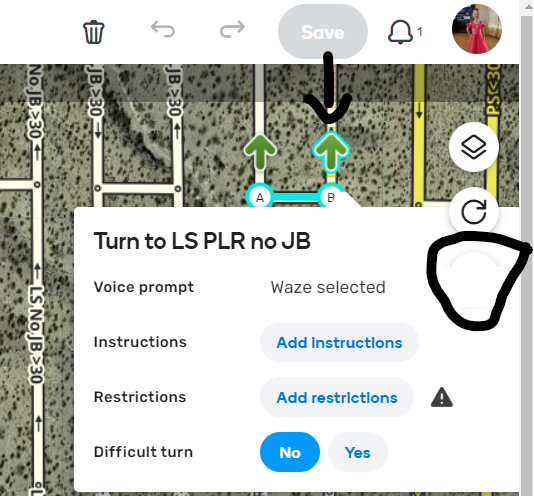
It is not so much steps to recreate but location of the arrow when you hover over it.
You just have to move the arrow around (in the upper right corner of the map) and hover over the arrow until you find it.
The best I can tell is the problem location is when the arrow is in the area below the save button and to the left of the layers button. 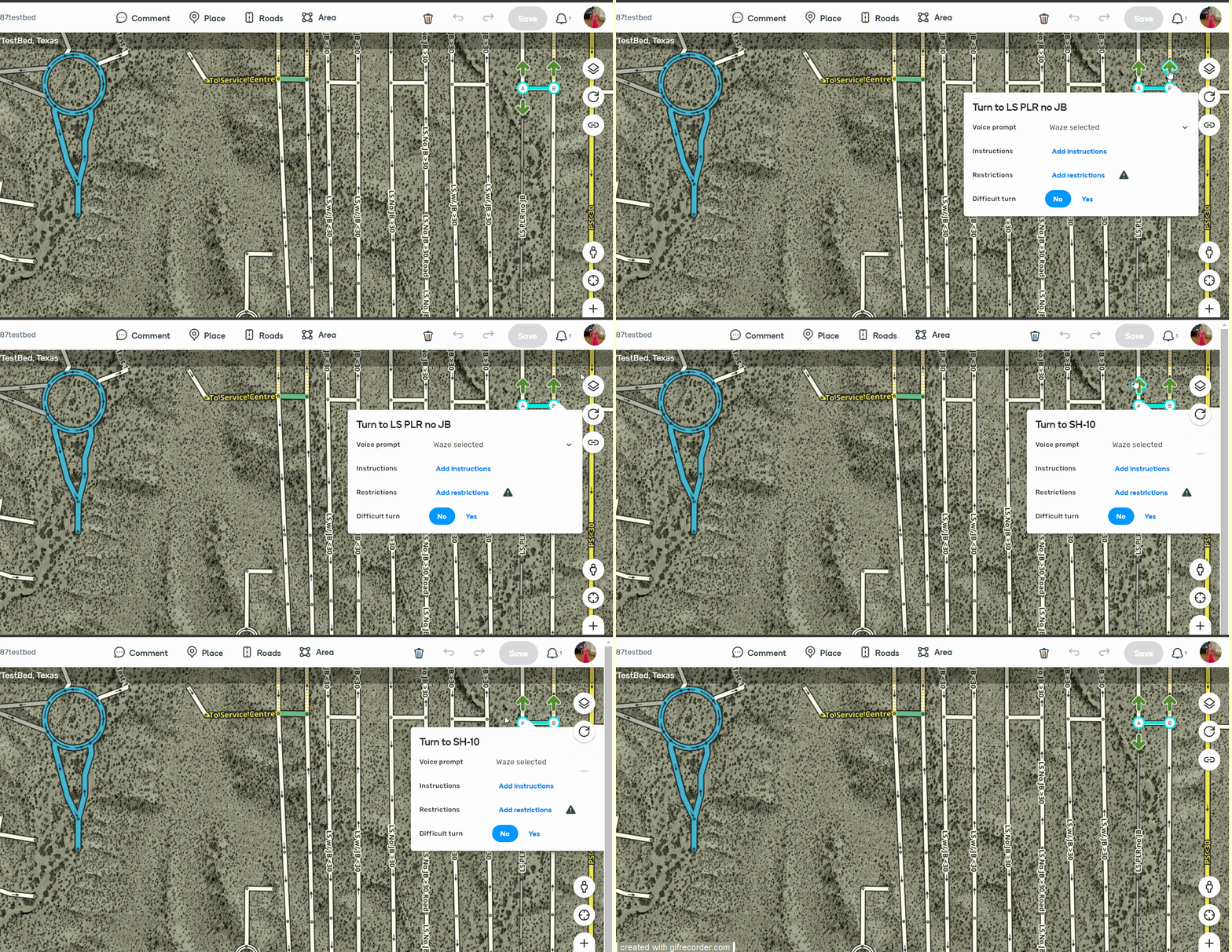
---
### Author:  [@Nataliia\_Staff](https://www.waze.com/discuss/u/Nataliia_Staff)
#### Post date: [August 17, 2022, 1:23pm UTC](https://www.waze.com/discuss/t/new-editor-version-2-109/299715/47 "2022-08-17T13:23:07Z")
Hi Everyone,
I want to inform that we have reverted recent changes and you should not experience issues with Fire Fox at the moment.
Regards,
Nataliia
---
### Author:  [@Nataliia\_Staff](https://www.waze.com/discuss/u/Nataliia_Staff)
#### Post date: [August 17, 2022, 1:42pm UTC](https://www.waze.com/discuss/t/new-editor-version-2-109/299715/48 "2022-08-17T13:42:53Z")
> [@linguasaltitante](#):
>
> > [@nataliiaPi](#):
> >
> > Hey Linguasaltitante,
> >
> > No worries, thank you once again for the report.
> >
> > Have a nice day!
> > Nataliia
>
> Nataliia, since we are talking about Events (and hoping that this wasn’t already also a reason of another thread reporting the same issue :oops: ) please see the GIF below.
>
> Being I a member of Portuguese localization team, I can apply some kind of abbreviation to allow the language to fit on the drop box, but as you can see, there are another languages that do not fit on the drop box. In what concerns the Portuguese language, we can’t distinguish between Brazil and Portugal so, in the end, the editor do not know which language is selecting. This must be revised, by changing the font size, making the drop box bigger, whatever …
>
> Best regards
>
> 
Hi Linguasaltitante,
Thank you the report. I will check this with the team and will open an internal ticket to fix this.
Regards,
Nataliia
---
### Author:  [@Nataliia\_Staff](https://www.waze.com/discuss/u/Nataliia_Staff)
#### Post date: [August 17, 2022, 2:58pm UTC](https://www.waze.com/discuss/t/new-editor-version-2-109/299715/49 "2022-08-17T14:58:59Z")
> [@jm6087](#):
>
> > [@nataliiaPi](#):
> >
> > > [@G\_W1Z](#):
> > >
> > > Are the 3 floating buttons on the right supposed to cover/partially cover windows that are open?Screenshot 2022-08-16 183355.png
> > > Permalink of where I experienced this: [https://www.waze.com/en-US/editor?env=usa&lon=-76.97618&lat=39.82527&zoomLevel=19&segments=514447553](https://www.waze.com/en-US/editor?env=usa&lon=-76.97618&lat=39.82527&zoomLevel=19&segments=514447553)
> >
> > Hi G\_W1Z,
> >
> > Thank you for the report. Could you please indicate steps how do you recreate this behaviour? I can’t open an additional window in WME.
> >
> > Regards,
> > Nataliia
>
> Natalia,
>
> It is not so much steps to recreate but location of the arrow when you hover over it.
>
> You just have to move the arrow around (in the upper right corner of the map) and hover over the arrow until you find it.
>
> The best I can tell is the problem location is when the arrow is in the area below the save button and to the left of the layers button.Share link hidden - beta.gif
> Share link hidden 1.png
Thank you John for the explanation. Now I understand what the problem is. I have filed an internal ticket for this. The team will review it.
Additional thanks to G\_W1Z for catching the issue.
Best,
Nataliia
---
### Author:  [@SC1GHERA](https://www.waze.com/discuss/u/SC1GHERA)
#### Post date: [August 17, 2022, 3:13pm UTC](https://www.waze.com/discuss/t/new-editor-version-2-109/299715/50 "2022-08-17T15:13:58Z")
> [@nataliiaPi](#):
>
> Hi Everyone,
>
> I want to inform that we have reverted recent changes and you should not experience issues with Fire Fox at the moment.
>
> Regards,
> Nataliia
Hi Nataliia,
Perfect, I can confirm that WME on Firefox 103.0.2 once again works!
Thank you!
---
### Author:  [@EloheiYishi](https://www.waze.com/discuss/u/EloheiYishi)
#### Post date: [August 20, 2022, 7:16pm UTC](https://www.waze.com/discuss/t/new-editor-version-2-109/299715/51 "2022-08-20T19:16:41Z")
> [@G\_W1Z](#):
>
> What krzycholub said ^^
>
> Road closure (RTC) details, such as start and end dates, no longer show in the history pane.
>
> Here is a PL for a segment that had a RTC on Mon May 31 2021 at 10:25: [https://waze.com/en-US/editor?env=usa&lat=40.70530&lon=-77.58899&s=412387220757&zoomLevel=19&segments=507584266](https://waze.com/en-US/editor?env=usa&lat=40.70530&lon=-77.58899&s=412387220757&zoomLevel=19&segments=507584266)
>
> Here is what the entry looks like when a RTC is added:3.png
> Here is what the entry looks like when a RTC is deleted: 4.png
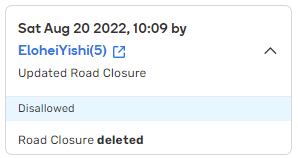
Current WME Production, I’m not using the URO+ script and don’t know of any script that I’m using which provides this info. Also shows without any scripts enabled.
Nataliia, as obviously this a WME feature, do you think it’s possible to move the closures history to the Closures tab? I guess I will make it a suggestion.
---
### Author:  [@turbomkt](https://www.waze.com/discuss/u/turbomkt)
#### Post date: [August 22, 2022, 3:56am UTC](https://www.waze.com/discuss/t/new-editor-version-2-109/299715/52 "2022-08-22T03:56:46Z")
> [@EloheiYishi](#):
>
> > [@G\_W1Z](#):
> >
> > What krzycholub said ^^
> >
> > Road closure (RTC) details, such as start and end dates, no longer show in the history pane.
> >
> > Here is a PL for a segment that had a RTC on Mon May 31 2021 at 10:25: [https://waze.com/en-US/editor?env=usa&lat=40.70530&lon=-77.58899&s=412387220757&zoomLevel=19&segments=507584266](https://waze.com/en-US/editor?env=usa&lat=40.70530&lon=-77.58899&s=412387220757&zoomLevel=19&segments=507584266)
> >
> > Here is what the entry looks like when a RTC is added:3.png
> > Here is what the entry looks like when a RTC is deleted: 4.png
>
> 2022-08-20\_22-01-13\_Maxthon.png
> Current WME Production, I’m not using the URO+ script and don’t know of any script that I’m using which provides this info. Also shows without any scripts enabled.
>
> Nataliia, as obviously this a WME feature, do you think it’s possible to move the closures history to the Closures tab? I guess I will make it a suggestion.
If you were using URO+ you would have a lot more detail on that history entry.
---
### Author:  [@Nataliia\_Staff](https://www.waze.com/discuss/u/Nataliia_Staff)
#### Post date: [August 22, 2022, 7:27am UTC](https://www.waze.com/discuss/t/new-editor-version-2-109/299715/53 "2022-08-22T07:27:50Z")
> [@EloheiYishi](#):
>
> Nataliia, as obviously this a WME feature, do you think it’s possible to move the closures history to the Closures tab? I guess I will make it a suggestion.
Hi EloheiYishi,
Please add a suggestion for this and we will discuss it with the team.
Thanks,
Nataliia
---
### Author:  [@EloheiYishi](https://www.waze.com/discuss/u/EloheiYishi)
#### Post date: [August 22, 2022, 10:10am UTC](https://www.waze.com/discuss/t/new-editor-version-2-109/299715/54 "2022-08-22T10:10:54Z")
Thank you, added. Here is the link for anyone who wants to follow.
[https://waze.uservoice.com/forums/59225-map-editor-suggestions/suggestions/45584869-move-closures-history-to-the-closures-tab](https://waze.uservoice.com/forums/59225-map-editor-suggestions/suggestions/45584869-move-closures-history-to-the-closures-tab)
---
### Author:  [@titchy](https://www.waze.com/discuss/u/titchy)
#### Post date: [August 22, 2022, 2:52pm UTC](https://www.waze.com/discuss/t/new-editor-version-2-109/299715/55 "2022-08-22T14:52:22Z")
When approving a PUR and clicking Save, it automatically goes to the next issue. Sometimes I want to be able to add more info to the place or edit it and I shouldn’t have to memorise where it is and go back to find it.
> [@turbomkt](#):
>
> > [@G\_W1Z](#):
> >
> > After approving a Place Update Request (PUR) and saving, the PUR window remains open. Here is what it looks like:Screenshot 2022-08-10 125714.png
> >
> > This is happening with all scripts/extensions disabled.
> >
> > Here is a PL to a place I had this happen with: [https://www.waze.com/en-US/editor?env=usa&lon=-75.18751&lat=39.95119&zoomLevel=19&venues=186646928.1866534811.1431437](https://www.waze.com/en-US/editor?env=usa&lon=-75.18751&lat=39.95119&zoomLevel=19&venues=186646928.1866534811.1431437)
> >
> > I tested in the general area with other types of PURs (adding a new place, for example) and the same behavior occured.
>
> Quite honestly…It’s not what we are accustomed to, but I think this is the way it should work. That way we can use the Next Place button after we save our current edit.
If the PUR box is to stay open for this reason then fine, it kinda makes sense, but it shouldn’t automatically go to the next issue when clicking save.
I’d prefer the previous version’s method though of just selecting a PUR from my feed.
---
### Author:  [@EloheiYishi](https://www.waze.com/discuss/u/EloheiYishi)
#### Post date: [August 22, 2022, 2:59pm UTC](https://www.waze.com/discuss/t/new-editor-version-2-109/299715/56 "2022-08-22T14:59:03Z")
Maybe just for the sake of speed of work, the links should be replaced with buttons and all possible drop-downs with buttons also. In this case and in case of all URs - replace the next link with big enough arrow buttons. I know people are worried about the enormous elements and I don’t like them, but on a 27" monitor it’s much easier to locate and click the button than a small link.
---
### Author:  [@Nataliia\_Staff](https://www.waze.com/discuss/u/Nataliia_Staff)
#### Post date: [August 22, 2022, 3:30pm UTC](https://www.waze.com/discuss/t/new-editor-version-2-109/299715/57 "2022-08-22T15:30:13Z")
> [@EloheiYishi](#):
>
> Thank you, added. Here is the link for anyone who wants to follow.
>
> [https://waze.uservoice.com/forums/59225-map-editor-suggestions/suggestions/45584869-move-closures-history-to-the-closures-tab](https://waze.uservoice.com/forums/59225-map-editor-suggestions/suggestions/45584869-move-closures-history-to-the-closures-tab)
Thank you EloheiYishi! I upvoted it.
Regards,
Nataliia
---
### Author:  [@Nataliia\_Staff](https://www.waze.com/discuss/u/Nataliia_Staff)
#### Post date: [August 22, 2022, 3:33pm UTC](https://www.waze.com/discuss/t/new-editor-version-2-109/299715/58 "2022-08-22T15:33:07Z")
> [@titchy\_](#):
>
> When approving a PUR and clicking Save, it automatically goes to the next issue. Sometimes I want to be able to add more info to the place or edit it and I shouldn’t have to memorise where it is and go back to find it.
>
> > [@turbomkt](#):
> >
> > > [@G\_W1Z](#):
> > >
> > > After approving a Place Update Request (PUR) and saving, the PUR window remains open. Here is what it looks like:Screenshot 2022-08-10 125714.png
> > >
> > > This is happening with all scripts/extensions disabled.
> > >
> > > Here is a PL to a place I had this happen with: [https://www.waze.com/en-US/editor?env=usa&lon=-75.18751&lat=39.95119&zoomLevel=19&venues=186646928.1866534811.1431437](https://www.waze.com/en-US/editor?env=usa&lon=-75.18751&lat=39.95119&zoomLevel=19&venues=186646928.1866534811.1431437)
> > >
> > > I tested in the general area with other types of PURs (adding a new place, for example) and the same behavior occured.
> >
> > Quite honestly…It’s not what we are accustomed to, but I think this is the way it should work. That way we can use the Next Place button after we save our current edit.
>
> If the PUR box is to stay open for this reason then fine, it kinda makes sense, but it shouldn’t automatically go to the next issue when clicking save.
>
> I’d prefer the previous version’s method though of just selecting a PUR from my feed.
Hi Titchy\_,
We are looking into this and will update you when we receive information about possible solutions.
Best,
Nataliia
---
### Author:  [@titchy](https://www.waze.com/discuss/u/titchy)
#### Post date: [August 22, 2022, 3:35pm UTC](https://www.waze.com/discuss/t/new-editor-version-2-109/299715/59 "2022-08-22T15:35:10Z")
I cannot delete multiple segments.
When I try to delete this roundabout, the save button stays gray. Not sure if this is a known issue so sorry if repeated.
I’m using Chrome and no scripts running.
[Permalink](https://www.waze.com/editor/?env=row&lon=-1.29867&lat=53.53292&zoomLevel=18&segments=400592079,400592080)
---
### Author:  [@turbomkt](https://www.waze.com/discuss/u/turbomkt)
#### Post date: [August 22, 2022, 4:57pm UTC](https://www.waze.com/discuss/t/new-editor-version-2-109/299715/60 "2022-08-22T16:57:12Z")
> [@titchy\_](#):
>
> When approving a PUR and clicking Save, it automatically goes to the next issue. Sometimes I want to be able to add more info to the place or edit it and I shouldn’t have to memorise where it is and go back to find it.
>
> > [@turbomkt](#):
> >
> > > [@G\_W1Z](#):
> > >
> > > After approving a Place Update Request (PUR) and saving, the PUR window remains open. Here is what it looks like:Screenshot 2022-08-10 125714.png
> > >
> > > This is happening with all scripts/extensions disabled.
> > >
> > > Here is a PL to a place I had this happen with: [https://www.waze.com/en-US/editor?env=usa&lon=-75.18751&lat=39.95119&zoomLevel=19&venues=186646928.1866534811.1431437](https://www.waze.com/en-US/editor?env=usa&lon=-75.18751&lat=39.95119&zoomLevel=19&venues=186646928.1866534811.1431437)
> > >
> > > I tested in the general area with other types of PURs (adding a new place, for example) and the same behavior occured.
> >
> > Quite honestly…It’s not what we are accustomed to, but I think this is the way it should work. That way we can use the Next Place button after we save our current edit.
>
> If the PUR box is to stay open for this reason then fine, it kinda makes sense, but it shouldn’t automatically go to the next issue when clicking save.
>
> I’d prefer the previous version’s method though of just selecting a PUR from my feed.
Have you checked if there are any scripts causing this? Or are you working from the feed? When I am running scriptless, and select any PUR on the map, WME does not move to the next place automatically.
[Previous page](https://www.waze.com/discuss/t/new-editor-version-2-109/299715.md?page=2)
[Next page](https://www.waze.com/discuss/t/new-editor-version-2-109/299715.md?page=4)