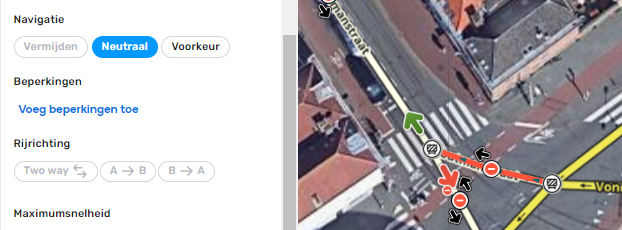
On closed segments, you cannot see the direction:
Would it be possible to make it visible? With node closures it’s not always obvious from the map.
No issues:
Road segments (I tried to check every road type; general-, closures- and Lanes-Tab)
Walking trails
Roundabouts
Residential places
UI issue:
Map comments (point & area)
Drives-Tab
Events-Tab
Settings-Tab
Places (point & area); border around the “Chosen/Suggested categories” field
Speed/red light cameras
Junction boxes
Not identified:
Thank you Sebastian, that’s a really valuable help for the team.
We filed an internal issue for this with all details.
Regards,
rompompom:
On closed segments, you cannot see the direction:
Would it be possible to make it visible? With node closures it’s not always obvious from the map.
Hi Hans,
Thank you for the suggestion. I will check with the team the reason why the direction isn’t displayed and update you.
Regards,
phuz
October 21, 2022, 12:27pm
44
You’re assuming that
the issue is easily identifiable
the script author doesn’t have to work and doesn’t have a family or other things going on
If authoring a waze script was a full time job, yes several weeks is ample time.
dBsooner:
I chose to wait because of the bug reported in the link in MajkiiTelini’s post above. I “thought” the issue would be fixed in production release. It was not. While it was semi-fixed (the script tab no longer disappeared), it did not get 100% fixed as the ACTIVE (denoted as having the ‘active’ class) tab is not being restored when a map element is deselected. (See MajkiiTelini’s post above).
I KNEW there was an issue with the width of the container as Waze decided for some unknown reason to me to set the width to 330px, which is 30px wider than they have set for “max-width” of the side panel. They set the max width to 300, but they set the side panel root container to 330px. I hard code 300px for my inner containers, but this was being overwritten by their higher dependency of the 330px via their new CSS update. I forced mine to be priority with an !important flag. Again, I THOUGHT they’d catch this before release to production, but they didn’t.
That being said, Ruben, Nataliia: There are two bugs here:
The “active” CSS class is being removed from the entire DOM tree under the #side-panel container when an element is selected/deselected. This is causing the active script tab to no longer be selected upon the deselection of the map element (place, segment, etc). Further, if that script has sub-tabs (URC-E, GIS-L, are two examples) that also utilize the “active” CSS class, they are being stripped as well. So if you do manually select the script tab to make it active again, the tab will be blank because the “active” tag was removed from the sub-tab by your selection / deselection process.
You are manually setting the width to 330px for the side-panel. Which is wider than the max width you have coded at 300px. So 10% of the panel ends up being hidden behind the left side of the map.
Hi Daniel,
Thank you for your feedback and summarising problems. I will communicate this information to the team.
Best,
I have another request. WME now remembers the tab you were on: when you had the closure tab opened on a segment, and you select a new segment this is opened on the closure segment as well. For existing segments this is quite convenient behaviour. However, when you draw a new segment, this also opens on the closure tab or lane guidance tab. That is inconvenient.
Could it be made that newly drawn segments always open on the general tab?
nimper2000:
I also think that calls for a rollback aren’t the way, although I can understand the frustration.
Of course Waze is not obligated to consider user scripts when updating WME, but those scripts exist for a simple reason. To make WME better, more efficient, less annoying and because there are no built in features addressing a lot of those issues.
The fact that we ‘need’ scripts to efficiently manage and process URs baffles me. That’s were community engagement happens. URs and the editors processing them are essentially what makes Waze the crowd-sourced app it is. And the tool behind that is the Feed? Does it work? Sure. Is it efficient? Nope. It’s as basic as it gets.
For me it’s not about ‘you broke a script that someone else wrote ’, it’s about 'can we please already get a built in solution for managing URs’
Are you in the WME beta?
No, I’m not. @nimper2000
I highly recommend you check with your community leadership to get in the WME beta.
jm6087
October 21, 2022, 9:36pm
48
rompompom:
I have another request. WME now remembers the tab you were on: when you had the closure tab opened on a segment, and you select a new segment this is opened on the closure segment as well. For existing segments this is quite convenient behaviour. However, when you draw a new segment, this also opens on the closure tab or lane guidance tab. That is inconvenient.
Could it be made that newly drawn segments always open on the general tab?
You can turn this behavior off in the settings.
G_W1Z
October 22, 2022, 4:07pm
49
It’s worth noting that if that setting is turned on when you are deleting place photos, you will get sent back to the general tab each time you delete a photo and not remain in the photo tab.
abc1357
October 22, 2022, 5:24pm
50
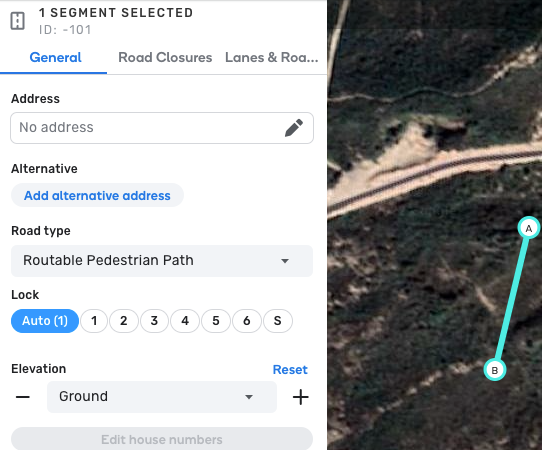
If you do not have “Draw new roads as two-way” selected when you create a pedestrian path, the pedestrian path is drawn in as a 1-way path. I would have expected that this setting would have effect on the segments in the Roads drop down, not the Pedestrian Path drop down.
sketch
October 23, 2022, 12:16am
51
I spent several paragraphs making the point that editors need to be more patient, not that script authors need to be faster.
(Nevertheless, most authors seem to find the time to fix problems at a fire-drill pace once they reach production.)
It is unreasonable to expect Waze to slow feature development and release to a glacial pace just to give script authors more time to adapt.
maiapas
October 23, 2022, 6:39am
52
dBsooner:
Vespucci41:
Hi,
First of all thank you for the great feedback and for letting us know that some scripts are being affected.
As some said, we make sure to collect all feedback in Beta before we release a new version to production.
One of the objective is to make sure scripts are not being affected. If critical scripts are affected we can hold a release to production for some time so that script authors have time to adjust.
We give heads up to the scripter community of potential breaking changes and make sure to support them through the update if needed.
We understand how important scripts are for the community, and how valuable it’s your work.
Feel free to report to the script authors, if needed we can help with that and we will work with them to find a solution as fas as possible.
Thank you,
turbomkt:
For staff, please keep in mind that many scripters will wait until after the beta is released to start fixing their scripts. They do this because they don’t know what changes will be made between the day the beta is released and when it goes to production. Because of that, we are accustomed to not having scripts available in beta and can’t report everything before that beta goes to production.
MajkiiTelini:
I have a problem very similar to the bug discovered (and reportedly fixed) in Beta .
Difference is that the script tab is not dissapearing, but instead of it will not stay active and the left panel after deselecting the segment (landmark etc.) have no active tab, so I must again manually select the script tab.
Anyone else with this issue?
sketch:
And to the community: Please note that script offers do have the opportunity to plan for production releases, but they—for perfectly valid reasons, don’t get me wrong—choose not to.
So the reason your scripts break immediately upon a production WME release is not because staff changed things without notice . Most often, staff gives us (through beta) plenty of notice. If you want your own advance warning, as Ruben said, sign up for WME Beta. We can’t talk about what’s in beta outside of beta channels, so you won’t hear about it otherwise.
What script authors choose to do with that notice may vary, but many choose to wait until production before reacting. That is their choice. They have ample opportunity to adjust scripts while new features and changes are still in beta, but many choose not to.
That is not reason to delay a production release. The timing between beta and production makes absolutely no difference if a script writer chooses not to address WME changes until a production release anyway.
Again—that is a valid choice. But it means that anger at WME developers for “not delaying production releases” is misguided, misdirected, and unfair.
As an example, URC-e has been broken in beta for several weeks. That is ample time to adjust. The best we can do is notify URC-e’s author of the changes. In this case, he chose not to adjust until the changes hit production, and that’s fine. Don’t blame staff for that, that’s not staff’s fault.
Don’t blame anyone. Just chill, be patient, bring your feedback calmly to the person who can actually do something about it, check your sense of entitlement before you open the browser, and understand that the sky isn’t going to fall down because you can’t filter automagically respond to URs for a few days.
I chose to wait because of the bug reported in the link in MajkiiTelini’s post above. I “thought” the issue would be fixed in production release. It was not. While it was semi-fixed (the script tab no longer disappeared), it did not get 100% fixed as the ACTIVE (denoted as having the ‘active’ class) tab is not being restored when a map element is deselected. (See MajkiiTelini’s post above).
I KNEW there was an issue with the width of the container as Waze decided for some unknown reason to me to set the width to 330px, which is 30px wider than they have set for “max-width” of the side panel. They set the max width to 300, but they set the side panel root container to 330px. I hard code 300px for my inner containers, but this was being overwritten by their higher dependency of the 330px via their new CSS update. I forced mine to be priority with an !important flag. Again, I THOUGHT they’d catch this before release to production, but they didn’t.
That being said, Ruben, Nataliia: There are two bugs here:
The “active” CSS class is being removed from the entire DOM tree under the #side-panel container when an element is selected/deselected. This is causing the active script tab to no longer be selected upon the deselection of the map element (place, segment, etc). Further, if that script has sub-tabs (URC-E, GIS-L, are two examples) that also utilize the “active” CSS class, they are being stripped as well. So if you do manually select the script tab to make it active again, the tab will be blank because the “active” tag was removed from the sub-tab by your selection / deselection process.
You are manually setting the width to 330px for the side-panel. Which is wider than the max width you have coded at 300px. So 10% of the panel ends up being hidden behind the left side of the map.
Thank you so much for the detailed information, dBsooner and apologies for the temporary inconvenience.
I’ve opened a new thread (only visible to script writers) in the Scripters Hall forum so we can continue the conversation there.
Best,
Hi.
When I zoom out / zoom in, the PA will still the same size before zoom but the map was zoom out. If you zoom in again, it will be back normal. I attached the screenshot for your easy reference.
Does this happen with scripts and extensions disabled?
abc1357:
If you do not have “Draw new roads as two-way” selected when you create a pedestrian path, the pedestrian path is drawn in as a 1-way path. I would have expected that this setting would have effect on the segments in the Roads drop down, not the Pedestrian Path drop down.
Hi Abc1357,
Could you please share more details about this? I don’t see a possibility to set a direction for the pedestrian path. I probably miss something.
Yes, but I only want it off on newly drawn segments. For existing segments it’s great. I can’t imagine it being convenient for anyone to have this switched on for new segments, as you can’t put in a closure anyway.
G_W1Z
October 25, 2022, 2:56pm
57
After WME v2.115, a place point requires 2 clicks to move it. When creating a new place point, you can add the stop point. But to move the place point, you have to de-select the place point then re-select it.
https://waze.uservoice.com/forums/59223-waze-suggestion-box/suggestions/45864859-extra-click-required-before-moving-place-point
Screen capture of behavior
1 Like
G_W1Z
October 25, 2022, 3:01pm
58
G_W1Z:
Is there an update on this ? It was stated that this was going to be brought internally to the development team.
Also, can this change be addressed?
Hi G_W1Z,
The team is working on the feature to allow close handled UR/PURs by clicking the “save” button. We will keep you posted.
About the “add” button, I missed that comment. May I ask you to open a related suggestion in the Uservoice section ?
Regards,
Done - https://waze.uservoice.com/forums/59223-waze-suggestion-box/suggestions/45864877-extra-click-required-for-approving-a-pur
1 Like
abc1357
October 25, 2022, 11:31pm
59
Hello Nataliia,
I am not able to duplicate this today. So…I don’t know what happened that day I made the report.
Thanks for looking into this.
abc1357
1 Like
G_W1Z
October 26, 2022, 11:39am
60
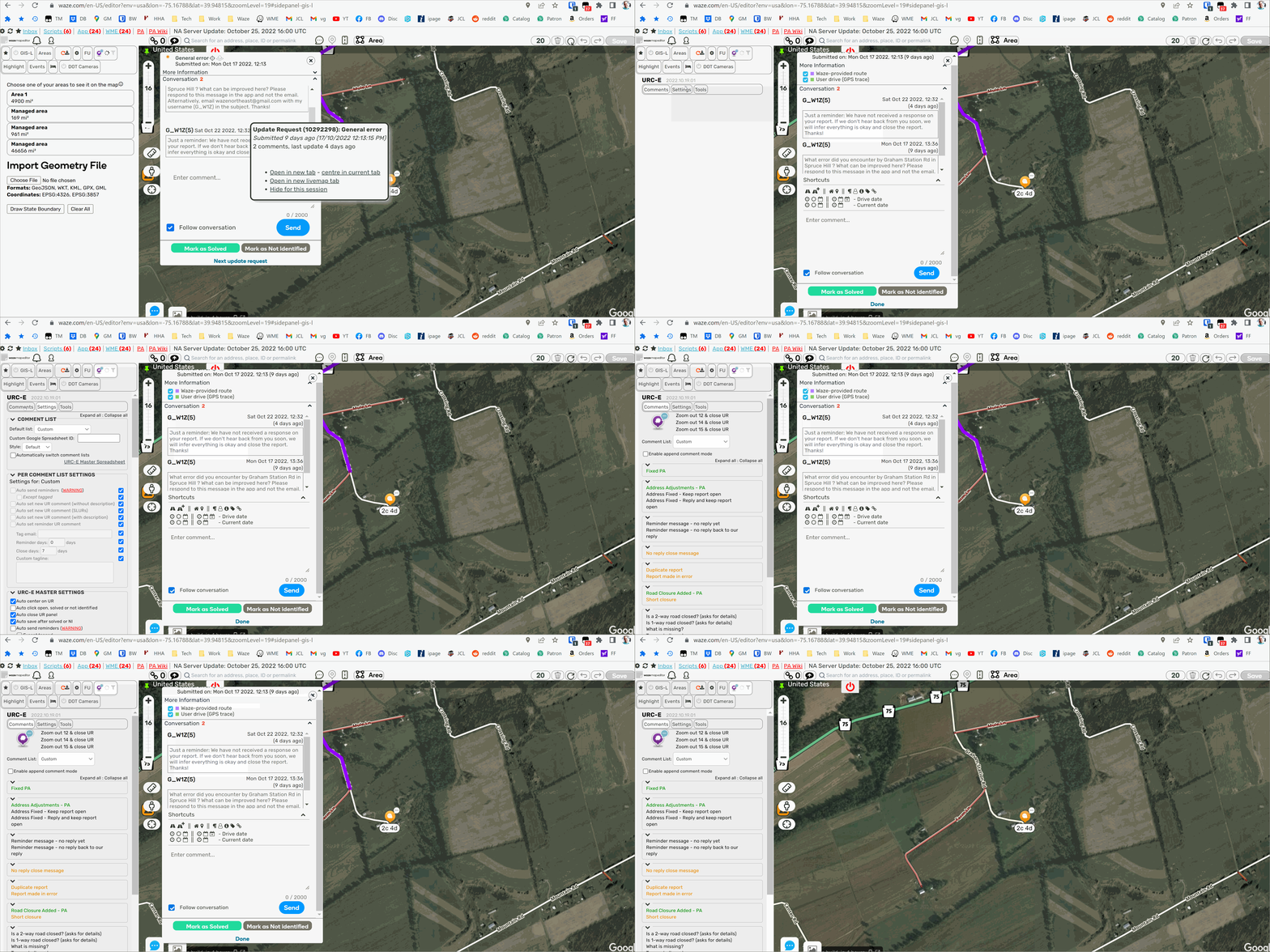
The new WME version has impacted scripts/tabs that have multiple sub-tabs. If the tab has multiple sub-tabs, it will open and be blank. If you open another sub-tab then re-open the first sub-tab, it will show the content. But this will repeat every time. Here is a screen capture of the behavior:
https://waze.uservoice.com/forums/59225-map-editor-suggestions/suggestions/45877612-sub-tab-is-blank