# Places appear and disappear in the map editor
**URL:** https://www.waze.com/discuss/t/places-appear-and-disappear-in-the-map-editor/218370
**Category:** United Kingdom
**Created:** [February 3, 2016, 11:44am UTC](https://www.waze.com/discuss/t/places-appear-and-disappear-in-the-map-editor/218370 "2016-02-03T11:44:09Z")
**Posts on this page:** 3
**Page:** 1
### Author:  [@StewartR](https://www.waze.com/discuss/u/StewartR)
#### Post date: [February 3, 2016, 11:44am UTC](https://www.waze.com/discuss/t/places-appear-and-disappear-in-the-map-editor/218370/1 "2016-02-03T11:44:09Z")
Can anyone tell me whether what I’m seeing is expected behaviour, and if so what I can do to control it?
There’s an area local to me where all the houses have names, not numbers, and trying to locate specific addresses can be very difficult. (The structure of postcodes around there doesn’t help either.) The house number field in the Waze map can’t accept names instead of numbers. So I’m adding a ‘place’ for each house, to make them searchable.
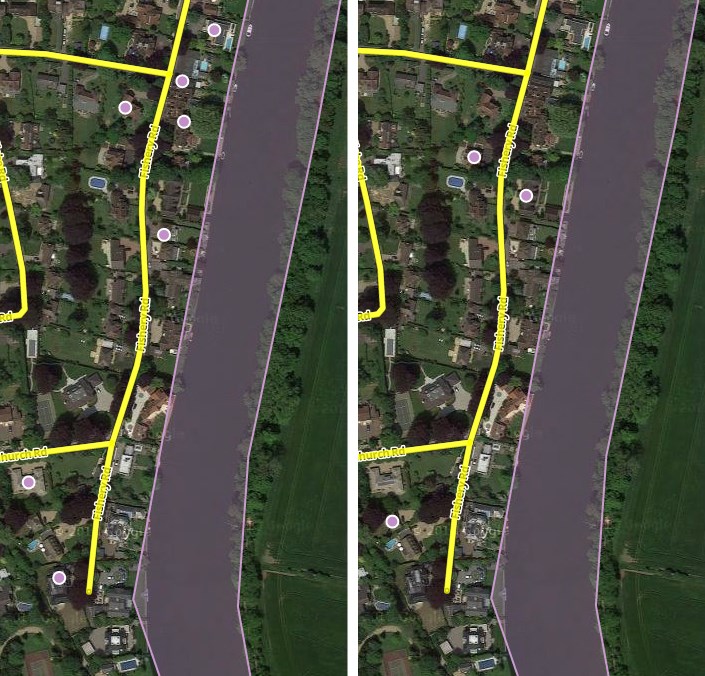
However, when I return to the map I typically only see a few of the places which I have added in this area. According to my notes I have so far added 28 places here, but I’m typically only seeing about 6-12 of them at any time -and not always the same ones either.
Here (below) is an example. I went into the map editor, scrolled into the area of interest, and took the first screen shot. Then I scrolled away an scrolled back to the same area and took the second screen shot. They were literally only about a minute apart. You can see that a different set of places is shown.
Any ideas?
---
### Author:  [@Twister-UK](https://www.waze.com/discuss/u/Twister-UK)
#### Post date: [February 3, 2016, 3:44pm UTC](https://www.waze.com/discuss/t/places-appear-and-disappear-in-the-map-editor/218370/2 "2016-02-03T15:44:54Z")
I thought that bit of the map looked familiar… As one of your area managers, firstly welcome to Waze map editing 🙂
Secondly, as you’ve discovered, WME can be maddeningly inconsistent in how it displays places. It’s particularly bad when the places have only recently been added to the map data, as is the case here.
Looking at this area myself, each time I reload the WME session I get a fairly consistent subset of the places being shown initially, with the precise selection appearing to be based on whereabouts the map is centred at the time I reload the session. As I then pan around the area and cause WME to perform additional data requests to fill in the blanks around the edges of the map I’ve started to uncover, I’ll see more places showing up to go with the ones that were previously loaded and which are still visible in the current view. Very very occasionally I’ll get WME loading the complete set, but more often than not each request only adds a few more places still leaving sizeable gaps.
So the behaviour you’re seeing is, unfortunately, quite normal and just one of those WME quirks we have to put up with. If you give the place data a chance to “bed in” over the next week or so and then go check the area again, you should see far fewer (ideally none) gaps.
Regards,
Chris
---
### Author:  [@StewartR](https://www.waze.com/discuss/u/StewartR)
#### Post date: [February 3, 2016, 5:38pm UTC](https://www.waze.com/discuss/t/places-appear-and-disappear-in-the-map-editor/218370/3 "2016-02-03T17:38:45Z")
> [@Twister-UK](#):
>
> WME can be maddeningly inconsistent in how it displays places. It’s particularly bad when the places have only recently been added to the map data, as is the case here. … the behaviour you’re seeing is, unfortunately, quite normal and just one of those WME quirks we have to put up with. If you give the place data a chance to “bed in” over the next week or so and then go check the area again, you should see far fewer (ideally none) gaps.
Thanks for the advice, Chris. Glad it’s not me going mad!