[Script] Street Vector Layer

I am considering deprecating the “show geometry nodes” functionality (which is already not working and would need to be fixed).

Would anyone miss it? If yes, please reply to this post. If not, give a thumbs up here.

This was useful when you could only change the geometry by dragging the geometry nodes, but I think that now there is not really a reason to display them…

1 Like

Version 6.2.3 is out!
What’s new?
You can now customize the appearance of nodes (size and color).
Please note: there is a settings entry for virtual nodes, but they are not available yet (due to a WME/SDK bug).

Deprecated:

  • “show geometry nodes”
  • “hide minor roads” options.

Bug fixes:

  • nodes had the wrong size when the setting “use realsize” was disabled. (Reported by @titchy )
  • road layer not getting hidden when SVL got enabled.
  • fallback translations not getting used.

I would like to suggest a feature for a future release. Could you add an option to show or hide geo nodes (handler)?

edit:
oh i just read this
" Deprecated:

  • “show geometry nodes”
  • “hide minor roads” options."

So, does this mean these features are abandoned by the SDK? If so, please disregard my request.

It would be supported by the SDK, but what would be the use of it?

Purpose: To align parallel roads (A/B roads, divided highways/main streets).

Current Workflow:

  1. Select both roads.
  2. Hover the mouse to reveal the geo nodes.
  3. Micro-adjust the nodes for Road A and B until they are side-by-side.

This allows the roads to be aligned neatly.

Version 6.2.5 is out!

  • Fix a rare bug with labels (when the simplified segment did not have enough points)
  • New: No more unknown direction labels (red X) on non-drivable segments
  • New: more labels will get shown (maybe slightly outside of the segment).
  • New: It is now possible for other scripts to know if SVL was initialized (useful for road-widht helper)
  • Minor fixes and more SDK functions

Version 6.2.6 is out!

  • Fix: restart drawing after SVL was automatically disabled, also after panning. (Reported by @YanisKyr )

In the next versions, I will attempt to rewrite the entire controlling logic, as it has grown uncontrollably over the years…

1 Like

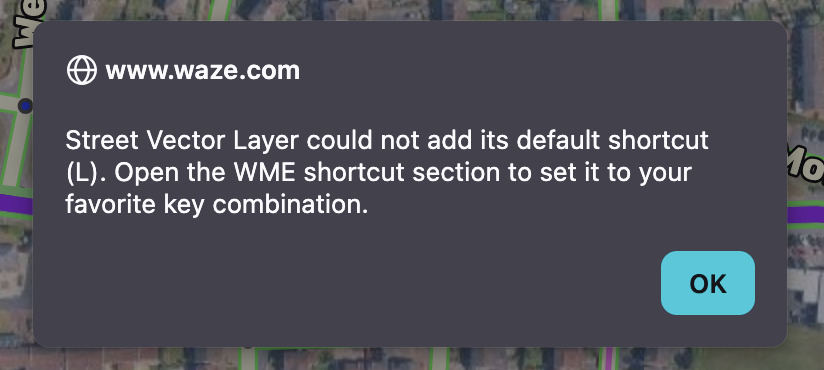
Can this popup be looked into please.

I carry out what is asked of me by the popup and assign the script a shortcut key in the WME window, but the popup keeps resurfacing, with the shortcut key appearing to unassign itself fairly quickly after I’ve assigned it.

If I am working with multiple open WME tabs, this popup will often force a dormant unused WME tab to become the open tab, dragging me away from the tab I’m working in, I assume because the popup in the dormant tab is demanding an action.

Fantastic script, with it’s uses, but this issue is annoying me enough that I’m considering removing the script :slight_smile:

Edit: browser is Firefox

1 Like

I thought that that was fixed, I personally don’t get that.

Are you sure you’re on the latest version? Anyone else having the same problem though a different shortcut gets set?

1 Like

Yeah it was persisting for me too, but I don’t recall if it happened in Chrome or in Firefox.

1 Like

Maybe its due to another script?

1 Like

@IP4883 @YanisKyr I am testing it with v. 6.2.6 (the latest), on Edge.

I manually set this, and I am not getting that alert anymore:

image

1 Like

Could it be because I put ‘L’ back to it’s default (Layers)?

I still think forcing the script’s shortcut to one of the (few) native ones is not ideal.

1 Like

I could finally reproduce the problem, but can’t fix it before Jan 5th.

2 Likes

Version 6.2.7 is out!

  • The new default shortcut is Shift + S (s for SVL)

This is not how I wanted to implement the fix, but it would cause too much work to fix it in another way before the next big version gets released.

Version 7.0.0 is out!

  • Complete code refactoring
  • New SVL badge right under the location name, which shows the current status of the layer, making it clearer what is going on
  • Fix: road width was incorrect when the WME was set in Imperial
  • Dropping support for WazeWrap (e.g., Alerts)
  • Various improvements in the drawing system and events management
  • Probably new bugs due to the heavy refactoring :slight_smile:

A few new strings were added; if you want to help translate them, send me a message via chat with your Google email.

2 Likes

Spanish done.

2 Likes

Noticed SVL covers up the JB paths.

2 Likes

Version 7.0.1 is out!

  • Fixed: SVL gets shown above the WME’s paths.
  • “Show under/above the GPS layer” now should also stick. Warning: due to current SDK limitations, this is refreshed anytime something gets deselected. This may cause a brief flickering.
1 Like