Hi, can you please update the Waze Wiki with your working proposal?
https://wiki.waze.com/wiki/Scripts/WME_JavaScript_development
Hi, can you please update the Waze Wiki with your working proposal?
https://wiki.waze.com/wiki/Scripts/WME_JavaScript_development
I’ve already proposed some changes in the talk page of that article. I’ll discuss this further with Timbones first before making any changes there.
In waze we don’t monitor the talk page for change discussions, please post your proposal for a wiki update to the wiki update and discussion forum.
Sent from Android using Tapatalk
Brave beta testers may download a new version (2.6) from here. It will be updated automatically to the production one with an updated version number once it is release to anyone.
New:
+In the preferences panel is now possible to define the labels’ width for the far and close-zoom levels.
+There is a new div that appears when you open the preference panel that shows you with 2 colors if you are currently in the far or close zoom level.
+Closing animation for preference panel
+You can also decide whether to display unverified speed limits with a dashed line from the preferences too (recommended, it’s the default behaviour).
+New proposed Chrome/Firefox bootstrap added.
Fix:
labelOutlineWidth parameter in the preferences is now working.
Version 2.6.2 is out for everyone!
The changelog is in the previous post.
Version 2.6.3 is out!
Bug fixes (thanks to dummyd2)
I’ve got a new PC and now the shortcut is not working for me :(.
I didn’t have that keyboardShortcuts key in the list before installing toolbox. Afterwards I’ve noticed that it is correctly set as shown by someone previously in this topic. It is the only one with that value.
I’m currently using chrome and Windows 10.
Any hint to make it work again?
Mine hasn’t worked for a long time. I wonder if this provides any hints as to the fix? It says in the hotkey list “Toggle [missing “en.layers.name.vectorStreet” translation]”. I also can’t change what hotkey is assigned there; it’s stuck on ALT+L (which doesn’t work. I’ve also verified that toggleStreet(Vector) is set to 4,76
Does anybody know what was changed in the beta? If yes, let me know and we’ll have a working version much faster 
registerShortcuts became _registerShortcuts (note underscore). There may be more…
I have updated the script to version 2.6.7, now it looks like working on the beta (I didn’t test it much yet, let me know if it still has problems).
your keyboard shortcut is overwriting a custom shortcut i have had set. is there a way you can get your script to play nice with the toolbox shortcut key manager?
the overlapping, I have no comments on, Its probably a bad idea to try to edit from the “far” zoom levels anyway.
The symbols that i’m seeing in your screenshot in the names are the one way indicators (the arrows), two way speed limit and unverified flags the (##?,##?). you can also change the settings to get different appearances.

 \
\
increasing the outline for the “shadow” outline on the labels can make them much easier to read.

setting to enable/disable speed limit information.

I do not believe there is a way to disable the one way markers on the street names.
At the moment there is no way to do it (unless you edit the code directly to remove them). I personally don’t see the reason to remove them as often they are the only way to see if a segment is one way as the name covers the segment’s arrow.
Version 3.0 is out. At the moment it won’t be updated automatically!
I had to move it to a different repository.
Make sure to delete the old version before installing the new one. Please click here to install it.
Changelog
New: You can render the road layer as another level (from preferences: Decorations > Render map as level)
Fix: Speed limits are not shown on named segments when the “Show speed limit as text” is unchecked.
Issue: that repository doesn’t support utf8 encoding in script files at the moment, so the speed limits are shown with question marks and weird characters. I’ll try to fix that soon, maybe you should postpone the update until it get fixed.
The problem with the file encoding has been solved, it should now work correctly.
Sorry for the inconvenience.
So, Version 3.3 and 2.9 are out!
Who didn’t manually update should now be on version 2.9, and an alert will “kindly ask” him/her to update to the new repository.
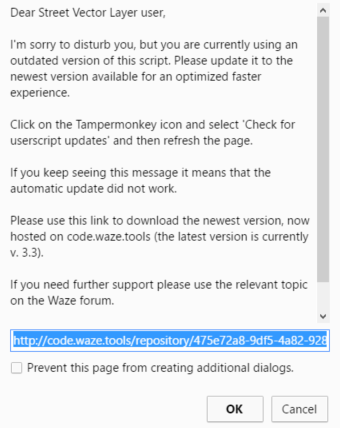
For the people who are already on code.waze.tools, version 3.3 improves the rendering speed thanks to some optimizations and makes the rendering of speed limits on one way streets a little bit nicer.
Technical info for advanced users: the code in production is now minified. If you want to do some manual changes you find the original code here: https://github.com/bedo2991/svl
Version 3.5 is out!
Moved the “Render map as level” into the “Rendering parameter” section.
i cried a tear of joy
thanks so much