Never ending story 
- new WME and some scripts are down again…
https://www.waze.com/forum/viewtopic.php?t=373015
Never ending story
3.212 restores operation in WME Production - I’m also aware something else is broken in Beta…
3.213 updates the startup and tab generation code and improves the tab UI. Fans of the feed filter functionality will also notice that it’s now disappeared - this is intentional, as the feed filter was only ever intended to be a short-term hack pending a native solution, and it’s now time to retire it…
Has a native solution been released?
Soon
With the latest updates, I’m now seeing these duplication buttons for closures. 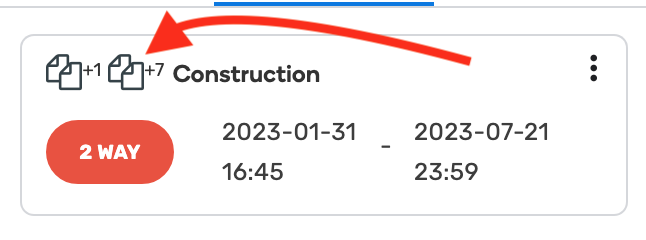
What I’m not seeing is a way to turn those off and make them disappear. Is there a way to do that?
They’ve been around for quite a while, so bit surprised you’re only noticing them now  No, there’s no way to turn them off, as up til now this hasn’t been something anyone’s ever asked about. So as you’re the first, it’d be useful for me to understand why you’re wanting to do that.
Something in the recent updates (prod WME and the script) has made them visible for me all of a sudden.
I want to turn it off because I never use it (Advance Closures is a better tool for adding multiple closures). It takes up space and indents the name of the closure, making it slightly harder to glance at what is going on. Even putting it after the name of the closure would help.
I’m aware that the latest production release has broken URO - this will get fixed ASAP…
The Issue Tracker has changed many things related to how URs display in the feed. Two of them in particular:
There’s no option to delete URs from the feed. I have multiple areas that I manage and sometimes I want to set aside for later URs in one area and only see URs in another general area (such as one state.) Without a delete option they will just remain listed. maiapas has stated that there are no plans for adding back the delete UR from feed feature.
In the old feed, each UR used to have the Street and City appended to it. Having the Street/City viewable on each Issue allowed us to instantly know where the Issue is in the world/country/state/etc. This especially helps when we work in multiple locations or have a very large Managed Area.
Can future versions of URO+ reinstate those former features?
3.214 restores operation following the latest WME update (aka let’s once again randomly change a class name in a part of the UI that several scripts hook into…)
3.215 fixes a startup problem if WME is loaded from a URL containing a UR, MP etc. reference, and adds the last editor/time info to segment popups…
Is it possible to add this functionality to URO+?
I’m going to say no to that, partly because
a) a quick look behind the scenes suggests that, if it’s possible at all, then it’d be more work than I’d be willing to put in for something I didn’t have a burning desire to see in WME myself, and there’s more than enough other stuff I need to be doing in the time I can devote to Waze-related activities
and
b) where the issue tracker is concerned, given how much attention the devs are giving to it as the next best thing since a baker had the bright idea of taking a knife to a load of bread prior to putting it on sale, I’m currently of the opinion that any stupid design decisions like this are entirely on their heads to rectify, and the longer they remain in place annoying the crap out of more and more editors, the more the criticism of them will build until critical mass is reached and the devs are forced to reconsider…
3.216 fixes an error that could get thrown when building the MTE list for the current map view
URO+ no longer shows segment info when hovering over a segment (likely due to today’s WME prod release.)
Unless the segment has been edited but not yet saved, hmm…
It doesn’t show for me even before an edit.
That’s what I meant - the popup is only showing if there are unsaved changes on a segment.
It sporadically shows for me on segments with no unsaved changes pending.