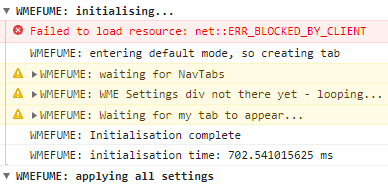
I tried to click a segment, which would open the sidebar and it was blank. URO seems implicated. Here’s the dev console’s very first block of messages.
third_party-9c33f5fe5e1a0edb.js.gz:2
Uncaught TypeError: Cannot read properties of undefined (reading ‘length’)
at uroCheckCommentsForTag (userscript.html?name…5fa43da2243:6866:23)
at uroGetCustomType (userscript.html?name…5fa43da2243:6969:14)
at uroFilterURs (userscript.html?name…5fa43da2243:5886:27)
at initialize.uroFilterItems (userscript.html?name…15fa43da2243:6793:4)
at initialize.triggerEvent (third_party-9c33f5fe…edb.js.gz:2:1173787)
at initialize.moveTo (third_party-9c33f5fe…edb.js.gz:2:1335342)
at initialize.setCenter (third_party-9c33f5fe…edb.js.gz:2:1331671)
at initialize.updateSize (third_party-9c33f5fe…edb.js.gz:2:1329710)
at e.updateSize (third_party-9c33f5fe…edb.js.gz:2:1053305)
at e.updateHeight (third_party-9c33f5fe…edb.js.gz:2:1053193)
uroCheckCommentsForTag@userscript.html?name…a-15fa43da2243:6866
uroGetCustomType@userscript.html?name…a-15fa43da2243:6969
uroFilterURs@userscript.html?name…a-15fa43da2243:5886
uroFilterItems@userscript.html?name…a-15fa43da2243:6793
triggerEvent@third_party-9c33f5fe5e1a0edb.js.gz:2
moveTo@third_party-9c33f5fe5e1a0edb.js.gz:2
setCenter@third_party-9c33f5fe5e1a0edb.js.gz:2
updateSize@third_party-9c33f5fe5e1a0edb.js.gz:2
e.updateSize@third_party-9c33f5fe5e1a0edb.js.gz:2
e.updateHeight@third_party-9c33f5fe5e1a0edb.js.gz:2
resize@app-c5c2f6505afaecd9.js.gz:1
resizeFromTopLeft@app-c5c2f6505afaecd9.js.gz:1
(anonymous)@app-c5c2f6505afaecd9.js.gz:1
Nl@third_party-9c33f5fe5e1a0edb.js.gz:2
t.unstable_runWithPriority@third_party-9c33f5fe5e1a0edb.js.gz:2
$r@third_party-9c33f5fe5e1a0edb.js.gz:2
Pl@third_party-9c33f5fe5e1a0edb.js.gz:2
(anonymous)@third_party-9c33f5fe5e1a0edb.js.gz:2
R@third_party-9c33f5fe5e1a0edb.js.gz:2
b.port1.onmessage@third_party-9c33f5fe5e1a0edb.js.gz:2
3.223 restores operation after the latest WME update, and reintroduces RTC filtering…
As per usual when WME undergoes significant changes, I make no guarantees that everything is working as it ought to be, so please report any issues here once you’ve verified that they are indeed URO issues - i.e. check that they occur when URO is the only add-on running, and also check that they don’t occur when no add-ons are running, because the WME devs make no guarantees that everything is working as it ought to be either
Hi,
As the enable checkbox of the script gets switched off randomly - sometimes never in days, sometimes multiple times a day - I was wondering if the switch is really needed. I don’t see an urgent need for this option, and I think that it’s even easier to switch on/off the script via TM.
I know that other scripts might be the culprit for this behavior, but I need those scripts and I don’t have the time/knowledge to find out what the conflicting reason is en ask the script authors for a change ir order that another script wouldn’t cause conflicts.
So, I was wondering if it would be possible to omit this option in favor of having a more stable behavior and less frustration upon editing.
Many thanks in advance,
Eddy
Sure, but what’s need to switch it off? Does somebody actually switches on/off it all the time?
Btw one needs to go to the plugin menu in WME, click on URO+ and then click on the checkbox in order to switch it on/off
Going to the TM menu takes less effort. Refreshing isn’t such a pain either.
The fact that for some strange reason the switch gets turned of randomly is more frustrating, certainly when it’s one of these days where it happens a lot. The burden that causes is bigger compared to the person that deliberately wants to switch on/off the - very useful, so why bother to switch it off? - script and needs to reload WME.
So, the reason I added the in-script master enable option is because, back when we didn’t have the new sidebar UI with the dedicated scripts tab, it was slightly faster to access the script UI (if URO was the script who’s UI was currently being shown at least), and being able to quickly switch off the script so that all of its filtering features would be disabled allowing everything to become visible again at the click of a mouse button WAS, and still IS, a useful feature to have if you’ve got some particularly complex filter settings enabled which means what you’re seeing in WME is far from what WME thinks you’d be seeing…
And even though the WME UI changes mean it might now take slightly longer to disable the script that way than via the TM menu, there’s also costs incurred in performing the WME reload - you might be in the middle of an edit which means you can’t simply reload WME, or you might have moved some distance away from where you first opened up WME without the session URL being updated, such that when you do the reload you’re suddenly whisked back to a part of the map you now have no interest in and have to then spend time and effort relocating back to where you want to be.
The issue with the script options randomly switching themselves off is due to the way WME is now so flakey on startup that it generates far more errors which can throw scripts completely off track - even if the error isn’t in URO itself (and whilst I don’t guarantee my scripts will ever be error free, I do put a LOT of effort into eliminating any errors I become aware of, because I really, REALLY, don’t like seeing my code associated with anything undesirable in the console output), errors elsewhere - either in another script or in WME itself - can still prevent it from completing its startup process. And if this happens at a certain point in the process, the options will be lost.
I’m WELL aware this is a pain in the arse, because not only have several users reported it already, but it regularly affects ME as well, and I’m probably my biggest critic when it comes to complaining about things like this not working properly. So I am looking at ways to avoid it happening, but between the more urgent needs to fix the truly show-stopping bugs/compatibility issues, and other drags on my time and energy away from the world of Waze, I haven’t YET got around to doing it.
Thx for the elaborate answer. I do understand that finding the reason for this behaviour is painstaking, but the question is if this research and the option to switch the script on/off is needed at all. Is there a use case where one needs to switch on/off the script (in the middle of editing)? I don’t have any, but I might not be a representative editor.
Btw one doesn’t lose the segments during editing when one have installed WME Permalink Updater. It’s useful when the blank left pane bug that is still not solved. The script enables a reload and to continue the state of WME before the reload.
I’ve already mentioned two use-cases for wanting to temporarily disable the script mid-session, and note that the script you mention only deals with the “reload the session causes the map to jump back to where you were when you started” one, it can’t do anything about the “reload the session loses all your work in progress edits” one.
As a more general note I prefer my scripts to be essentially stand-alone, providing all of the functionality they need themselves so that users don’t have to rely on installing anything else. And especially not stuff written by anyone else which then means my scripts are potentially at risk of losing functionality because someone else hasn’t been able to keep their script up to date.
When I try to use the URO+ feature of ‘Delete closure - apply to all’ to delete current/scheduled closures I get a message in the left panel saying ‘Operation not supported.’ I believe this is due to there being finished closures still associated/showing in the closure panel.
The issue happens also without that button. I have an issue with a user defined closure in the past that has never started and can’t be changed/deleted resulting with the same error. The extra uro+ button is never used in this case, so imo it’s a general issue.
No, trust me, this specific issue raised by G_W1Z is very much a URO+ thing, because it’s entirely related to how the delete all button works behind the scenes… Basically, every closure shown in the UI has a delete button defined for it, even if the closure can’t be deleted because its already expired. In the release version of URO+, it doesn’t know that expired closures are a thing, so it simply iterates through the closure list trying to click every delete button it can find, and when it does this on an expired closure, WME throws the error noted earlier.
Couple of issues and I’m wondering if others are seeing them as well, as I have not noticed them mentioned above:
1 - New WME seems to have broken the mouse-over popup for PUR, it still works for UR.
2 - This is not new, probably been happening for a year or more, when I mouse over a venue and select “Jump to nav point in new tab” it always takes me to Union Square Park in Manhattan.
Filtering still seems to work, albeit continues to be “iffy”, and opening a UR in a new tab works properly.