Is your filter by city also enabled at the same time? When applying the Recently Edited and Filter by City simultaneously, I’ve noticed that it changes the Recently Edited to an “AND” condition that matches the city selection.
Nah, turned all scripts off. And no additional options:
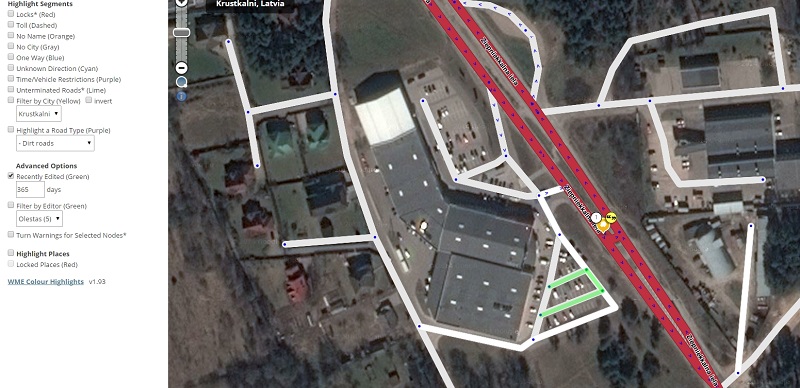
^ Try upgrading to v1.94, which fixes this issue. ^
This was published as a non-beta, and has Chrome extension.
Oh, I somehow missed an update. Sorry  Now it works.
Not all segments without names are highlighted. Parking lots are not highlighted. Please highlight
Parking lots are explicitly excluded from no name highlight, as they should not be named, in my opinion.
You can add a custom rule to WME Validator to find these if you really want to.
:ugeek:
After an evening of busy hacking, I have an new version for you.
Please try this beta version* which adds a new option: Highlight Incomplete Places (Dashed Orange).
This will find any Place with no name, no street or incorrect categories, and draw them with dashed outlines and orange (cyan for parking lots). Some natural features (i.e. green and blue ones) are excluded.
It might still highlight Places you don’t expect or want to be hightlighted, so please post your feedback.
*Requires Greasemonkey or Tampermonkey
:ugeek:
1 Like
Hi Timbones,
Regarding the 1.96 beta, I’m wondering what criteria you’re using as an “incorrect category”.
I see that several places are marked incomplete when they use one of the “parent” categories, however some places (e.g., storage facilities) don’t really fall into one of the more specific categories, and so the parent category is used. From what I’ve read elsewhere on the forum this is proper. I realize that there are requests out to expand the set of more specific categories, but we’re stuck with what we have for now.
Thanks,
Robert
While I accept that a few places might not have any category that fits them, I think we have very many more which could but currently have a parent category. So, I still feel it’s important to flag places that use parent categories, but if they cannot be changed then we’ll just have to live with that.
Perhaps I could show a dashed border for these, without the orange hightlight?
I’m not sure they should be highlighted at all, and if anything, it should be subtle and also documented (maybe in an explanatory mouseover it could say that that is not necessarily an issue). We don’t want people to put things into the wrong categories just because none of the general categories fit. Tobacconists go in “shopping and services” because there isn’t a narrower category that fits. Same with liquor stores, and those are just the two I could think of, there are plenty more.
Well I’ve come across supermarkets categorised as “Food and drink”, which I suppose is technically correct.
A dashed outline with the default purple colour will be relatively subtle.
How about if I suppress this particular highlight of incomplete categories when the place is locked?
Oh, that’s a pretty good idea actually. The dashed line does sound pretty subtle now that I think about it and I can abide that too.
I also ignore junctions and (soon) islands from the no name / street check. I could instead look at the City field, and ignore those with no city. I worry that I might miss some this way though…
Would miss a lot that way – many parts of the US at least aren’t part of any city at all.
BTW, curious about the criteria for the yellow highlight. For example, our airport is highlighted despite its name including the word “Airport” and its being typed “Airport”.
- No name
- No street name (as per your airport)
- Residential without house number (shouldn’t be possible)
- Incorrect category (now* more subtle, and not for locked places)
- Natural features and junctions are excluded from all the above
- Please try version 1.97…
Not Found
Ooops. sorry - try now…
1 Like
I don’t know if this has been brought to anyone’s attention yet, but I’m finding that Color Highlights is causing a lot of really bad lag in WME. When I run with it active, moving the map around lags, updating roads lag, everything just seems to lag rather badly.
I’ve tried both the Chrome store version 1.94 as well as the userscript version 1.97 for Tampermonkey, and they both cause equal amounts of WME lag. I hope this is something which can be fixed; I really like and use the things it highlights…
Sorry to hear that. Have you figured out which setting makes it laggy? Any of the segment highlights, or the places highlight perhaps? Either or both?
Is it the same with all other scripts disabled?