Unfortunately, yes. I’ll poke them again and see if they have any updates coming to resolve this issue.
ok, thanks for the quick reply 
Added DC.
Added Auto-Center.
v1.14
-Modal re-design with movable window
v1.17
-Updated streams for PA
-Fixed issue with CSS causing placement issues
v1.18
-Fixed NJ feeds (now requires a token)
v1.19
-Bug fixes
-Began to roll out icon status color for online/offline (currently PA & NJ)
1 Like
Numerous states are broken as a result of a Chrome update that no longer allows a secure site (Waze) to use a non-secure image link (http). We are working to update what we can, but for a lot of these, the fix will come when the state switches over to https (hopefully soon).
v1.25 -
WME DOT Cameras will now play nice with Toolbox! The hooks have been removed and you can now run both simultaneously. Thanks for the patience, but more importantly thanks to the new TB team who fixed the issue.
Merry Christmas!
1 Like
This tool is awesome.
HI doesn’t seem to be working
Update: It works in Brave Browser, but not Chrome, Version 87.0.4280.141 (Official Build) (x86_64)
this is due to a change in Chrome’s behavior with mixed content - previously, it would allow for content served over HTTP to be displayed on a webpage that is HTTPS. One of the latest updates removed that, and all content on an HTTPS webpage (i.e. waze.com/editor) needs to be served over HTTPS. Unfortunately, HI & goakamai serve their content over HTTP. Honolulu’s webpage is also the same way. Until they begin to serve over HTTPS, nothing will display.
You could allow insecure (mixed) content in the site settings https://experienceleague.adobe.com/docs/target/using/experiences/vec/troubleshoot-composer/mixed-content.html?lang=en#task_FF297A08F66E47A588C14FD67C037B3A but that is your own choice which comes with its own potential insecurities.
Thanks for the explanation, and workaround. And thanks for your work.
v1.26
-Fixed PA’s PTC cams (which are still images)
v1.29 - Fixed WI
v1.30 - Fixed after WME update
v1.31 - Now only populating camera icons in the visible portion of the WME window, which reduces graphical load and improves performance.
Can there be an option to not display the icons above a certain (adjustable) zoom level? In some areas there are so many of them they clutter the map, and at zoom 12 you can’t really tell exactly where they are anyway.
Selection is greyed out and unavailable for Hawaii. 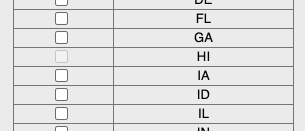
Yes, HI is using http instead of https which is now blocked by browsers. Hopefully they update their stuff to SSL soon.
Great idea. This is now added to the v1.35.
1 Like