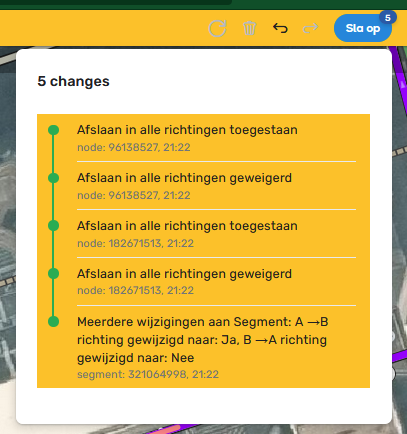
The latter problem is being caused by the combination of FUME’s “Disable map blocking during save” option being set, and then using the keyboard shortcut to save your changes rather than clicking on the save button itself. And I have absolutely no idea why this should cause the edit list to either be briefly shown during the save, or for it to then start appearing on subsequent edits…
So all i can suggest for now is to either get into the habit of using the save button, or disable the option and just accept the brief lockout of the map on each save.
FUME is now creating two tabs in the scripts panel – the “FUME” tab is created by the function tabCreate(), while an empty “FU” tab is created by the function tabsLooper().
The dual-tab issue arises if you do certain things that provoke the script into calling tabsLooper, e.g. switching between metric and imperial. I don’t know if this can also be provoked as part of the standard script initialisation - I’ve never seen dual tabs appearing, but I know only too well that stuff I see on my system doesn’t always reflect what other people see on their systems… I also don’t know if this need for FUME to try regenerating its tab is still a requirement, or if changes in how WME handles the script tabs has now made this code entirely redundant.
The search field itself definitely isn’t supposed to be recoloured, it’s only the topbar background that gets turned yellow. The reason this gap is now more obvious is because WME now places the search bar in the middle of the topbar rather than over to the left - previously this meant the majority of the topbar would show up as a single unbroken swathe of yellow with just a small bit off to the left of the search field, whereas now it’s split into two more evenly sized bits with a more obvious gap.
As part of my ongoing efforts to undo the work of the WME devs (or at least those involved in messing around with the UI design), I’m hoping to be able to reposition the search field back to where it was, which would have the beneficial side effect of improving the look of the yellow highlight, though so far the way the topbar has been redesigned is making it surprisingly resistant to any such tweaks.
Ah, forget my earlier answer, now I look closely at your example image here (it’s not the clearest of screengrabs for some reason) I can see what you’re actually referring to - namely how the highlight doesn’t fully fill the vertical space within the topbar, leaving a thin white strip top and bottom…
The good news is that I’ve already fixed this due to having myself noticed another glitch in the topbar highlighting over the weekend which was related to the same topbar redesign which is causing the issue you’re seeing, though there’s some other stuff I still need to work on before I do the next release.
1.47.257 sorts out the topbar highlighting when comments are disabled, and stops the second script tab being generated when switching measurement units
This behavior is still happening with the latest version of FUME. Should I still keep “Disable map blocking during save” unchecked to avoid the edit list to display when using a keyboard shortcut?
Hi,
Some odd behaviour happens with the search bar. When a maximized windows gets resized, the whole bar vanishes. It also happens when a closure has been added (whatever size of the window)
The magnifying glass in the search is also oddly placed when the window is maximized.
Unfortunately yes. Although I had another look at this, I still couldn’t figure out why that particular combination of FUME setting and WME input was triggering this behaviour, nor could I think up a cunning workaround, so for now you’ll need to continue dealing with it manually.
Corrected notification counter position if notification icon has been moved to left of topbar
Workaround for the weird changelog visibility issue reported by G_W1Z
Option to hide the Far Turns button
No idea how long the notification counter positioning had been broken, because I don’t get enough messages to cause the counter to be shown regularly (and no, that’s not a subtle plea for people to start sending me messages :lol: )
Also still no idea, not even the first clue, as to what’s causing the changelog visibility problem, hence why I’m referring to this as a workaround rather than a fix per se - whilst the end result should hopefully be the same to users, the method by which it’s been achieved is by patching over the top of the problem rather than stopping the problem from occurring in the first place
And yes, the addition of the last change should give you a bit of a hint as to what’s been my personal bugbear with WME recently - as much as I love the Far Turns functionality, I’m rather less in love with how eager the Far Turns button is to put in an appearance whenever I’m trying to do other segment-related edits, especially given how easy it is to then accidentally click it :roll:
Since this last update of FUME, my screen display acts like it is running on a larger display size than it is. I have to carefully scroll up to see the top buttons and scroll to the right to get to those buttons. Disabling FUME brings everything back to fitting on the screen. Have I messed up some setting?