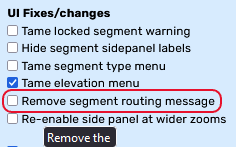
Do you mean the info box that pops open to show details of what’s going to be saved when your pointer is over the Save button? If so, then I’m not seeing any difference in behaviour in either Chrome or Firefox with or without FUME running - in all cases, the box only remains visible when my pointer is over the Save button or the box itself, as soon as I move outside of that area it closes.
If that isn’t what you’re on about, then please can you post a screengrab or a clearer description so I can tell exactly which bit of the UI you’re referring to.
So, having not been able to reproduce this problem last week, having had it reported to me by another user I’ve just tried reproducing it again here and now, lo and behold, it’s doing exactly as you described… I have no idea what’s changed in the past 5 days that could have changed the behaviour of FUME here, but at least now that I can see the problem for myself I’m in with a better chance of being able to fix it.
1.53.257 extends the aerial shifter functionality onto all of the imagery layers, and also increases the maximum permitted shift distance to +/-300m due to having seen just how inaccurately placed at least one of the layers is :shock:
Sorry for the lack of updates recently, work has been crazily busy the past few weeks.
In the meantime, the problem with HN buttons not being displayed appears to be related to using the move user info/notification option in FUME - disabling that ought to be a workaround until I fix it properly.
1.54.257 fixes the problem with the house number editor, stops hiding the restricted area sidebar details from users who can’t edit restricted areas, expands the search bar to fill all the unused topbar space again, and fixes a few other glitches etc. noted since the last WME update…
If you’ve not yet tried replicating the problem with FUME as the only addon running, please do so.
If you have, please send me a screengrab (or two, depending on whether or not you need to scroll to see them all) of the FUME settings, as it could well be a specific combination of settings that’s still triggering the problem for you.
Concerning the aerial shifter & additional images layers: Is there any way you could implement a feature to shift the additional imagery separately from the default satellite image? i.e. to have two aerial shifters, one for the default layer and another one for the additional images? This would make editing with additional layers that are out of position much easier because you could line up both layers. Could look something like this:
Thanks in advance and keep up the great work!
Hello,
I am still seeing a blank top bar in house number mode. For some reason using Command S (on a mac) won’t even save HNs when it used to. Now to edit HNs I have to disable FUME. This is with FUME as the only script running and also no Toolbox extension. (unavailable attachment: Screenshot 2023-12-10 at 8.42.18 AM.png)
Here are my FUME settings(unavailable attachment: Screenshot 2023-12-10 at 8.44.20 AM.png)(unavailable attachment: Screenshot 2023-12-10 at 8.44.32 AM.png)
Here are some screenshots of the console.(unavailable attachment: Screenshot 2023-12-10 at 8.46.12 AM.png)(unavailable attachment: Screenshot 2023-12-10 at 8.46.46 AM.png)(unavailable attachment: Screenshot 2023-12-10 at 8.48.29 AM.png)
I’m not sure if any of that is useful. Let me know if there is anything I can do to trouble help. Thank you.
Unfortunately I can’t replicate the problem when running FUME here with a copy of your config. The console captures also don’t suggest anything is wrong with FUME itself - the errors associated to it are the usual ones caused by recreating the zoom bar. However, the various errors being thrown by WME itself are unusual, as I’m not seeing any such behaviour here - this makes me wonder if these native errors and the missing HN edit buttons are related…
Please can you repeat your test and see if those errors are still present. If so, please then disable FUME, reload WME and repeat your test, and see if they’re present then.
Then re-enable FUME and reload WME, untick all FUME options, and see if HN editing is possible. If it is, please then start re-enabling options and testing HN editing until it stops working. Make a note of the FUME options at this point, then untick all except the most recently re-enabled, and see if HN editing works again. If so, let me know which option is the problem, otherwise let me know which options were set when it failed earlier.
Running WME on a Mac potentially complicates things here, as I don’t have access to any Mac hardware so can’t do any testing in that environment - if the problem turns out to be Mac-specific then fixing it may not be quick or easy…
The offender is…(unavailable attachment: Screenshot 2023-12-10 at 6.16.28 PM.png)
Every time I enable that the top bar goes blank in HN mode. If I disable that option I have to refresh the tab to get the buttons to appear again in HN mode.
So at least I know how I can make FUME work again. Not sure if that helps you narrow things down for issues with that option.
Thanks for your help! Let me know if there is anything else I can help with.