Looks like this latest release retrieves data from Google Sheets, is that correct?
If so, would explain why GIS Layers disappeared from my workstation, as Google Drive stuff is blocked here. 
Looks like this latest release retrieves data from Google Sheets, is that correct?
If so, would explain why GIS Layers disappeared from my workstation, as Google Drive stuff is blocked here.
Correct, it’s pulling from Sheets now. Is GitHub blocked for you?
I was able to get the parcel layer working again, but couldn’t find one for address points
Apparently not, I can see the home page.
I might be able to get the spreadsheet to automatically export to a file in GitHub, so people that can’t access Sheets could use that instead – assuming GitHub isn’t blocked as well. I haven’t tested it out myself, but Damian Torres was doing some work on WMEPH Sheets->GitHub that seemed promising a while back.
Worst case, I assume I could set up a manual file import. Download the spreadsheet to a file you can access at work (e.g. USB drive), and import into GIS Layers. It’d probably be a bit of a pain to deal with, but I think it would be doable.
GitHub sounds promising. I wouldn’t consider troubling yourself to the degree of a loose file somewhere requiring periodic download unless there were many power users affected by this. Your efforts are probably best directed to the benefit of the many than the few. 
As things get tighter and tighter, I will eventually be forced to do the bulk of my editing on a laptop at the point it becomes less problematic than the workstation workarounds.
Thanks!
For now, you could continue to use the last pre-spreadsheet version:
https://greasyfork.org/en/scripts/37072-wme-gis-layers?version=276013
That should work until something in WME breaks it, or the GIS site(s) you use change their setups.
That is exactly what I am doing for now, thanks!
Google Docs and GitHub are blocked for me as well at work. The good news, at least for the time being, is that the Google Sheets “feed” access still works for GIS Layers and WMEPH. We are migrating domains and to a new IP space so the access could change soon unfortunately and if that happened I would be very interested in being able to pull the sheets to be loaded manually.
Release v2018.05.04.001
I’m not seeing it. Is it a separately selectable layer?
If not all the counties in the WME GIS spreadsheet are not showing in GIS-L, how can we get the feedback about why this is, such as unsupported format/site? Or if these are all still in process, when it would be added?
Thanks! This tool is super!
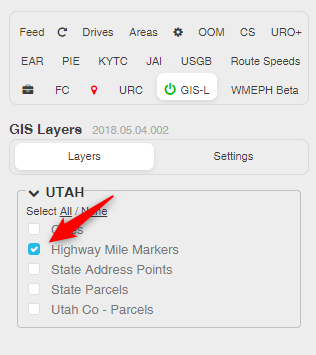
Hi Alan,
We haven’t kept a formal list to track exactly what has / hasn’t been looked at in the WME GIS spreadsheets for each state (hindsight: that would have been a good idea. There are over 1700 layers defined in the script, and we’re still going…). However, if a state has a lot of layers listed in the GIS Layers script, there’s a good chance that someone went through the WME GIS spreadsheet and picked out everything that appeared to be usable.
That’s not to say we didn’t miss something, or a site couldn’t have changed or been added since then. So feel free to ask about a specific state or site(s), and someone will investigate and report back. Typically you’ll get a faster response if you post in my channel on the Scripts server in Discord, but posting here works too.
Just removed and re-installed GIS Layers, closed and re-loaded browser, got it now, thanks!
Release 2018.05.08.001
Added an option that will only display layers in the list that are available at the current WME map location.
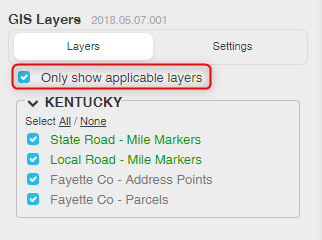
This should allow you to keep multiple states turned on without having to scroll and search for layers to toggle them on/off. Layers that are specific to a city should appear whenever the county(s) that contain the city are within the map window.
When jumping to a new location (e.g. when you use the WME search box), you may need to manually nudge the map to get the list to update. I’m working on a fix for that…
 Wow. Now that’s one great improvement on an already great script. BIG timesaver. Thanks.
This is a great idea! Thank you!
Another potentially useful layer would be the Federal Railroad Administration data at http://fragis.fra.dot.gov/GISFRASafety/
I could add a layer for the rail lines easy enough (I think), but there wouldn’t be any labels… just lines. Anything else useful from that site?