This is already highlighted by Toolbox. Or do you want the arrow to be highlighted?
Do you actually use/know this script?
EDIT: If you want to know what my request in the previous post is about, start reading this thread from page 44, where the IO was integrated in JAI.
I have the TB highlight, but I’m using JAI to show the actual IO in colour. There is no colour yet for continue, so I can’t deviate NO instructions from CONTINUE instruction now, without accessing the IO popup.
Instruction Override Continue prompt = outline colour: orange ; background: White; with arrow icon
Instruction Override No Instruction prompt = outline colour: orange ; background: White; without arrow icon
I do not see where the conflict is.
It should not be forgotten that white is the default color for straight instruction or no instruction.
The icon is representing the original instruction I think. I can’t see the difference between a keep left that is converted into a No instruction, or a keep left that is converted into a Continue.
Both have orange outline, white background and an < icon.
So my request is to make the Continue background adjustable, just like any other background.
EDIT: ok, NONE removes the icon, so there is a difference. But it’s not really the icon that is representing the continue…
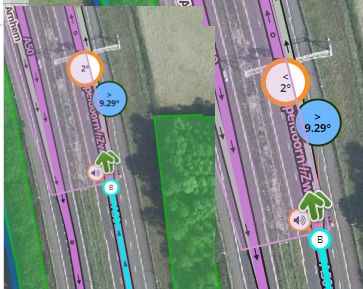
For reference:
Waze Selected, best continuation

None (TIO)

Continue (TIO)

To me, this is perfectly adequate.
I would recommend changing your “direction arrows” setting. To be honest I don’t know why the first four options even exist. With a ‘continue’ they are misleading for sure. At least, there should be an ‘up arrow’ or carat ^ for continue with the first four options, if people like <> for exit/keep for some reason.

So the conflict is actually in your last sentence; There’s a default colour White, for 2 different instructions.
I prefer to modify the continue, rather then the Best Continuation colour, which is not possible at the moment.
I just noticed the difference in arrow sets as well, and have changed mine into the last. I actually only look at the arrow to differentiate the left from right. Instruction I use the colour code.
Is it difficult to implement? I don’t understand why you wouldn’t 
I understand you use the arrows, but I like the colours. All other colours are customiseable, so why not this colour?
Sure do. And the same as with others further back in the thread as you pointed out, missed the part where it was providing an indicator of TIO. I think a new option like this should be opt in rather than opt out, so you don’t have to read through every single post to learn something has changed.
For the moment, is the best solution 
The problem:
angleDisplayArrows: { elementType: "select", elementId: "_jaSelAngleDisplayArrows", defaultValue: "<>", options: ["<>", "⇦⇨", "⇐⇒", "←→", "⇐⇒⇖⇗⇑", "←→↖↗↑"]}, var ja_arrow = {
get: function(at) {
var arrows = ja_getOption("angleDisplayArrows");
return arrows[at % arrows.length];
},
left: function() { return this.get(0); },
right: function() { return this.get(1); },
left_up: function() { return this.get(2); },
right_up: function() { return this.get(3); },
up: function() { return this.get(4); }
};
When I implemented the overrides, I simply added these two symbols: ⇑ ↑
And I had not tested the first 4 set of symbols :oops:
I think of a better way to do …
Maybe just delete the first 4 set of symbols ?
Sorry, but I’m not the original author.
Or do this :
angleDisplayArrows: { elementType: "select", elementId: "_jaSelAngleDisplayArrows", defaultValue: "<>", options: ["<><>^", "⇦⇨⇦⇨⇧", "⇐⇒⇐⇒⇑", "←→←→↑", "⇐⇒⇖⇗⇑", "←→↖↗↑"]},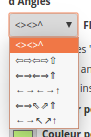
Choosing the last option works VERY well !
I say, just delete the first four sets. No reason to display the left and right arrow when the up-left and up-right would be more appropriate anyway.
Agree on that. Kill the first 4 arrow sets.
And to make the Instruction Override colour visibility default ON like Turbomkt suggested
And off course, to match all other instructions; create a colour box for the Continue. (if you don’t want to use it in orange, you can always set it back to white)
Script (version 1.12.0) is not working for me in Chrome (and, yes, I’ve had disabled WME Color Highlights). Works OK in Firefox.
Please update to latest version 1.13.4, see opening post.
Sent from my S7 using Tapatalk
Hello, I would like to report a wrongly estimated instruction. Recently WME started reporting “Keep left”, while JAI gives “Turn left”. Can you check what’s going on? Here is permalink
Hello,
I don’t see the problem on WME and I am not in the secret of the guiding algorithm …
But I can increase the “GRAY_ZONE” (yellow color) in relation to this instability.
I think we can adjust it to 1
FYI, in JAI, we have these value:
var TURN_ANGLE = 45.04;			//Turn vs. keep angle specified in Wiki.
var U_TURN_ANGLE = 168.24;		//U-Turn angle based on map experiments.
var GRAY_ZONE = 0.5;			//Gray zone angle intended to prevent from irregularities observed on map.
var OVERLAPPING_ANGLE = 0.666;	//Experimentally measured overlapping angle.
At first I changed the limit value TURN_ANGLE to 45.66 (measured value on the intersection of WazingArch), I left the GRAY_ZONE at 0.5
So if
angle < (45.66 - 0.5) = Keep
angle > (45.66 + 0.5) = Turn
(45.66 - 0.5) <angle <(45.66 + 0.5) = ? (Yellow)
And URL compatibility with “editor?” or “editor/?”
V1.13.8
http://seb.d59.free.fr/Script/WME_Junction_Angle_Info/wme_junctionangle.user.js
Just an update for the instruction override in the Spanish-Latam translation strings:
override: "Revisar \"instrucciones forzadas\"",
overrideAngles: "Mostrar ángulos de \"instrucciones forzadas\"",
Please add them in the next release…
Thanks!!!
Hi seb-d59,
Please look at this segment on permalink - use snapshot for couple days, while old map lasts,
segment to uturn had 45,89 degrees angle, so app said keep right when driving straight… JAI displayed straight as straight. - should have displayed keep right.
https://www.waze.com/editor?env=row&lon=37.55791&lat=55.69508&s=88078143&zoom=8&segments=137025079