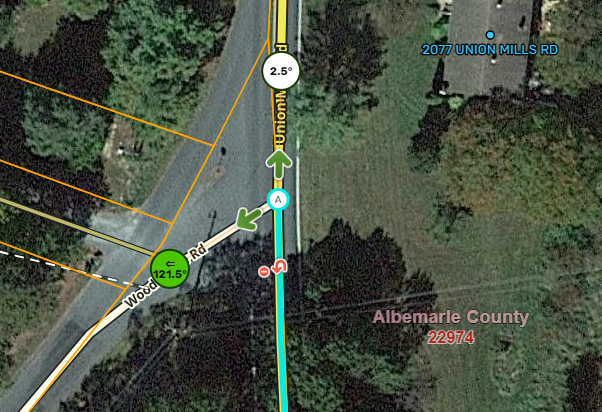
Select one segment, and the junction angles display as expected (normal):
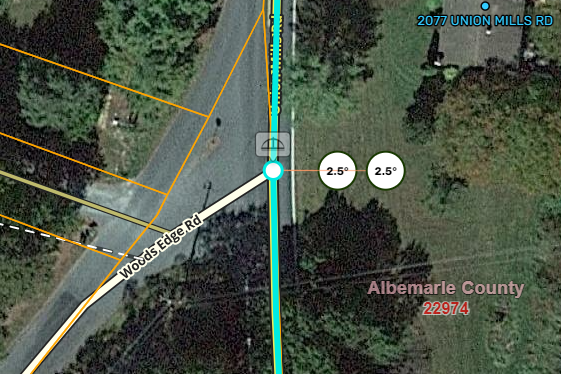
Ctrl+Select the adjoining segment on the same street, and the junction angle appears duplicated:
If you select more than 2 segments, you can get even more identical bubbles!
After the latest WME update, here in Australia the script has started mistakenly showing “keep left” as the default instruction in places where it should be “exit left”, such as on freeway exits.
(unavailable attachment: Screenshot 2024-07-16 at 6.58.52 PM.png)
I wonder if some kind of country detection in the script has stopped working, because “exit right” is also appearing as a default instruction, which can never happen here (in the same way that “exit left” can never be given by default in America).
(unavailable attachment: Screenshot 2024-07-16 at 7.00.44 PM.png)
Months ago I noticed that the last state of the checkbox is not being saved. Localstorage is not working properly. Only today I felt like coming to let you know. Thank you.
I’ve noticed a bug with JAI where, if you use the “select entire street” button, after deselecting, it gets “stuck” and you can’t select any other segment on the map again. But if you drag the map just a little bit, it corrects itself and now you can.
Screen recording below.
When I turn JAI off, this bug goes away - after deselecting the multiple segments, I can immediately select another segment without having to move the map a bit first.
 Thank you.