Meh. Was totally sure I published it already =/ Oh well… Should be available “soon”.
Unfortunately, the native Chrome version of 1.6 doesn’t seem to work. I can put in any number of decimal places, and it still just gives me a whole (integer) number when showing an angle. It also seems to ignore the size feature if I turn that on. Yes, I hit “apply.”  And when I refresh the page and check again, everything I selected under the JAI settings resets back to default values.
The one you linked to that runs under Tampermonkey that you link to here seems to run fine and remember my settings.
Meh. Something strange with local storage it seems. I’ll see if I can it fixed tomorrow.
Should be fixed now. (Well… “works for me” anyway)
The JAI settings seem to be working for me in the native Chrome version.
Chrome Version 40.0.2214.94 m
If I enable the Native Chrome version from the Chrome store
- If I start WME with nothing selected, I get the behavior I would expect – I see the JAI tab when I have no objects selected, after the Toolbox tab.
- If I start WME with a segment PL, I see what I expect from the JAI tab, but nothing happens when I click the JAI tab.
- If I start WME with a places permalink, I see the JAI tab with the other places tabs (General|More|photos|JAI). But after I click somewhere else on the screen, I never see the JAI tab again, even if I select the same place again. https://www.waze.com/editor/?env=usa&lon=-75.761770145&lat=45.279857515%20&layers=4005&zoom=7&venues=186253765.1862799792.621033)
If I disable the native Chrome version and enable the tamper monkey version
Junction Angle Information seems to load but not work – I see the layer in the layers menu, but don’t see the angles when I select a segment, and I never see the JAI tab.
Tampermonkey 3.9.202
Ah. Never tried with places permalink. The object model is probably different then. I’ll check that
I’ll also check the Tampermonkey issue (never checked that since I reinstalled all operating systems) [emoji17]
Sorry. I edited my post while you were typing.
If I start WME with a segment PL, the JAI tab shows up but doesn’t do anything.
When you say does nothing, do you mean if you deselect the segment and then select it again angles are not displayed, or deselect the segment and try to click the JAI tab and it doesn’t open?
Sent using Tapatalk for Android 4.4.2
The JAI tab itself – nothing happens when I click on it, if JAI was originally loaded from a URL that included a segment.
Oh where are my manners?
Hello milkboy – junction angles information is so brilliant is has become essential. Thank you.
This new enhancement seems very promising and I am looking forward to seeing the bugs worked out of it.
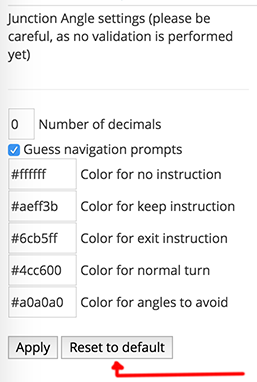
I saw the Apply and Reset to default buttons when clicking on the JAI tab and when I clicked on the Reset to defaults, this appeared:
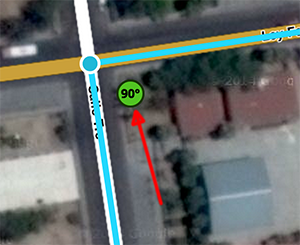
“#4cc600 for normal turn”
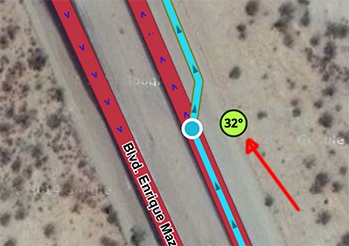
“#aeff3b for keep instruction”
I am using his alpha1 with Tampermonkey.
Right. Usually, I see all that stuff. But if I start WME from a permalink, Clicking onJAI doesn’t open up the JAI settings. The tab area just stays in whatever tab it epwas on before I clocked the JAI tab.
Reset to defaults just turns the JAI settings back to what they were. So if I had been using pink for turns, it goes back to that pale lime.
OK. I’ve managed to fix the permalink (with selected segment(s)) issues: settings tab content not showing up and “angles not showing up”. Tampermonkey issue next, and then I’ll make a new release =)
Hmm… Works fine for me (both Chrome+Tampermonkey and Firefox+Greasemonkey). Just make sure you have a “recent” (1.6.1+) version of the script, with the correct update URL: https://github.com/milkboy/WME-ja/raw/master/wme_junctionangle.user.js
Previously the update url was pointing to userscripts.org, which has not been working for quite some time.
Thanks!
I see that the problematic tampermonkey script is old.
In order to keep all the information about where to get the script in one place, where you can get help maintaining it, please consider simply pointing to the wiki page.
In any case, please update your forum post telling users where to get the script:
https://www.waze.com/forum/viewtopic.php?f=819&t=61926&start=50#p735439
I have just updated the wiki page:
https://wiki.waze.com/wiki/index.php?title=Community_Plugins%2C_Extensions_and_Tools&diff=93550&oldid=93375
Now I will get a couple of updates and test for you thanks.
I manually updated and tested in Chrom both with and without tampermonkey. The JAI tab now seems to work for me no matter whether you start WME naked or with a segment, place, or node selected.
Thanks!
(Side question: How automatic does using github make the update process when using it as your source for Greasemonkey/Tempermonkey? When you update the script there, will Greasemonkey/Tampermonkey know to update the script automatically?)
Something you might want to consider is to put it on greasyfork.org. A lot of script authors who used to use userscripts.org are using that now, and a lot of people who are just going straight to a source to look for user scripts who used to use userscripts.org are now searching greasyfork.org for those scripts. There are quite a few WME scripts already there.
Just a thought, anyway.
The @updateURL points to the current master branch, so it should “just work”. The possible downside is that it’s always going to update to the latest (committed) development version, which usually should work though.
Maintaining the code in several places is a pain-in-the-***, but I’ll check it out =)
Wonder how hard it would be to write a script to do that.
Record the process with AutoHotKey and play it back each time.
Greasyfork.org can pull committed changes automatically from github, and the like. So you only have to maintain a single copy of the code and everything else is automated. Just push an update to the existing live version soit looks at greasyfork for future updates. Then once setup you’d only ever need to update and commit source code, and the rest is automatic.[emoji1]
Sent using Tapatalk for Android 4.4.2
Added script on greasyfork also for completeness. The support for web hooks to update was a pleasant surprise =)
1 Like