Update released - 2019.06.12.01
Added support for loading/saving script settings from the server.
Update released - 2019.06.12.01
Added support for loading/saving script settings from the server.
First of all, great script and I really love it!
If I may, I’d like to request for an additional feature which would be really useful for me (and others, hopefully). Could we have option to automatically hide PPs and/or PAs when the map zoom is lower than, let’s say 4 for example.
PPs are hidden by native WME at are certain zoom level so PIE can’t interact with them anyway. Area Places are size dependent for which zoom they are hidden at.
Oh! I never noticed that. I was up to zoom 4 and I felt the PPs are already cluttering the map too much. But never ventured to zoom 3 and beyond. Thanks for the info!
Toolbox can change your point place display threshold from Z5 to Z3. Are you using it?
Dang, I never noticed this option! I’ve unchecked it and it’s working great for me now.
Thanks guys. Great help!
Reposting here because I absent-mindedly posted to the WMEPH thread… :oops:
When creating a new RPP, the setting for “Use city name from closest segment” and subsetting for “When the primary is ‘No city’ look for an alt city” do not seem to be working for me any more. Anyone else seeing this?
I hope I’m not reporting an already known issue.
When rectangular place is aligned perfectly on X and Y axes, rotation handle gets hidden behind right bottom corner and thus cannot be grabbed. See example screenshots below.
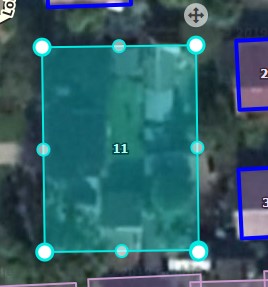
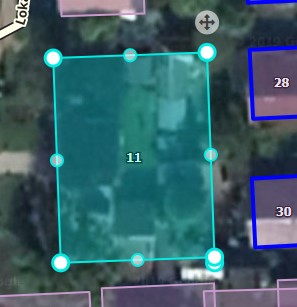

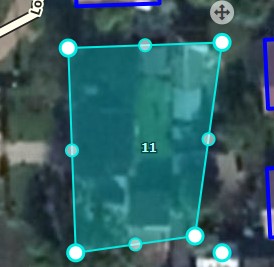
This is not a bug. The rotation handle is supported natively by OpenLayers and all I am doing is turning it on - there is nothing that I can do to move it. If you disable the enlarged geometry handles you can see the rotation handle.
Thanks! Then there’s one another thing. Somewhere along the way underscore.js lost “contains” method. I really don’t know if it’s waze.com vendor dependancy or wazewrap or your.
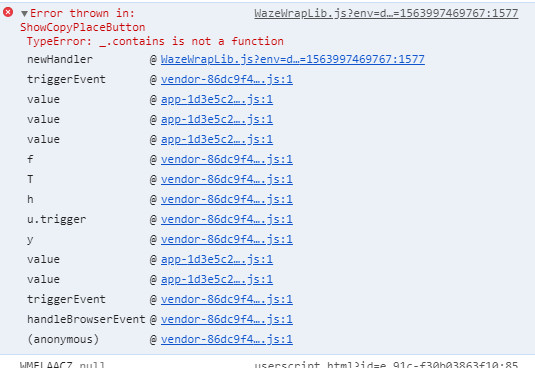
Following the latest WME release, the setup of entry fields for new RPPs appears broken again…
Could you be more specific?
Sorry Justin… when placing a new RPP, the entry fields are not opened up with the cursor parked in the HN field ready to go, and the HN field is back below the Street field.
But now I am suddenly doubting myself and wondering if WMEFU is involved in these fixes instead.
So many scripts - so easy to forget which one is doing what!
This is from PIE and it is working correctly last I checked (yesterday). Check the console immediately after creating a new RPP - another script is likely having an issue and interfering with this functionality
I don’t know enough about any of this to interpret except that I see a reference to Toolbox in there.
I’m lucky I even know how to access the error console - I only learned that much since becoming an editor here, lol.
[code]FancyPermalink.min.js:227 Uncaught TypeError: Cannot read property ‘mainObjectID’ of undefined
at e.WMETB_FPnewSelectionAvailable (FancyPermalink.min.js:227)
at initialize.triggerEvent (vendor-86dc9f4c83949efd6718.js:1)
at e.value (app-1d3e5c24957b318a3943.js:1)
at e.value (app-1d3e5c24957b318a3943.js:1)
at e.value (app-1d3e5c24957b318a3943.js:1)
at createPlace (userscript.html?id=6d4557a0-20b6-4839-b59c-14e63305c52c:5786)
at endPlacementMode (userscript.html?id=6d4557a0-20b6-4839-b59c-14e63305c52c:5692)
at HTMLDivElement.eval (userscript.html?id=6d4557a0-20b6-4839-b59c-14e63305c52c:5575)
at HTMLDivElement.dispatch (vendor-86dc9f4c83949efd6718.js:1)
at HTMLDivElement.f.handle (vendor-86dc9f4c83949efd6718.js:1)
WMETB_FPnewSelectionAvailable @ FancyPermalink.min.js:227
triggerEvent @ vendor-86dc9f4c83949efd6718.js:1
value @ app-1d3e5c24957b318a3943.js:1
value @ app-1d3e5c24957b318a3943.js:1
value @ app-1d3e5c24957b318a3943.js:1
createPlace @ userscript.html?id=6d4557a0-20b6-4839-b59c-14e63305c52c:5786
endPlacementMode @ userscript.html?id=6d4557a0-20b6-4839-b59c-14e63305c52c:5692
(anonymous) @ userscript.html?id=6d4557a0-20b6-4839-b59c-14e63305c52c:5575
dispatch @ vendor-86dc9f4c83949efd6718.js:1
f.handle @ vendor-86dc9f4c83949efd6718.js:1
userscript.html?id=fc739a23-e725-42e4-82e3-3cc468d31121:44302
Uncaught TypeError: Cannot read property ‘-101’ of undefined
at eval (userscript.html?id=fc739a23-e725-42e4-82e3-3cc468d31121:44302)
at Array.forEach (<anonymous>)
at eval (userscript.html?id=fc739a23-e725-42e4-82e3-3cc468d31121:44293)
at Array.forEach (<anonymous>)
at MutationObserver.eval (userscript.html?id=fc739a23-e725-42e4-82e3-3cc468d31121:44273)[/code]
That’s a TB error. I’d report it in that thread and disable if it is interfering with other scripts
Thanks Justin. Looks like it is already reported there, too.
Looks like the Parking Lot button has disappeared.
This parking lot button?
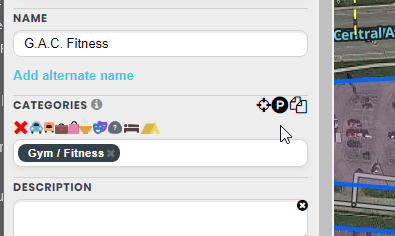
:lol:
Try turning off TB and see if it appears.
Had to reinstall PIE after turning off TB, but that looks like the culprit. That makes a tough choice as I use both a lot.