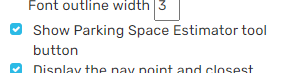
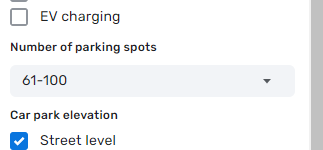
BUG: When PIE is enabled, the Place menu in the top toolbar doesn’t include the Residential Place item.
Works for me. Double check the “Place Menu Customization” panel.
The original Place menu has 12 items, and Place Menu Customization of PIE shows 11 items. So. I can select Residential Place instead some other one, but I cannot see the original Place menu.
lg1992 is right, the “Place Menu Customization” panel has only 11 items. It needs to have 12 items so you have can all 12 visible.
Hi!
After updating WME to new version there is some strange behaviour of PIE. After saving any place (by pressing "Save" button) and trying to add another - PIE doesnt lock new places to desired value (customized in settings)
Am I alone with this (probably) bug?
P.S. After saving any place by pressing “Save” - “Residential Place” item becomes visible in dropdown menu (is this sympthome of non-working PIE ?)
I disabled all scripts/extensions except PIE and experience something similar as well as some other behavior:
- If I add a new place, it will set it to the desired lock level that I set in PIE settings.
- After I save that new place, any additional places I add do not set to the desired lock level that I have set in PIE settings.
- Also, after adding a new place (step #1 above) the Place Menu Customization goes back to the standard customization list. Adding other places and saving does not bring it back. It only comes back when I do a hard refresh. In PIE settings they still show as I want them but in the Place dropdown menu they revert to the standard customization you get with no scripts/extensions turned on.
It appears that PIE stopped working on New Places sometime over night. None of the options for RPPs are having any effect.
Thanks!
Not sure if this a known issue, but PIE gives me a dotted yellow line (to what seems like a random location) when hovering over Gas Station brands. It’s the same yellow dotted line designed to show where Google Places are.
Example: https://streamable.com/rk4059
I have never noticed this but am able to duplicate it as well.
It only does it for the first 4 brands on the list for me. After the 4th brand, I no longer see it. Watching your video, it appears to be the same for you as well.
Looks like the issue where PIE loses its grip on its preferences again… where the customizable list of places to choose from when creating new is getting lost and the list reverts to default choices. Looks like making any change on the map and simply saving your changes causes the issue, but it can be restored by entering and then exiting HN mode (or full browser refresh of course).
I noticed this earlier this month: https://www.waze.com/forum/viewtopic.php?p=2220407#p2220407
Thanks a lot, @junyianl. The workaround fixed the problem I had.
Bump for issue where list of default places keeps getting reset.
Also, when creating new RPPs, closest city segment feature for ignoring PLRs and PRs is failing to ignore PRs. When I am going to create a new RPP, if closest segment is PR, new RPP comes in with blank street/city. Flopping closest segment(s) to PLR first allows me to create an RPP with closest segment attributes appropriately getting picked up (PLR is successfully ignored), and then I flop the PLR stuff back to PR.
Would love both of these to get fixed if possible. Lots of extra selections and clicks to work around these… Thanks!
Hi can you, please, fix external provider link location, so we can effectively link Google Places to Waze Places.
Sorry to beat a dead horse. I’m sure you know full well how I feel about the latest WME release, and how it negatively impacted scripts and authors along with editors. :x Completely understand anyone who needs a break or gives up trying to fight this stuff.
But, that said… the ongoing issue with the user defined list of place types in the drop down resetting… the shortcut I was using to force the list reset (entering HN mode) is now much less efficient thanks to the native WME bug with pressing H to enter that mode. Don’t get me started about how dumb it was for them to let that go to prod despite ample warning… :evil:
Anyway, it is now easier to just press F5 and reload the whole browser window than to select a segment and enter/exit HN mode by scrolling the left panel to get the button into view. :roll:
I sincerely hope this gets fixed one day so resetting is no longer an issue, but not going to press it further because I know there is pain behind all of this. Thanks for all you do.
The horse is well and truly dead. Justin has indicated on discord that real life is rather annoying at the moment and he’ll get to his scripts when he’s able. I think further “it’s broken” posts are at best counterproductive.
Now, if you only read this post without reading up on the discussion preceding it, you might misinterpret it. I know I did, at first.
The dead horse is NOT the PIE Script in itself. That horse is very much alive. In fact, I just received yet another update for it, further restoring part of the many-splendored functionalities of this script. The dead horse referred to complaints about things temporarily not working, due to circumstances out of the script creator’s control. If the script were a horse, it’d be very much alive, with its trainer teaching it to jump and gallop like it used to, one function at a time.
PIE is alive and well. Many thanks to Justin!
Hi, there was a Copy Place button. Don’t see it now. Was it gone due to some updates? Could it be restored? Or is there some other script for this?
You can find it in this temporary fork (1) or in this script (2)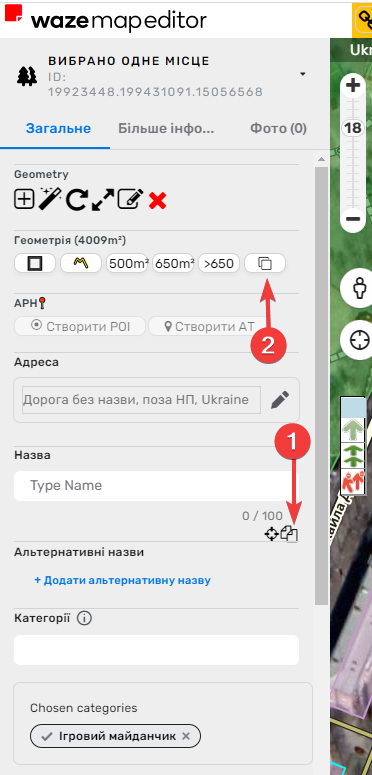
This was the last post I could see referencing this feature, is it currently broken or am I missing something with how to activate it?