Thanks, I was beginning to think it was just me
Request: When making a new PLA, is it possible to have the Primary Lot Type set to “Restricted”?
IMO this should be the Waze default setting, as the massive majority of parking lots are privately owned and provided for access to certain businesses. True public lots are not very common, but if you leave this option unselected, those PLAs display in the app as public (blue “P”).
Additional requests: When making a PLA for a new PLA that is for a single business, it would be nice to copy the URL, Phone Number and Hours from the existing place if they exist.
Update released - 0.8.03
New PLAs will copy the phone number & url from the selected Place. The parking type will be set to Restricted by default.
I like it, no more having to tab over and select it… thanks.
Outstanding!! Thank you!!
Outstanding, this will make working the PLAs that much easier 
Maybe you can have it also draw the PLA around the correct parking lot while you are at it :lol: One can dream
Just curious if copying the hours across is under consideration or is it even possible.
I had a conversation somewhere, sometime, about whether or not we actually want to do this. If someone navigates to a store before they open, perhaps someone who works there or someone who wants to get there when doors open, we don’t want the parking lot to not show up just because it’s marked as “closed”. If access to the parking lot is not physically blocked when the store is closed, then it should not be “closed” IMO.
Also, I’m really not sure copying the phone number and URL are necessary or even desirable. It’s another set of data to maintain, and data that if you need you’ll get from the Place itself.
I am quickly changing my opinion on phone/URL and hours from PP. I am still on the fence for the hours since these are dedicated PLAs for a single business and you make a valid point.
The phone/URL now actually makes no sense to me to include based off of conversations I have followed and I would not be disappointed if they stopped copying over.
After talking about it some, I am going to disable copying of the phone and url.
Sounds good, thanks for giving it a try and seeing how it would work out.
Update released - 0.8.04
Removed copying the phone and URL to PLAs when using the PLA button.
Per request - added the ability to create the suggested PLA from missing PLA MPs. Carefully review the suggested size/geometry before using! This will not be appropriate for some/many PLAs but will hopefully make it easier for some.
The Create Suggested PLA button will only appear for missing PLA MPs, and only if you click on the MP - sorry, not sure how to detect one being selected when using the next button.
Only MP type 71 is supported - the one with the description: “If there’s a parking lot around these parking-lot-road segments, create one on the map. Entry point should be marked at the lot entrance.”
MP type 70 is also a Missing Parking Lot Place MP, but its description is as follows and merely copies the geometry of the Place it is associated with, which in 100% of the cases I checked, was very, very wrong: “Drivers tend to park around this location. If there’s a parking lot here, create one on the map. Entry point should be marked at the lot entrance.”
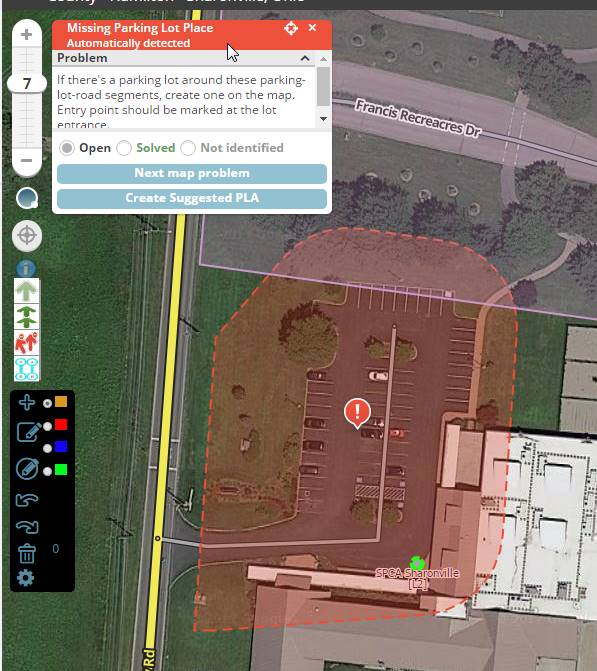
To cool, thanks for the enhancement to your script
Update released - 0.9.00
Added the ability to display Place names - configurable to display point, area and the lock level.
To prevent overloading the screen and causing excess lag, names will not be display below zoom 5 (default zoom where Places start showing).
Using the same styling as the Place Name script since that seems to be acceptable to everyone thus far.
Awesome now I can get rid of https://greasyfork.org/en/scripts/6083-wme-placenames
Looks good, the font can be difficult to read at times but I think it would be tough to figure out a font color since to much variety in Sat View colors.
The place display is nice, thanks for that! Is it possible to have area place names display at a higher zoom level? I can scan an area for shopping centers, parks, and larger places like that at zoom 2 or 3. Having to zoom in to 5 can be tough. If lag time is an issue, maybe limit to zoom 3. Thanks.
Update released - 0.9.02
Area places will display the name down to zoom 3
RPPs will now display the HN. If the RPP happens to have a name set, that will be displayed after the HN.
1 Like
Thank you, this is great!