Just noticed in decrement mode when moving from a 3-digit number to a 2-digit number a leading “0” is added (also 2-digit to single digit etc.).
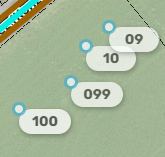
Correct. Assumptions have to be made if there should be a leading zero or not because some places it’s like that and others it isn’t. We could add another option toggle for it if necessary, or you can just manually enter the house number when you change the number of digits (e.g. manually enter 99 and 9 in your example).
1 Like
Ah, I see - didn’t realize some regions might add the zero!
A toggle would be great, but I don’t think it’s a very pressing issue - manually stepping down a digit isn’t much of a bother.
In this version, when you auto increment (hit 2 or 4 or whatever) it auto adds the next HN but you then have to hit enter to accept the HN. I don’t think previous versions you had to hit enter, it would just keep auto adding and you could hit 2, 2, 2, 2, and keep adding. Now it’s 2, enter, 2, enter, 2 enter.
I only need to hit Enter after using H to start a sequence. After that, I can hit 2, click, 2, click, etc, with no Enter needed.
1 Like
I see, if I wait about 4 seconds after hitting 2, it auto enters and I can keep going. Is that delay adjustable, or is it just my computer is that slow?
There is no 4 second delay in the script. It seems to be ready after about a half second or less for me. I’m not sure if slow computer would cause that much delay.
Could there be some interaction with another script? I’m not sure how there would be an interaction, but you might experiment with just QuickHN and see.
1 Like
Thank you! I like the new decrement mode.
Seems to be GIS-L that slows it down, on a Mac and a PC, so not machine related.
There is a new minor update, 2025.06.12.01. It updates the way the QuickHN left panel is brought forward when adding HNs and at what step that happens. It also uses a new SDK method to determine when HNs are added or moved (used to update the last house number value).
How do you use this, I opend map editos and nothing
Select a segment, type H , click the spot and type the first HN and hit return. Now if you type a digit, like 4, it will let you click and then enter the last number +4.
The QuickHN panel on the left lets you switch to decrement mode and see what would be entered for each keystroke.
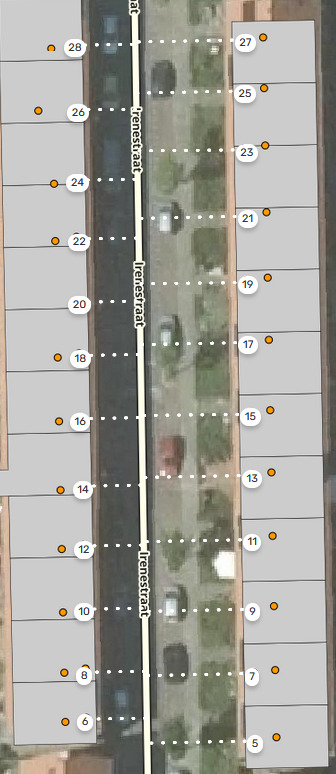
Still love this script. I do have a feature request: would it be possible when you’re dealing with complicated numbers that instead of updating the last digit (2A → 2B) you would update the main number (2A → 4A)?
Here a case for this: the initial import only added the main number and skipped all #A ones. This is quite a regular occurrence in Netherlands, but I don’t know about other countries.
1 Like
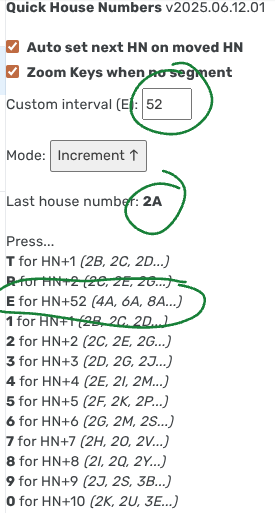
What you are asking for is already possible. Just enter multiples of 26 (number of letters in the English alphabet) as the custom number, and use E to place the HNs. So to go from 2A to 4A, you would use the custom interval of 52.
3 Likes
I had not thought of that, many thanks!
1 Like
Does anyone else have that the scripts gives a preceding zero when decrementing from 100+ to 100-? So if 100 was the last number and I go to the next, which would be 98, it enters 098.
See screen recording here.
Yep - iirc - this behavior was reported already. But script is working great so this small behavior is not a problem for me at all.
Working as intended. The script keeps the same number of characters (3 in this case) when possible. There are cases where either scenario (with or without the leading 0) could be correct, so the script has to pick one. You can either enter that one number manually, or work from the other end of the street so you’re incrementing from 98 to 100.
New update and renamed to Quick HN+RPP
QuickHN has been updated to include RPP capability. You can now add a series of RPPs similar to the way you can add HNs. Once you have the current number and street set, you can then set it to RPP mode and add new RPPs with 0-9 and E R T keys. The current number is set as before when you add or move an HN, and is also set when you select an existing RPP or venue, and when you add an RPP. Selecting a segment will set the street and if the city on the primary street is not set, it will look at the alternates.
HN mode is automatically set if you add a new HN or move an HN. HN mode will be changed to Off if you turn off the House Number layer.
If you have the Zoom Keys option enabled, it will zoom if the mode is set to Off, or there is no segment selected and the mode is HN.
There are some new keyboard shortcuts that can be set. One will create an RPP with the current number and street. This shortcut does not require the script to be in RPP mode. If you want to create an RPP for a business with an existing place in Waze, first select the place, then hit that shortcut and click where you want the RPP.
In addition, you can create shortcuts to toggle the increment/decrement button, increase or decrease the custom interval, and switch between Off, HN and RPP modes.
There is no documented way for a script to know when you change any shortcut, so for now, QuickHN+RPP will save the shortcuts whenever it saves its other settings. Changing the custom interval will cause the settings to be saved. In addition, there seems to be a problem in the SDK when saving/restoring shortcuts that include the Control key.
The name of the script has changed, so Tampermonkey may think it is a different script and you will have to remove or disable the old version of QuickHN.
3 Likes
Hi Dave, I’ve gone to use the script and it doesn’t seem to be showing in my scripts. I’ve re-downloaded it and removed any other HN scripts in case they’re conflicting. Have you got any ideas?