Hi beautiful people
They noted that this script has an error when setting the speed to Argentina ?
In my country the speed is measured in km / h while the script is seteado in miles.
For example the streets in Argentina have a value of 40 km / h and using the script leaves them 64, one knows how to solve this problem?
Wazers hope your answers , of course thank you for your time = )
This is because Argentina has mph set instead of kmh  Same as Uzbekistan post higher.
gertbroos, can you add option to set speedlimits on Private road and Parking lots? They contain speed fields, they are just hidden… Thanks.
Hi gertbroos
Could You extend the values of hungarian SLs with 10, 20, 100, 110, 120 km/h? So the full list would be 10, 20, 30, 40, 50, 60, 70, 80, 90, 100, 110, 120, 130. (We’re No. 7.)
Thanks
Update 0.7.3
- Small code change, Speeds didn’t show up when following a permalink
- Changed the mph/kph settings of Argentina & Uzbekistan
- Added requested speeds to Hungary
Thanks guy, it works! 
So, gertbroos, could you add option to set speedlimits on Private road and Parking lots? They contain speed fields, they are just hidden… Thanks.
Not tried yet. In my country, I added those (hundreds of them) by temporarily changing the roadtype to street, setting the speed and changing them back to private/plr
I currently have no idea if it’s possible in any way because the speed input fields don’t appear when editing a private / plr
I will add this to my todo list, so no ETA ( “soon”)
Yeah, I am doing street change hack too… But maybe it can be done directly from script… like try entering into same fields, where they could be… Or even make it automatically - show speed limit signs on these types, and by pressing speed limit button, script changes, say, parking lot to Street, sets speed limits, and changes it back
Hi beautifull people.
Nice job!!!
Thank you.
Request, that will make localization easier.
Have the script follow the editor settings whether Imperial or Metric.
Though I am in the US, I prefer using Metric since I “grew up” using WME following the 5m/15m guidelines. The KPH/MPH translation is easy to do, however, when I load the script, and tap the “40mph” option, it inserts 40 into the speed window, which translates to 25mph.
For me, learning what kph is needed for a particular mph is easier than having to toggle my settings every time I want to input a speed limit. It would be nice if the script could automatically sense this.
Even easier, simply be user-configurable where we can select what speeds we want to use on what buttons, similar to the WSLM add-on for Android.
Hi Gert,
Great job with WME Speedhelper, really does help with SL inputs.
Thanks
Update 0.7.4
Small bugfix, India was set to MPH instead of KPH, which resulted in wrong speeds.
My apologies for any inconvenience…
Hello,
Since the update of WME, I no longer have the button “clear value”, nor of “Settings”.
Config: Windows 10 and Chrome (updated)
Someone also had this problem?
Edit : I cleaned up the browser cache. then restart the PC.
Same problem.
Config: Windows 7 and FF (updated)
The problem here is, that I cannot reproduce the problem, so it will be very difficult to debug :?
This is Chrome & Windows 10

This is Firefox & Windows 10

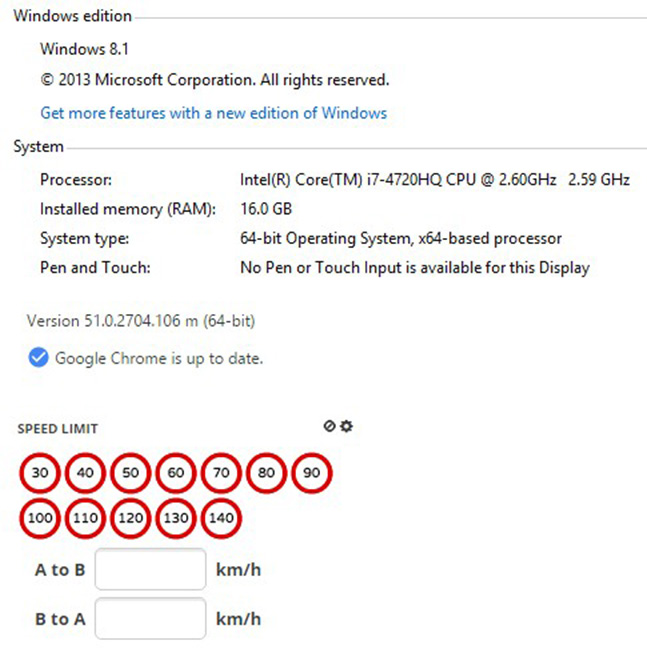
So everyone with this problem: post your setup (browser / OS) so I can try to find a solution
Windows 10.0 NT
Chrome Version 51.0.2704.106 m
So I have exactly the same browser & OS, and I don’t have the issue you’re having… Will not be easy to find what’s going wrong there :?
Maybe 2 scripts that don’t work nice together? Could you disable all scripts (tampermonkey) and only enable the Speedhelper, just as a test…
If it works, start enabling scripts one by one and look when it starts failing…
same as you, i am having no problem
Estonia needs a BGg (20) as the first one (now that speed limits are enabled for all road types).
Win10, Firefox 49, multiple computers and no issues with the cog wheel.
Monaco - MN
20-30-40-50-70-80-90
kmh
The sign is standard as in France.
Thanks !