Big thank to gertbroos for this script I use each day.
I have suggested some modifications to avoid verification and warning message (even if we are allowed to modify a segment.)
I test it with different users level without problem, but I don’t know what append in others countries.
But what I saw in France is the same thing that TimAThing saw in Australia.
Small update
EDITED Greece (forgot someting) 
Changed the code to re-enable the 1-click function of the speed inputs, when the segment has unverified speeds attached. It now re-enables the input fields and enters the value again in 1 click.
Please test it out and let me know if it doesn’t work for you, but I tested it myself and it works
Version 0.10.1
It works fine at bypassing the “verify buttons”, but there’s an incorrect warning displayed:
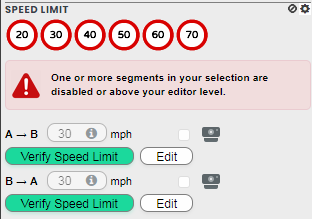
Yeah, I’m assuming I coupled that warning together with the status of the input fields.
Input fields disabled = warning message.
Since these fields are now also disabled because of the verify button problem, I need to add another check to get rid of this problem
Will be something for the upcoming version, as it doesn’t really affect the workings of the script, it’s just a bit annoying for now. Thanks for noticing!
Regarding the “verify buttons”:
Is there anyone that can tell me, if these only show, when the editor has edit rights on that specific segment?
I’m changing the code, but I can’t find a segment, with these verify buttons outside my editing area, maybe because WME just hides them if you have no rights.
Just want to be sure
You’ll find plenty of primary street with unverified speed limits around here, if you want to test outside your area.
Thanks!
I’m now 99.99% sure that the verify buttons only appear when you have eding rights in the area, as I can’t see any on these segments
Expect an updated code version soon (not Waze soon, much sooner  )
)
I’m experiencing an issue in WME Beta lately. Behaviour seems to be the same in all situations I tested:
- set the speed limit with WME Speed helper button
- the appropriate fields are populated with the new speed limit
- de-select and re-select
- speed limit fields are blank
And yet again… Why does Waze keep changing 
I have no beta access anymore, so can’t help untill the code get’s transferred to the “normal” WME… But I’l getting tired of all these changes. The last problem still isn’t fixed yet, and there’s allready a new one on the horizon…
Thanks for letting me know.
That can easily be arranged, I can make the request for you if you’d like
If you want, much appreciated !
NP 
Expect to have it next week since staff is already gone for the weekend in Israel
Strange thing is, I’ve allready checked and now I do have access? Last week or so, it still wouldn’t let me in… Maybe there’s still someone there answering mails?
Or something has changed in the last week, but that would be weird… Oh well, I have access again, success
Thanks for the help!
1 Like
Thanks to the help of another scripter in my country (Glodenox) this problem will be solved in the next update (easy fix it seems )
hen the update comes, I have no idea, as I’m still working on the previous problem (verify speeds- fields)
Good news!
I met @Glodenoxin Madrid last month, his contribution is priceless
Could you please update Australia and add 10 km/h, thanks.
Hello,
The new French regulation includes 80 km/h.
Could you please add it?
Thanks
Update 10.0.2
- Fixed problem with empty speeds when deselecting segments and reselecting
- Updated France
- updated Autstralia
Still todo:
Problem with “verify speeds”
Hi!
I know when you update this script because I added 5, 15 and 25 km/h for Hungary. Please add this speed limits to it.
Thanks you very much in advance!
I’m having an issue with the latest version of Speedhelper 0.10.2. Specifically, it tells me that I am unable to edit segments above R1 in certain areas of the map where I am not an SM but an AM. I have confirmed this with other users as well. The error says that the segment is either locked above my rank or is outside my editable area. Neither is true. Seems you can still edit the segment despite the error that is generated.