Thank you very much
Enviado desde mi GT-I9505 mediante Tapatalk
Thank you very much
Enviado desde mi GT-I9505 mediante Tapatalk
Please add:
Brazil - BR
30 40 50 60 70 80 90 100 110 120
kph (km/h)
Standard is ok.
Thank you very much, I’m now using Colombia’s speeds pretty good for us to have it in Colombia and to fill out in an easier Way the speeds limits.
gertbroos,
can you make change, so that when I have selected one direction text field for speeds limit (e.g. A-B), pressing predefined speed adds it only to this text field?
gertbroos, please add:
Uruguay - UY
30 45 60 75 80 90 110
kph (km/h)
Standard is ok.
You can add more speeds later, if necessary?
Thank you for your effort!!
Good script
Regards!!
At the moment this is not possible, Do you have a lot of roads with different speeds in 2 directions?
Added to my TODO list  I’m currently working on a bigger code change, so I expect the next update tomorrow.
Adding speeds afterwards is allways possible, but every change needs an update, keep this in mind
Not a lot, just asked, if this might be possible…
Please update Latvia (LG) speeds: to 20-30-40-50-60-70-80-90-100
Thanks 
Russia seems to be included to the supported countries list still I see “Your country is currently not supported yet” message.
Just to remind:
I’d say that it’s way too much option. Usually we have following limits:
20 - private house roads
60 - general town roads
90 - not-in-town roads
110 - highways
130 - toll highways
That is because the country abbreviation for Russia is no RU but RS (I just checked)
It will be fixed in the next update
Hello gertbroos:
Thank you for your hard work in this wonderful script.
I wanted to make a comment about it.
When selecting streets or highways next to a border country, the script fails to determine where we are (that is which of the two neighboring countries).
When you change the zoom level, this situation is resolved, but it would be good you look. !!
Thanks again!!
Cheers
Fernando P.
“napauy”
Hi napauy, the only solution for now would be to include the neighboring country to the list.
The script “listens” for the current country code, and this does change when working on a border between the two, not much else I can do, besides adding some sort of country-blocking function.
I will look into it, but I can’t say when this will be done though. Thanks for bringing this to my attention
USA does have a lot of speedsigns
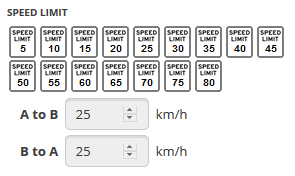
Thks, ready to install
Enviado desde mi iPhone utilizando Tapatalk
Nice speedup helper
I’ve noticed that the list of road signs does not appear, if WME gets started with (a list of) segments in URL. De/Re-selecting any segment lets the signs appear. Intentionally, or an oversight?
Nice script! Thanks a lot!
But… Could you add some missing speed limits for Russia?
30-40-50, 70-80, 100, and 120
A couple of posts ago, someone asked to remove some of the speedsigns https://www.waze.com/forum/viewtopic.php?f=819&t=166746&start=40#p1259998
I’m currently trying to implement a settings panel, where you can disable speeds you don’t need on screen. I will add the missing speeds again in the following update…
oh… different people - different views )))) I think setting panel is great idea!
hi gertbroos
greetings wazers!
please include my country in this script
thank you much and best regards!