Not sure if it is by design or bug. The “Toolbox - properties editor” do not change city name field when it is a new city name. It does nothing when you click the Apply button… The workaround is easy, just create the city, then select all segments in an area place and finally set the city name field. But, if this is by design, would be nice if there is some error message, something like “The city name does not exists” or something like that.
I’m also facing the same thing here on beta editor. No problems on public editor.
Sent from my GT-I9300 using Tapatalk
Yes, we have found the fix, but you will have to wait for the next release. 
Here’s an example. And a screenshot of error. The inserted pictures is the initial fix, the big picture the error upon save.
https://www.waze.com/editor/?env=row&lon=55.12662&lat=25.03517&layers=1349&zoom=7&segments=246217058
And i’ve created one in Germany, here, if editing rights might be an issue
Not real easy to make one, wondering how people keep ending up creating these… :?
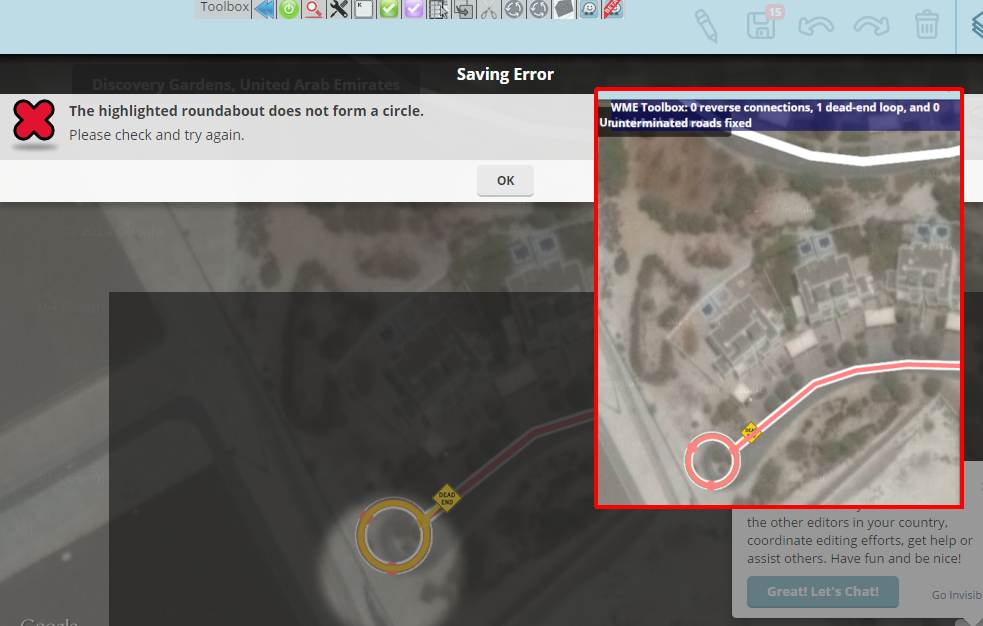
OK, thanks for the example (which I deleted before a tile update brands my name into that forest ;)). I didn’t grasp you were talking about “real” roundabouts (although you said so). I can confirm the problem.
Firstly, I think 99.9% of cul-de-sacs are no roundabouts, but simply circular roads. But that is a common misunderstanding among new editors. So your example in Dubai should be converted into a circular road, I guess, or even made a regular dead-end.
But of course Tb should nevertheless not attempt to do anything which is not saveable. The check for dead-end loops will in future skip roundabout segments. Issue logged in:
Good, Thanks ! And deleting by you was the intention.
I put your name in it so someone would hesitate to delete it before you saw it
And luckily Tiles aren’t updating that frequently nowadays 
I’m aware how to handle them; Usually delete the roundabout and keep a dead end segment. But Dubai editors can be harsh…
Look forward to see the fix leave them alone but please keep the yellow flag on them!
send from my SGS4, using Tapatalk
Yup, there will additionally be a warning message when the “auto-fix other function” diagnoses one of those (but it does not touch it).
Request: Allow map update request for junction node.
Why: Request “allow all turns” or “fix revcon/SEDS/U-turn” at junction – this makes it quicker and easier on whoever is responding.
Thanks for considering this request.
I don’t understand what you’re asking for.
“allow map update request” – update requests (URs) don’t provide enough concrete data to automatically apply a fix, in my experience.
I think he was talking about FP links
Sound like a request for ‘Unlock Request’ or ‘Update Request’ to forum link from FP at the bottom of the screen to be available and use a PL to a node when only a junction node is selected.
Sent using Tapatalk for Android 4.4.2
That’s it exactly. Sorry I was unclear.
There has been a change in the message from the waze team on U-turn arrows – no longer necessary to eliminate them. Toolbox has been a valuable tool to editors seeking to follow the directions on the wiki page, but they can stop that now.
https://www.waze.com/forum/viewtopic.php?f=276&t=98334&p=957720#p957676
“Notice: this segment has 1 U-Turns and THAT’s OK”
As with any of the TB highlights, there is value in seeing where a u-turn is enabled versus disabled, and seeing an indicator for an enabled U does not force editors to change them. As enabled u-turns become more prevalent though, we may need to consider changing the indicator to show where they are actually disabled and not enabled. In any case, it would be good to discuss in light of the recent change of focus from Waze.
With that said, there is an “auto fix u-turns” functionality available at the CM/L5 level that disables all u-turns, and in this case, we should determine how best to adjust this functionality. Most people at that rank should have the discretion not to auto fix everything on screen just because they have the capability, but we may want to adjust the behavior or availability of the u-turn auto “fix”.
The idea behind the “auto ‘fix’ U turns” function was to disable them all in countries or cities where they’re across-the-board illegal, iirc. I do agree that it could use some thought.
A framework to allow country-specific features is already on the backlog, so in this case, I suppose including or excluding the u-turn auto fix would just fall under that realm–with the understanding, of course, that local editors know when and how to employ the u-turn fix (and any auto fix really) appropriately.
I would suggest we even create a function to enable all u-turns on a selected node.
1.5.4 Released
New: Option to display actual elevation values with the "Elevation < or > ground" highlight (#157)
Fix: "Auto Add Nodes to Loops" now skips dead-end loops (#152)
Fix: Tb now launches again on WME beta (#154)
Fix: "Auto-fix others" function now skips dead-end roundabouts (this provoked a save error), but issues a warning message when finding one (#156)
Update: Changed the toolbar icon of "auto-fix u-turns" to the u-turn highlight icon, to avoid confusion with "auto-fix others" icon (#153)
Update: Updated internal JNF to version 0.0.9.5 (#158)
Thank you very much for the actual elevations, it’s a lifesaver trying to correct complex interchanges.
Sent using Tapatalk for Android 4.4.2
On the U-Turns topic, when you are in a country or state that generally accepts U-Turns, the message “Auto Fix U-Turns” is ambiguous. I propose that with the current functionality the text should say “Auto Disable U-turns”.
I would then propose that you are likely to be editing an area that either generally allows or does not allow U-Turns, so maybe the settings can swap between “Auto disable U-turns” with a red u-turn triangle and “Auto enable U-turns” with a green u-turn triangle.