When pressing Q, please be careful to review the existing turn restrictions before doing so.
“Q-W” will disable any u-turns on the junction but you can not see that when only the junction is selected.
Now that u-turns are instructed in the app, this is important to remember.
I looked in the change thread and haven’t seen a discussion of this functionality. Toolbox is actually quite “close” to solving it, but …
When needing to add one or more junctions on a segment, using Cut Segment works fast for very short/not too curvy segments. However, the normal method of adding a junction is slow. Especially when the SAVE locks up or runs slow. (add a segment, save, delete the segment, save … hope it didn’t freeze).
The ability to “choose” the point that “Cut Segment” places the junction (say with a mouse-click), could be a real time-saver. Or it could be added to WME (i.e., in the Road/Roundabout drop-down menu). Either way, I think it could serve a real purpose.
Your process contains an unnecessary step. There is no need to save in middle of the process. To speed it up you can try: (add a segment, delete the segment, save … hope it didn’t freeze).
Choosing a location for the cut would be great too.
But even if it does freeze, I have not encountered a truly failed save in over a month.
Worst case, reload the screen using just the /editor/ url, and if it doesn’t then display the cut, tap the map reload button a couple of times on the WME pulldown.
I’ve had more cases of a change saving while I thought there was an error and then getting the
“segments have changed” error on the next save than I have honest failed saves.
And yes, operations that add a new junction node, or that attach a junction node to another segment are the most likely to cause “freeze” problems.
This was possible some years ago in the old cartouche. You select from the menu to create a node, then click on the place you need it and finally you got a junction on that place. That was the old way to create junctions until the WME release.
Enhancement request: could the “layers=nnnn” clause be omitted when creating a permalink for posting into a forum topic? This would avoid my preferred settings getting altered every time I select the link someone else has posted.
That works for when we create a PL for someone else… the complaint is when we open a PL from someone else, it changes our preferred layers.
Defaulting the layers to not change would be quite welcome. There have been many times that I’ve opened a PL and the aerial and even road layers have been shut off!
I doubt that it is possible to ‘catch and modify’ a URL entered into the browser, as this would be a severe security issue (not for our purpose, but generally).
The request is not to catch URLs. The bulk of the issue is unlock requests. If the FP links in TB (and standalone) can be modified so they default to “no layers” for the unlock and the update buttons, most of this issue would dissolve.
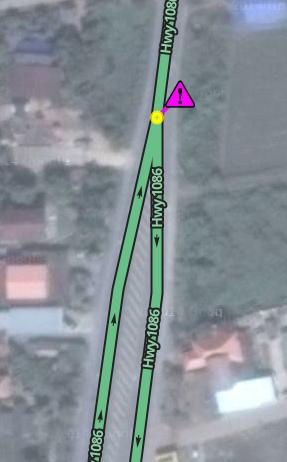
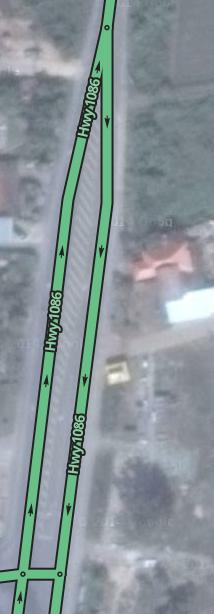
Today TB don’t like highway become a double carriageway.
It warns about a “reverse connection” and when I press Q on the node to solve the issue, TB transform the double oneway carriageway onto double doubleway carriageway.
Before:
After Q:
Can you please add settings to set Default Ruler Measurment tool option? For example I want mine to always show places area… But I have to set it each time and popup window stays there too.