yes:
- in the select segment table, expand “columns”
- check only city (and maybe country and state)
you’ll be able to select all segments of a city in one click.
yes:
So simple. Many thanks!
I have used the Download Chrome Extension with mixed results:
https://addons.opera.com/en/extensions/details/download-chrome-extension-9/?display=en
Uh, thanks for the heads up, I’ve started using Opera again for one week (after leaving it because I couldn’t install WME extensions 4 years ago). It is great again. 
I’ve installed it and so far I didn’t notice any problem. Any particular issue I should be aware of?
Has anyone else been having PL issues? In particular, here’s an example PL
https://www.waze.com/editor/?env=usa&lon=-118.36216&lat=34.02643&zoom=5&venues=158335316.1583615307.3120390&lo%20...%20ueFilter=0Note the section at the end “3120390&lo%20…%20ueFilter=0”
This is in FF 46.0 and TB 1.6.15.
What is happening to the place List function that is experiencing places everywhere where the editor has an editing area and not only in the environment where you are editing ?
Complicates the display of Places of Interest.
Thanks for pointing that out. That must be caused by some change in WME. Logged in as issue #320.
This is a known WME bug, which is not related to Toolbox. Can’t find the link to more information on that now, can someone help out?
Excellent!!! tested and approved 
TheLastTaterTot addresses this problem in two scripts
Keep my layers and simplified Permalink from keep my layers
https://www.waze.com/forum/viewtopic.php?f=819&t=172335
https://greasyfork.org/en/users/11629-thelasttatertot
Request feature:
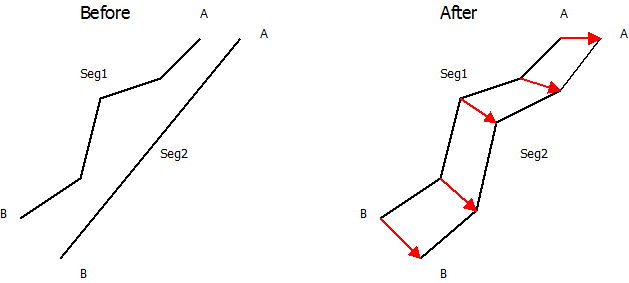
If you want to draw parallel roads (road A and road B), u need something to guide during making them. Is it possible to have this features in the future toolbox?
a. Copy segment geometry so that they will perfectly parallel to each other?
b. Can toolbox also have highlight layer for geometry point? Currently now lock highlight layers already mark the mid portion between geometry nodes. I use it a lot during creating parallel roads. It help me to make the roads neatly arrange. A position where the geometry nodes are will be fantastic.
Do you think adding a checkbox in the “Copy Segment Attributes” feature to copy geonodes is a good idea? We can copy geonodes positions without moving nodes A and B and interpolate the shift between both vectors: (seg1_A -> seg2_A) and (seg1_B -> seg2_B).
I hope I am understandable
Image is better:
Toolbox 1.6.16 has been released for Chrome and Firefox:
1.6.16 (20160514)
Fix: Segment and place lists occasionally crashed on improper database entries (#321)
Fix: Function "Enter address (prefill city, state, country)" sometimes did not fill the state field correctly (#323)
Update: Updated country rights settings for Belarus, India and Turkey
allow all connections is broken. I’ve been having issues with this for a while, It might be another script interacting but this is the error I’m getting.
Uncaught TypeError: this.setAllConnections is not a functionWMETB_JNF_hookShortcuts.Waze.accelerators.events.listeners.allowAllConnections.(anonymous function).func @ toolbox_jnf2_include.min.js:146OpenLayers.Events.OpenLayers.Class.triggerEvent @ OL-4d377501.js:91OpenLayers.Class.onKeyDown @ WME-9d09e89d.js:9(anonymous function) @ OL-4d377501.js:9Q.event.dispatch @ libs-7c522cf3.js:25m.handle @ libs-7c522cf3.js:24does anyone encounter this today?
after server error
toolbox doesn’t work till now i post this message to the forum… the error seems like, toolbox doesn’t recognize that segment already selected

all operations failed.
That was a problem with WME, even without toolbox installed.
Fortunately, it got better soon.

6 u-turns on a single segment? LOL.
Yeah, I noticed that U-turn indication often shows strange numbers… even if segment has none… seems it shows all nearby segments u-turns too.
That message isn’t generated by Toolbox, so I’m afraid you need to blame someone else. :mrgreen:
Hmm… by whom? :shock: