Also, when processing through UR’s, is there any chance that this script (or possibly URC-e) could possibly move on to the next UR when the current UR window you’re working is closed? At the moment, when I finish working a UR and close the UR window, UR-MP opens back up and the highlighted line remains the current line. I then click on the next to open the next line. I think it’d be useful if there was a way to automatically navigate to the next line and have that UR open, if at all possible.
That would explain why this polygon does not work (ignore only São Paulo State’s capital)

I will try another approach then…
(edit: this worked well enough :D)

Hello,
the polygon file of Spain has a bug. Cadiz is out of this area so URs located at Cádiz are not listed. Can you correct? Thanks
Anyone has problem with WME UR-MP Tracking after recent WME updates?
No, just update it to 3.8.6
yep - new version works great - looks like new version was posted after my question in the forum 

I’m not sure if this is a problem with UR-MP, but that is where I see it. If I jump to a map location from a UR in UR-MP, then try to scroll the map, it jumps sometimes hundreds of miles away. Also, if I have the Satellite layer enabled when jumping to a UR from UR-MP, the satellite image starts to load correctly, then jumps to a distant place. Turning the Satellite layer off and back on will load the correct image.
Is there any interest in adding an option in the settings tab to default sort by column of user’s choice?
That would be an awesome addition. Not that the one click on the column is that challenging, but would be nice if it remembered my sort preference.
A very good point. I enjoy the challenge of seeing what the next step can bring.
Is it possible to implement the following in next release?
Couple of suggestions for you to consider…
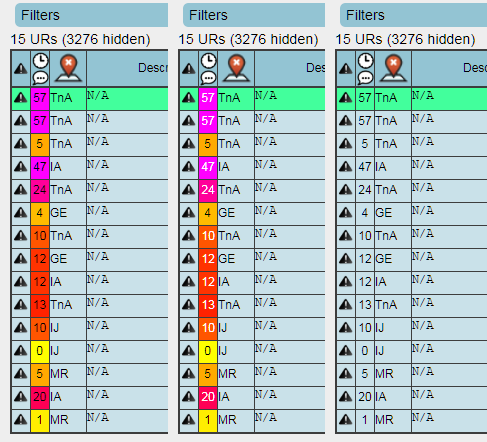
- Improved contrast on the UR age column. At present the consistent use of black text regardless of the background colour in the table cell makes it increasingly difficult to make out what the text is saying as the URs get older (and the background gets correspondingly darker).
One option would be to switch from black to white text once the background reaches a sufficiently dark tone, the other option would be to simply not colour in the background at all and rely on the number itself to give the visual indication of age:
- Add an option to disable the scrolling of UR description text if it’s too long to display in full - sometimes having a load of constantly moving text in the sidebar can be a bit distracting/irritating, and at times it also seems to contribute to WME getting bogged down.
Thanks,
Chris
The export mostly does not seem to always work as expected…
Export of following (2) worked:
[url=https://www.waze.com/editor?lon=15.148607&lat=50.688513&zoom=5&mapUpdateRequest=14067331]7 days  | General error | H911 inteva[/url]
[url=https://www.waze.com/editor?lon=13.799511&lat=50.555686&zoom=5&mapUpdateRequest=14083084]2 days  | General error | H911[/url]
Otherwise I am getting a HTML code, instead of UR list…
<!DOCTYPE html><html lang="en"><head><meta charset="utf-8"><meta name="description" content="Join the community of map editors to update Waze’s live map around your home, work and anywhere you drive."><title>Waze Map Editor</title><script type="text/json" id="localeStrings">{"language_name":"English","title":"Waze Map Editor","title_short":"Map Editor","meta_description":"Join the community of map editors to update Waze’s live map around your home, work and anywhere you drive.","time":{"formats":{"default":"%a, %d %b %Y %H:%M:%S %z","short":"%d %b %H:%M","long":"%a %b %d %Y, %H:%M"},"am":"am","pm":"pm"},"datetime":{"distance_in_words":{"half_a_minute":"half a minute","less_than_x_seconds":{"one":"1 second","other":"%{count} seconds"},"x_seconds":{"one":"1 second","other":"%{count} seconds"},"less_than_x_minutes":{"one":"a minute","other":"%{count} minutes"},"x_minutes":{"one":"1 minute","other":"%{count} minutes"},"about_x_hours":{"one":"1 hour","other":"%{count} hours"},"x_days":{"one":"1 day","other":"%{count} days"},"about_x_months":{"one":"1 month","other":"%{count} months"},"x_months":{"one":"1 month","other":"%{count} months"},"about_x_years":{"one":"1 year","other":"%{count} years"},"over_x_years":{"one":"1 year","other":"%{count} years"},"almost_x_years":{"one":"1 year","other":"%{count} years"}}},"formats":{"boolean":{"is_true":"Yes","is_false":"No"},"date":{"month_range":{"start_missing":"? - %b, %Y","end_missing":"%b, %Y - ?","single_year_single_month":"%{startMonth}, %{startYear}","single_year_multi_month":"%{startMonth}-%{endMonth}, %{startYear}","multi_year":"%{startMonth}, %{startYear} - %{endMonth}, %{endYear}"}}},"envs":{"title":"Environments","row":"World","usa":"US & Canada only","il":"Israel only"},"modes":{"title":"Mode","name":{"default":"Default Mode","mte":"Event Mode"},"exit":{"save_changes":"Save your changes before switching mode"}},"footer":{"wiki":"Wiki","forum":"Editing Forum","status":"Status","keyboard_shortcuts":"Keyboard shortcuts","copy_to_clipboard":"Press %{button} to copy","link_copied":"Link copied","coords_copied":"Coordinates
Any ideas?
Why does UR-MP Tracking keep deleting my custom area? I keep adding the custom area and, within a few days, it’s deleted.
Thanks for any help,
westfordjoe
I keep losing my custom area in UR-MP Tracking. I’ve tried creating the custom area by lon/lat coordinates and using an unsaved POI area. The custom area works fine until I reload the WME page, then the custom area disappears. It happens every time. I’m running Chrome on MacOS. Cookies are enabled. I’ve been deleting some other scripts and haven’t yet found a conflict. I’d really appreciate some help with this issue. Thanks!
Update: I’ve now reloaded UR-MP Tracking and turned off all other scripts but WME UR-MP Tracking. The problem continues.
Is this forum being monitored by the developer of UR-MP Tracking or anyone else?
Lots of people read this topic/forum. I don’t think the original developer of this script is particularly active nowadays, but I suspect that it’s been taken over by another person: the download link on GreasyFork indicates a different user name.
However, it’s important that you bear in mind who develops Waze scripts: they are Waze community members like yourself or me. We mostly have full-time jobs. The script development we do for Waze is entirely done in our spare time and brings us no rewards other than the click of a “thanks” button and encouragement from the community.
Sometimes people get tired of Waze and take a break. Sometime Real Life (they tell me there is such a thing :lol: ) gets in the way. Sometimes script developers get fed up with the never-ending cycle of adapting to changes in WME and give up. Sometimes they’re just on vacation for a few weeks!
So you need to try and be patient with the script developers. If you haven’t had an answer that doesn’t mean you won’t get one. Just that the developer has other things on at the moment.
Since you’ve asked, and caught me in a good mood, I will have a look at the script myself - see if I can work out how/where a custom area is stored and how it might get lost. But I don’t make any promises - my scripting talents are basic compared to some of the geniuses we have providing scripts. :mrgreen:
Sorry - I did my best but, after an hour, I still can’t even work out where the script is storing the data! I did say I wasn’t one of the geniuses. 
Joe, not sure if this will work as you want, but it may suffice till your issue is resolved with custom areas.
In the TAB for selecting areas and adding custom areas, use the dropdown menu and go to United States - Texas. Add that as a new scan choice. Those work correctly. (ie., I have added all separate states within SCR here. So I can clear and scan any state individually.)
Then go in and using “Filters”, select “Hide out of my managed area”. See if that does what you need, for the time being. Not sure of the results, but worth a try.
I am not sure since it has been a while since I have used UR-MP, but I think the setting for individual states is locked to SM+