This is my most used script. Without it I will not be working any UR or PUR 
@n4dog Is the “temp fix” provided by jushag not working for you?
The temp fix is not working for me. UR-MP doesnt even show up
Edited - fix provided below… 
In WME v.2.323 an optimization was made that seems to not load all sidebar tabs at startup, “Settings” being one of them. The script tries to get this sidebar via “sidebar-prefs” but unless that “Settings” sidebar is open when UR-MP initializes, it will fail.
Dumping all of the elements at UR-MP init time shows that sidepanel-issue-tracker is always present, so this can be used in place of sidebar-prefs and should never be null. This means changing the line
const sidePanelPrefs = WMEURMPT.getId('sidepanel-prefs')
to
const sidePanelPrefs = WMEURMPT.getId('sidepanel-issue-tracker')
around line 3385.
3 Likes
Work like a charm! 
Is this the only change to get basic functionality working again? I’ve been so deep in SDK work my instance has so many changes (not ready for release) that I’ve got concerns about tweaking versions and conflicting with my test versions. I saw your pull request, thanks!
As a side note, this whole block of code will also likely be killed as part of the SDK requirements for adding side bars.
3 Likes
Yes, this seems to be the only change necessary to get full functionality back in the testing I’ve done.
1 Like
Cheers, accepted PR, and released 3.9.24.
4 Likes
Yall are awesome! Thanks for the quick work.
Thanks that worked WOOOHOOOOO
Thanks for fixing. Guess the prevent breaking bugs is still work in progress although staff seems to be getting better
Thanks very much for the quick reaction.
2 Likes
Hello,
I edited your script so that it sorts the map notes based on the most recent comment on them. Below is the code, which you can adapt if you want to include the changes in a future update of your script.
4 Likes
Thanks for the work, I’d actually started adding this already as part of the work for the new SDK stuffs. I hope to have it out soon.
5 Likes
Great script and I still prefer it to the Issue Tracker. One thing I’ve noticed though since I changed my area(s) is that it’s listing URs that are a little outside my area. Almost like it has squared off the polygon defining my area? The extra URs are in the other side of an estuary that I thought I’d excluded!
2 Likes
When it scans it does use a bounding box, meaning if your shape is not a nice neat rectangle, it will find the edges to make a box for it. It should trim them out when it adds them to the list, but it may be that there is an issue there. What happens if you check the filter option “hide all but area”? Do they disappear then?
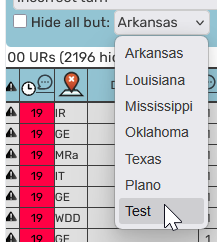
I’ll double check, but as I said, it should be filtering them out before it even adds to the list if you select to scan specific areas.
1 Like
Hi Jon,
My area isn’t a nice neat rectangle. The only “Hide all but:” menu I have lists UR types (I only have 1 area). I have

ticked but that doesn’t help.
Thanks
1 Like
@jangliss It was nice to chat with you this morning at breakfast!
2 Likes
I’ll take another look. It’s possible that the current released code is pulling the rectangle and displaying the results for that, vs the pre-filtered list, though the check box should filter out the results anyway. I know I’ve made a number of changes in the code while I’m working on SDK migration, so I might have already fixed any issues around that - possibly.
1 Like