Thanks… I found something that looks normal.

But if look closer the North/South segments connect but not to the East/West segments.

So I want to say thanks for the tool!!! The Blue highlight is what caught my eye for the three segments…
Thanks… I found something that looks normal.
But if look closer the North/South segments connect but not to the East/West segments.
So I want to say thanks for the tool!!! The Blue highlight is what caught my eye for the three segments…
29.01.2014 v0.5.7:
Sounds good. In the mean time I still think the stacked segments issue is a good one to solve mainly for properly setting restrictions. When I first started in Waze I did not read the instructions :oops: and created a bunch of stacked segments by mistake. Then I didn’t realize I had turn restrictions on both segments that were conflicting and causing problems, but I did not know the roads had been stacked on top of each other.
Is there a way to detect the geometry for two parallel segments are essentially the same shape? Maybe we only need to find those with no geometry nodes because they are easy to create by accident and easy to be hidden. Segments with many geo nodes would unlikely be matched perfectly with another road.
There are definitely threads about issues with routing related to segments which shared the same endpoints. And this has nothing to do with Cartouche, as it doesn’t do routing, so why is that even relevant to the discussion? The issue with the routing server has existed since the days of Cartouche. I doubt Waze will officially have much to say about it because they’ve never properly responded to the threads displaying the issue.
Don’t forget this is also the reason why WME does not allow the starting junction to split a segment if the end junction is on the same segment. It’s been built into WME since the very beginning to dissuade this type of loop from being created.
Related threads:
https://www.waze.com/forum/viewtopic.php?f=8&t=70559
https://www.waze.com/forum/viewtopic.php?f=8&t=69415
Message #44 is for a segment that doesn’t have any output to a drivable road, but the summary says “No connectivity from drivable road”. It should say “No connectivity to a drivable road”
Description:
#44 The drivable segment has no single outward turn enabled. Enable at least one outward turn from the segment
Thanks for the thread links Alan. I see there are circumstances where it looks like it could be contributing to the problems shown. So far all the examples point to the possibility this is the cause of the problems and I see where it could be, but have we seen any actual situations where a route is sometimes good and sometimes bad and then after inserting the junction it never fails again?
I am not trying to be argumentative, just fully understanding the facts.
I agree the Cartouche example made previously likely does not make sense for routing, but it was not my comment. I came into Waze after WME started, and I am not familiar with all the underlying code elements on segments that might have been set wrong with Cartouche that don’t happen any more. If you say it could not affect it, I will not argue that. 
As for WME preventing parallel roads, I just created two segments that connect in parallel (Test A and Test B) drawing from the endpoints of Test A with no problem. I then created another segment and then split it with a parallel segment (Test C and Test D) drawing from an endpoint of Test C and then into the middle of Test C with no problem. The only thing WME stops me from doing is creating a parallel road into the middle of a current segment requiring it to create two new junctions, not just one or none (Test E and Test F). https://www.waze.com/editor/?lon=-122.26388&lat=37.66844&zoom=9&layers=TBFTFFTTTTFTTFTTTTTFTTTTT&env=usa Personally it feels like the prevention of the 3rd example is more of a side effect of a problem with their interface, than being intentional if they allow the first and second example. :lol:
I saw your comment from the Waze Mapping Support Twitter Feed about loops now needing 3 segments. https://twitter.com/WazeMapping/status/422035262890188801 It appears Waze does indeed believe this is a problem. What I hate is that is seems solvable on their side, but they are pushing this one back to the free workers in the community to fix the problem. 
I will definitely keep looking at this one and report back if I find any other new information. In the mean time maybe it is better to have everyone split the parallel road as there is minimal down side even if that is actually not making any difference to routing. :mrgreen:
I request additional options:
BUG After solving No inward connectivity (RED) problem, segment still remains highlighted in red until I select it again or refresh map.
REQUEST And can segments located one over another or REALLY near be alerted as not connected?
I meant no connectivity from this drivable road. I’m not a native speaker, so if you have a spare time I would appreciate if you looked through the Settings->About->Available checks for any other mistakes.
So I’m switching it back, right?
I like the idea. At the moment Validator reports a bunch of errors at the disconnected segments or disabled turns due to a construction. This “CONST ZN” tag could be localizable so every country can have their own.
But I don’t like the options. Let’s just do not highlight/report segments with “CONST ZN” in the name (whatever issues it has) AND to implement a special report for such segments, so you could just scan a city and look through the list of the construction zones.
It’s due to a cache. You can also use clear report button and all of the segments will be re-validated on your next move. I’ll try to address the issue.
I have a similar idea in my todo, but with a dead-end node located very close to another segment. Will be implemented, but no promises at the moment.
Absolutely, glad to help! I have downloaded the list and will go through it tomorrow.
I agree this feels a bit annoying if it could be eliminated. I keep thinking there is something else wrong or my fix did not work.
Seems good if it can be done. Freeways and other roadways cross over each other without actually having an ability to allow traffic to connect between them. It should ignore crossing segments that are on different elevations. It could recommend the elevation be changed if they are not supposed to meet. I guess we could do that for roads that pass through each other on the same plane, but do not have routing between them (like we do with ramps and freeways).
Sure it can be done. And I have a very similar check in my todo, but it was postponed due to its potential slowness. We have to compare each segment with another, and some comparisons are not trivial due to a (sometimes) complicated segment geometry and intersecting bounds.
Say if we have 500 segments at zoom 4, we have to make ~500x500/2 = 125000 comparisons (sometimes non-trivial). I’m not sure if we can optimize something here…
Wow. Maybe add it to your list of optional checks?
Optimisation: you do not have to check the geometry if the boundingrectangles of segments do not overlap. But I guess you realized that one yourself. 
Parabéns pelo excelente script. Estou fazendo diversas melhorias aqui na minha região, Porto Alegre, Rio Grande do Sul, Brasil.
Great script
Thanks berestovskyy
31.01.2014 v0.5.8:
NEW ‘Construction zone (only available in the report)’
Default marker: ‘CONST ZN’
Marker for Poland: ‘REMONT’
No issues will be highlighted on the segments marked as a construction zone, i.e. they may have no connectivity etc. Instead those segments will be listed in the ‘Construction zone’ part of the report.
US Wiki reference
Please let me know which word(s) you use in your country to mark construction zones.
ENABLED for ALL: ‘Same endpoints drivable segments’
The explanation link is pointing now to Alan’s post in this thread.
fixed: after solving ‘No inward connectivity’, segment still remains highlighted
Validator is back in Layer Switcher
Note: you still might experience issues using old permalinks
other minor changes/fixes
Hi
Maybe a minor enhancement could be done.
When you select multiple segments, you got something like that.
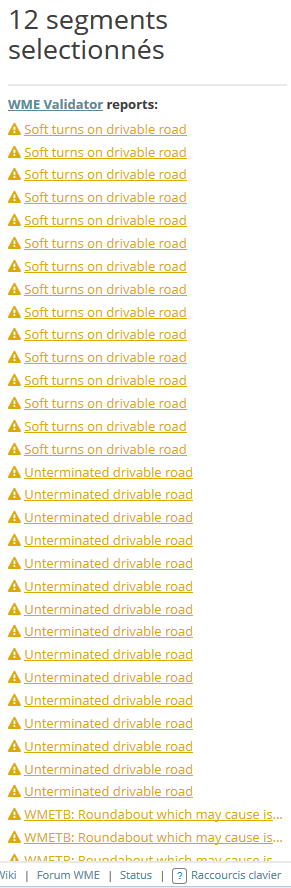
Maybe you can disable the report when multiple select is performed or at least grouping errors by #type?
That’s what I’d like to see: something like “Soft turns on drivable road (12) // Unterminated drivable road (5)” etc.
I didn’t see anything specific in the road naming guide for the US, but the following are being highlighted by #94 “lowercase street name (except country-specific words)”:
el
la
de
These show up in some states (CA/AZ/NM) and elsewhere as lowercase on street signs. Should they remain lowercase in WME?
if not, let’s add them to the exception list for US
if so, I will correct these in WME to be UPPER whenever I find them
ATM the exceptions for the US are da, de, to. I will add el and la in the next version.