Fixed in my localizaton 
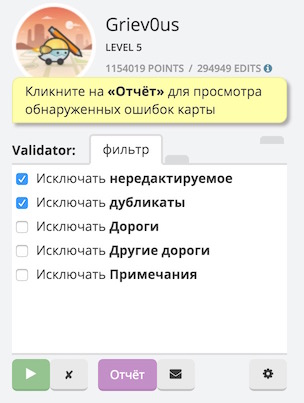
Fixed in my localizaton
I don’t know … It’s all Greek to me…
Sent from my XT1080 using Tapatalk
Don’t know if this has been addressed, but Validator is flagging roads as a bad name with the Expressway abbreviation Expy.
That’s because you should be using Expwy in the USA. Does the sign actual use Expy? If so please send a link
Sent from Android using Tapatalk
I’ll go find it again and check. Strange, the text to speech was able to read Expy as Expressway.
Expy is how they use it in ND.
That is against the national MUTCD. This needs to be discussed with the regional coordinator to determine a guidance. Match the sign vs deviate by one letter to create a uniform app experience and follow the MUTCD recommendation.
Sent from Android using Tapatalk
Hello, good morning !, I need your help downloading the file to install offline, I’m having trouble installing from the webstore. thanks
If you first install Tampermonkey on Chrome an then follow the link for Firefox in the first post, you should be set up.
Anyway possible to get validator to stop saying roads that have a period are invalid. Example G.5 Rd NE, Q.1 Rd NE, T.7 Rd NE etc…
Thanks!
Sent from my Nexus 6P using Tapatalk
Hmm, I’ve recently started having problems having WME Validator to load in Firefox 45.0 when I’m already logged in. This happens on two different computers.
The only message WME Validator gives in the browser console is “WME Validator v1.1.16: waiting for login…”.
Only when I log out and log in, WME Validator loads fine for that session as the login gets triggered. So at least we know it isn’t related to that. As this looks like a racing condition somewhere, I tried fixing it by putting the script to run before or after all other scripts, but neither action changed anything.
I personally use the following bit of code to check whether I still need to wait on a user login and that seems to work fine:
// preceded by a check on whether the element with id user-info exists
if (!Waze.loginManager.hasUser()) {
  Waze.loginManager.events.register("login", null, exportFunction(init, unsafeWindow));
  Waze.loginManager.events.register("loginStatus", null, exportFunction(init, unsafeWindow));
  return;
}
To be absolutely safe that the event doesn’t happen to be triggered between the check and registering the listener, you could also check hasUser again before actually returning, but in the time I’ve been using this bit of code I haven’t had any issues yet.
EDIT: I’ve noticed that enabling the WME Toolbox makes Validator work again. Toolbox probably slows down Firefox enough for Validator to pick up that someone is already logged in. That’s not really a solution though.
Do you have any permalinks for these roads, should they really have a period in the name? This is a check which is specific to USA and checks that names are in accordance with our recommended abbreviations.
Yes in Douglas and Grant County in WA have periods in the street name. When its a parralel road from the main one. Example G Rd NW, streets between that and F Rd NW would be something like G.7 Rd NW or G.3 Rd NW. I have confirmed from County GiS and one person who lives in the area thats how the streets are named. These are the same streets where i have the issue with TTS. Here is a PL of one of the road signs in that area. https://www.waze.com/editor/?env=usa&lon=-119.42813&lat=47.23699&layers=4005&zoom=8&segments=501783395&mapProblemFilter=1&mapUpdateRequestFilter=1&venueFilter=0&update_requestsFilter=false&problemsFilter=false
Here is another PL of a road example at intersection. https://www.waze.com/editor/?env=usa&lon=-119.23442&lat=47.14147&layers=4005&zoom=7&nodes=44628169&mapProblemFilter=1&mapUpdateRequestFilter=1&venueFilter=0&update_requestsFilter=false&problemsFilter=false
If you need any other info let me know.
Part of the reason for the check is to avoid TTS issues. We may have to do something to accomodate here, or work around.
Well it does look like you got the TTS fixed. now the roads say the right name. Before they said ten zero 2 road north east. Now it says ten point 2 road north east. So hopefully you guys can get validator to work around this. Thanks again!
Guys, isn’t there some USA-specific thread about Validator in which such discussions can take place? Right now it’s just cluttering this topic.
Another (easier) issue: would it be possible to fix the FontAwesome icons? This is what WME Validator looks like at the moment:
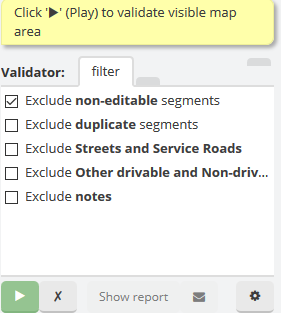
The problem is that the classes used to get FontAwesome icons were changed a month or two ago. You now need to apply the “fa” class and the icon-specific class. I’ve gone over the classes in Validator for you to make it easier:
icon-check -> fa fa-check-square-o (empty: fa fa-square-o)
icon-filter -> fa fa-filter
icon-search -> fa fa-search
icon-user -> fa fa-user
icon-wrench -> fa fa-wrench
icon-question-sign -> fa fa-question-circle
icon-list -> fa fa-list
icon-magic -> fa fa-magic
After these changes (I couldn’t find any other occurrences of “icon-”), Validator looks like this again:

is anyone having trouble with the WME Validator? sometimes it doesnt appear in chrom? After i log out - and back in it appears, and when i create a permalink for example, it disappears from the tools sidebar on the left?
I lose the Validator rather often, but I haven’t notice a pattern so far. Usually it’s enough to reload the Chrome page to get the Validator back.
I can confirm there is a bug I think with WME Validator when taking/creating a permalink.
I had to log out and then in in order for the Validator to appear. (Reloading chrome didn’t fix the problem).
