A place (river) is overlapping an junction/interchange and magic displays:
Magic TODO:
☞ Interchange over each other
6160871.61870854.22171629
You should review this kind of venues that are over each other
But there were not 2 Junctions/interchanges, only one and one “normal” place.
Very often it is still impossible to avoid this situation. For example a cityhighway on a bidge, under the bride is a parking lot or something similar were I have to draw “over” another place.
I just noticed that Magic is flagging unnamed parking lot areas as “You should always give a name to a place. How wazers can find a place without a name?” - even though according to the Wiki entry for them, it says “[…]If the lot does not have an official and/or signed name, then leave the name blank[…]”; I.E., it’s valid for a parking lot area to not have a name (and in fact shouldn’t have one).
Can Magic please be adjusted to exempt PLAs from this particular alert?
OT note to anyone using the State Manager forum signature icons that I created a few years back: I noticed a bunch of broken image icons in people’s signatures, and looked into it. Apparently, the actual storage location of the image files themselves has moved. Yay.
to author: is there any plan to indicate which junction that has problem for magic indication geometry node too close and no connection in the coming future?
The “geometry node too close” message does not have to be on a junction node. I have seen that message and found the geometry node in the middle of a segment.
Ok, got a question: Magic has an option at the bottom of its list called “Fix UI Glitches.” What exactly does that fix? I’ve tried selecting it, but I don’t know what I’m looking for, so…
I have a question as well. I noticed that there is an option in one of the sections that references an L4+ beta project. Should that be available for all to see?
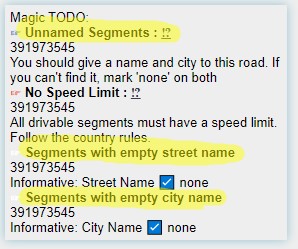
Was there a change to highlight only empty street/city names? (white seciton)
Wasn’t it segments without…name before? It was quite usefull to see faulty areas.
White section segments with empty…name is now the same as the blue one unnamed segments.
In WME it is impossible to safe a segment with only one name missing.
(Text says “fill in this form”)
Either the city is named and the street needs the checkbox or the other way around.
If even one is missing when saving, the error message above appears.
In my opinion highlight segments without name is doubble. I would recomment a change back to highlight empty streets or cities even if the checkbox is marked.