# UK Speed Limits - Editing Guidelines and Tips
**URL:** https://www.waze.com/discuss/t/uk-speed-limits-editing-guidelines-and-tips/201730
**Category:** United Kingdom
**Created:** [February 1, 2016, 11:53pm UTC](https://www.waze.com/discuss/t/uk-speed-limits-editing-guidelines-and-tips/201730 "2016-02-01T23:53:13Z")
**Posts on this page:** 20
**Page:** 5
### Author:  [@Timbones](https://www.waze.com/discuss/u/Timbones)
#### Post date: [May 12, 2016, 10:30pm UTC](https://www.waze.com/discuss/t/uk-speed-limits-editing-guidelines-and-tips/201730/81 "2016-05-12T22:30:12Z")
Memo to all editors: please do be careful when setting speed limits
- I’m seeing quite a few incorrect speeds being set around the country, such as:
- speeds obviously input in kph, e.g. 12, 19, 25, 31, 37, 43
- different directions with different speeds, e.g. 30/40
- other speeds that are just plain wrong, e.g. 3, 41, 39
- short sections left unverified between other segments
The WME Speedhelper script mentioned in the first post does help with precision of entry.
(but not accuracy - that’s on you)
---
### Author:  [@TheMKLightning](https://www.waze.com/discuss/u/TheMKLightning)
#### Post date: [May 13, 2016, 7:48am UTC](https://www.waze.com/discuss/t/uk-speed-limits-editing-guidelines-and-tips/201730/82 "2016-05-13T07:48:25Z")
> [@Timbones](#):
>
> Memo to all editors: please do be careful when setting speed limits
>
> - I’m seeing quite a few incorrect speeds being set around the country, such as:
>
> - short sections left unverified between other segments
I’ve found three problems that cause this:
1. Small sections can be locked at level 5, and when you are trying to systematically cover an area breaking off and heading to the editor request forum to ask for downlocks is a: just too much and b: not what we were encouraged to do.
2. I sometimes select entire streets and then traverse them to make sure they are all at the same speed. When they are, I verify the speed en masse but occasionally there are tiny unnamed segments that you don’t notice haven’t been verified (even with colour highlights on) - I spotted 3 or 4 like this of my own work in Birmingham when I was going over the area again.
3. Sometimes a selected segment just doesn’t verify, most times I notice this but it could be easy to assume you’re done when WME has let you down.
---
### Author:  [@hublander](https://www.waze.com/discuss/u/hublander)
#### Post date: [May 13, 2016, 1:42pm UTC](https://www.waze.com/discuss/t/uk-speed-limits-editing-guidelines-and-tips/201730/83 "2016-05-13T13:42:00Z")
I am finding the same I am trying to leave an area round a road locked to level 4 or 5. I did put in a request for the congestion change segments to have their speed limit set since they are mostly level 6. They may end being all that is left in London. 😃
Also I am guessing the system is not liking all this speed limit setting since I got Throttled after just 81 edits. I only need 600 to get to 100,000. O well I will have to come back later. 😃
---
### Author:  [@Timbones](https://www.waze.com/discuss/u/Timbones)
#### Post date: [May 13, 2016, 10:05pm UTC](https://www.waze.com/discuss/t/uk-speed-limits-editing-guidelines-and-tips/201730/84 "2016-05-13T22:05:16Z")
Oh, and another thing: single-carriageways (a la two-way segments) should never be set to 70 mph, except for a few odd bits of Motorway and a few dual-carriageways that haven’t been dualled in Waze.
Just sayin’ :ugeek:
---
### Author:  [@Timbones](https://www.waze.com/discuss/u/Timbones)
#### Post date: [May 14, 2016, 12:23pm UTC](https://www.waze.com/discuss/t/uk-speed-limits-editing-guidelines-and-tips/201730/85 "2016-05-14T12:23:33Z")
I’ve updated the stats and map in the [second post](https://www.waze.com/forum/viewtopic.php?f=55&t=176406&p=1320073#p1320073).
There’s been some fantastic progress in the last couple weeks, and we’re well on our way to getting pretty good coverage across our A roads.
Some areas that still need some significant attention: Lancashire, Stoke, South Yorkshire, East Midlands and the North West.
Keep up the good work!
:ugeek:
---
### Author:  [@hublander](https://www.waze.com/discuss/u/hublander)
#### Post date: [May 19, 2016, 9:45pm UTC](https://www.waze.com/discuss/t/uk-speed-limits-editing-guidelines-and-tips/201730/86 "2016-05-19T21:45:50Z")
Is there a way to have a zoomed in version of the Heat Map. Or how is it created so I can create my own. This would help to work out where the roads that need verifying are. I am pretty good at working out where they are but I was thinking of making it easier for other editors. 😉
---
### Author:  [@Ian](https://www.waze.com/discuss/u/Ian)
#### Post date: [May 20, 2016, 8:52am UTC](https://www.waze.com/discuss/t/uk-speed-limits-editing-guidelines-and-tips/201730/87 "2016-05-20T08:52:39Z")
While we are working on the map raid, is it possible to have the heat map updated more often? I don’t know how much work there is in producing it, but it would give both guidance what needs doing and encouragement as it continues to go green. 😃
---
### Author:  [@Twister-UK](https://www.waze.com/discuss/u/Twister-UK)
#### Post date: [May 22, 2016, 10:44am UTC](https://www.waze.com/discuss/t/uk-speed-limits-editing-guidelines-and-tips/201730/88 "2016-05-22T10:44:31Z")
> [@TheMKLightning](#):
>
> > [@Timbones](#):
> >
> > Memo to all editors: please do be careful when setting speed limits
> >
> > - I’m seeing quite a few incorrect speeds being set around the country, such as:
> >
> > - short sections left unverified between other segments
>
> I’ve found three problems that cause this:
>
> 1. Small sections can be locked at level 5, and when you are trying to systematically cover an area breaking off and heading to the editor request forum to ask for downlocks is a: just too much and b: not what we were encouraged to do.
> 2. I sometimes select entire streets and then traverse them to make sure they are all at the same speed. When they are, I verify the speed en masse but occasionally there are tiny unnamed segments that you don’t notice haven’t been verified (even with colour highlights on) - I spotted 3 or 4 like this of my own work in Birmingham when I was going over the area again.
> 3. Sometimes a selected segment just doesn’t verify, most times I notice this but it could be easy to assume you’re done when WME has let you down.
3 is a particular problem if you’re selecting segments manually - from time to time WME will do its damndest to fool you into thinking a segment has been selected as part of a multi-segment selection group, when in reality it’ll end up being left untouched by whatever edit you’ve applied to that group.
I’d also add a 4th scenario to this list, having just encountered it today. Sometimes you’ll find the odd segment here and there has a closure applied to it (e.g. the short segments we’ve been encouraged to add at railway bridges specifically to facilitate such closures…), and although there are ways and means to work around the “thou shalt not make ANY edits to a segment with a closure applied to it, not even if the segment ID remains untouched by said edits” restriction enforced by WME, it can sometimes be a bit of a pain to have to drop out of the limit-setting groove you’re in, copy the closure data over to an adjacent segment, delete the data from the first segment and set the speed limits, copy the closure data back onto that segment and verify it’s all OK again, and finally delete the data from the adjacent segment, before you can then continue on down the road…
---
### Author:  [@hublander](https://www.waze.com/discuss/u/hublander)
#### Post date: [May 22, 2016, 3:27pm UTC](https://www.waze.com/discuss/t/uk-speed-limits-editing-guidelines-and-tips/201730/89 "2016-05-22T15:27:35Z")
> [@TheMKLightning](#):
>
> 1. Sometimes a selected segment just doesn’t verify, most times I notice this but it could be easy to assume you’re done when WME has let you down.
My fix for most of the above when WME stops working is to save what you have done so far and then click on Live Map this then saves where you are then click edit map then you can go back and continue where you left off. I find I have to do this every so often as WME just decides it does not to work. 😉
> [@Timbones](#):
>
> Memo to all editors: please do be careful when setting speed limits
>
> - I’m seeing quite a few incorrect speeds being set around the country, such as:
>
> - short sections left unverified between other segments
Well until the Map Raid started I was leaving segments that was locked above me since it was taking time to ask for it to be unlocked and then doing the work.
But now what I have seen happening is what I would call Lazy Editing. Editors are only selecting a road and pressing Ctrl A and then work out when the speed limit changes. This leaves unnamed segments and Roundabouts not selected so they get missed. But I don’t work this way since when I was a lower editor it was a problem with Auto Level 3 segments changing to Level 4. So if I selected a segment doing this I would get an error saving and I would lose all the changes. So since I am use to editing this way I only select segments a few at a time and this also holds off Waze Throttling.
I would recommend editing this way and make sure if the road you are working on goes through a roundabout you set speed limit on that as well. 😉
---
### Author:  [@atrophicshiner](https://www.waze.com/discuss/u/atrophicshiner)
#### Post date: [May 22, 2016, 3:36pm UTC](https://www.waze.com/discuss/t/uk-speed-limits-editing-guidelines-and-tips/201730/90 "2016-05-22T15:36:33Z")
Well I’ve caused havoc around the 0.7% of the UK that I can edit and set all A-Roads with their (hopefully correct) speed limits.
If the CAs get desperate enough to need an area reviewing then I’m happy to jump in where required :shock:
---
### Author:  [@Timbones](https://www.waze.com/discuss/u/Timbones)
#### Post date: [May 22, 2016, 4:56pm UTC](https://www.waze.com/discuss/t/uk-speed-limits-editing-guidelines-and-tips/201730/91 "2016-05-22T16:56:45Z")
> [@hublander](#):
>
> My fix for … when WME stops working is to save what you have done so far and then click on Live Map this then saves where you are then click edit map then you can go back and continue where you left off.
The Editor is continuously remembering where you are, so all you need to do is reload it (without any parameters in address bar)
:geek:
---
### Author:  [@iainhouse](https://www.waze.com/discuss/u/iainhouse)
#### Post date: [May 22, 2016, 5:05pm UTC](https://www.waze.com/discuss/t/uk-speed-limits-editing-guidelines-and-tips/201730/92 "2016-05-22T17:05:23Z")
To expand on what Tim said, if you enter [waze.com/editor/?layers=1477](http://waze.com/editor/?layers=1477) in the address bar, this will refresh the editor, at whatever your current location is, with your “normal” layer selection - mine is 1477.
You can create a bookmark for this; or if you enter it half a dozen times in the address bar, Chrome (at least) will remember it as a frequently-used address. All I have to do now is click in the address bar and press W - Chrome then comes up with [waze.com/editor/?layers=1477](http://waze.com/editor/?layers=1477) as the most frequent address I use starting with a W. 🙂
Another useful tool is the WME Bookmarks script. This allows you to bookmark locations in WME and move to them immediately - without refreshing the editor. If I’m working across a screen at fairly low zoom and spot an issue I want to zoom in and look at, I “bookmark” my current location. I can then zoom in and make changes; then click the script bookmark and immediately zoom back out to the position and zoom I was at before - all without needing to save or reload the editor screen. :geek:
---
### Author:  [@Timbones](https://www.waze.com/discuss/u/Timbones)
#### Post date: [May 22, 2016, 6:54pm UTC](https://www.waze.com/discuss/t/uk-speed-limits-editing-guidelines-and-tips/201730/93 "2016-05-22T18:54:38Z")
See [post #2](https://www.waze.com/forum/viewtopic.php?f=55&t=176406&p=1320073#p1320073) for latest stats, plus a view of how much you’ve accomplished since start of March.
:ugeek:
---
### Author:  [@Ian](https://www.waze.com/discuss/u/Ian)
#### Post date: [May 22, 2016, 7:09pm UTC](https://www.waze.com/discuss/t/uk-speed-limits-editing-guidelines-and-tips/201730/94 "2016-05-22T19:09:15Z")
Thanks for the updated heatmap, it is looking good. 😃
We must be close to the 70% of A roads now if this is the total of the Major and Minor highways.
As soon as this goes live, the UR’s will flood in with the 30% of missing roads and anything that has changed since streetview was last updated. 😉
---
### Author:  [@hublander](https://www.waze.com/discuss/u/hublander)
#### Post date: [May 24, 2016, 12:15pm UTC](https://www.waze.com/discuss/t/uk-speed-limits-editing-guidelines-and-tips/201730/95 "2016-05-24T12:15:36Z")
Well since bedfordshire is not on the list I have been able to use I will be doing the Areas of Buckinghamshire/ Oxfordshire I drove today. This is once I have got my Hertfordshire snagging list finished. Just I have a few roundabouts locked above my level to finish. 😉
---
### Author:  [@quantumgenie](https://www.waze.com/discuss/u/quantumgenie)
#### Post date: [June 8, 2016, 4:47pm UTC](https://www.waze.com/discuss/t/uk-speed-limits-editing-guidelines-and-tips/201730/96 "2016-06-08T16:47:17Z")
My first post - here goes!
I live in a new housing estate and have been adding new roads - and of course making sure I input speed limits. Now I know that not all mapped roads have speed limits, I’ll be adding them as I come across them.
I just used this to get onto the forum really. A bit sad I know so I’ll keep future postings for when I have something worthwhile to say.
All the best
---
### Author:  [@Challenger3802](https://www.waze.com/discuss/u/Challenger3802)
#### Post date: [June 8, 2016, 4:56pm UTC](https://www.waze.com/discuss/t/uk-speed-limits-editing-guidelines-and-tips/201730/97 "2016-06-08T16:56:33Z")
Well hello and welcome to the forums. Always good to have another editor making waze better for everyone.
Ian
---
### Author:  [@Chris\_in\_Makati](https://www.waze.com/discuss/u/Chris_in_Makati)
#### Post date: [June 10, 2016, 4:17am UTC](https://www.waze.com/discuss/t/uk-speed-limits-editing-guidelines-and-tips/201730/98 "2016-06-10T04:17:57Z")
> [@Timbones](#):
>
> Memo to all editors: please do be careful when setting speed limits
>
> - I’m seeing quite a few incorrect speeds being set around the country, such as:
>
> - speeds obviously input in kph, e.g. 12, 19, 25, 31, 37, 43
How do you change the setting to input speeds in mph instead of km/h? I have my personal settings set to Imperial but the road speed limits on the editing screen are shown as km/h.
---
### Author:  [@Timbones](https://www.waze.com/discuss/u/Timbones)
#### Post date: [June 10, 2016, 6:45am UTC](https://www.waze.com/discuss/t/uk-speed-limits-editing-guidelines-and-tips/201730/99 "2016-06-10T06:45:38Z")
> [@Chris\_in\_Makati](#):
>
> How do you change the setting to input speeds in mph instead of km/h?
Click on the tab in the sidebar with a ‘cog’ icon.
[https://wiki.waze.com/wiki/Waze\_Map\_Editor#Settings](https://wiki.waze.com/wiki/Waze_Map_Editor#Settings)
---
### Author:  [@Evonic](https://www.waze.com/discuss/u/Evonic)
#### Post date: [June 10, 2016, 9:57am UTC](https://www.waze.com/discuss/t/uk-speed-limits-editing-guidelines-and-tips/201730/100 "2016-06-10T09:57:22Z")
Can someone please give advice on this road in Plymouth?
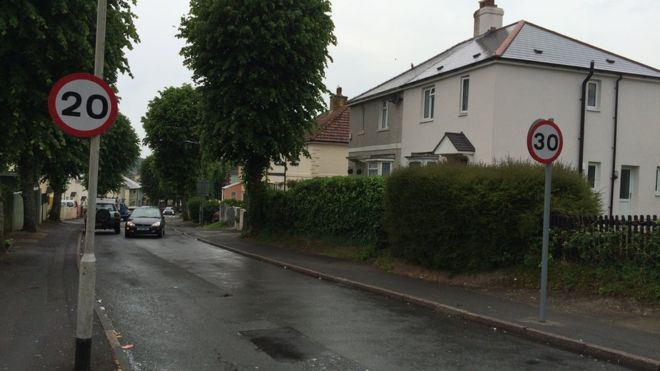
Just kidding, taken from BBC today - [http://www.bbc.co.uk/news/uk-england-devon-36497812](http://www.bbc.co.uk/news/uk-england-devon-36497812)
[Previous page](https://www.waze.com/discuss/t/uk-speed-limits-editing-guidelines-and-tips/201730.md?page=4)
[Next page](https://www.waze.com/discuss/t/uk-speed-limits-editing-guidelines-and-tips/201730.md?page=6)