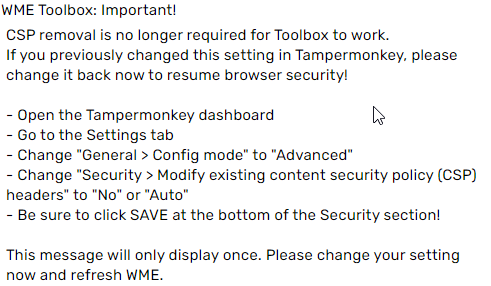
Information removed as it is no longer needed for Toolbox to work.
If you have previously followed the suggestion that was provided here, it is highly recommended that you reset your settings and not remove the CSP.
1 Like
John,
As always you are awesome!
Thanks,
Ted
It worked by following the steps, thanks for the contribution.
Dis worked. 10x.
Perform well the step by step and finally do not forget to SAVE , if you forget to save it will not work.
And double check your settings. I did have it set to “Yes” but at some point in the last few weeks it has reset to “Auto”;…
Thank you John! Toolbox is functional again…
Excellent!, working again, grateful.
Hooray! I’ve been away from editing for a while and couldn’t understand today why certain scripts weren’t working, but now they are! Thanks for the help.
I dont see this option in safari .
I have no idea if this could solve that but maybe at least give you the needed direction to find a solution
It didn’t work for me, I followed all the steps twice and the toolbox isn’t working for me, neither in Production and Beta editors. I don’t have any other scripts active. What could I do?
Thanks in advance.
For Toolbox to work, you need to have TamperMonkey and at least one script under TamperMonkey enabled.
Hola.
Es interesante el fenómeno que el toolbox no me falló hasta ahora. (30 de junio)
tenia la versión de Tampermonkey 1.9 y no se había actualizado hasta ahora y volver a fallar el Tampermonkey.
Tuve que buscar en el foro nuevamente y me encontré la solución quebya estaba hace 6 meses.
Saludos
For those who want to know how to reset the settings