This stuff happens for no apparent reason. Next time this error occurs, press the „Revert“ button a few times and try to save again. Rinse and repeat until WME accepts the changes. You might lose 30 out of your 80 edits in the process, which is still better than having to redo everything.
I’ve noticed that the dropoff point of area places will reset back to the default location if I don’t save the area place prior to setting the dropoff point.
Lol, I actually thought of that the day after my post and started doing that. It almost seems like the more points to an area place, the fewer edits it allows. After that post I was all the way down to 30 points and below when it would start giving me that error. I was pretty frustrated by the end of that area being corrected. I’m now editing another river and I still can’t do more than 35 without it erroring. I’m just trying to save every 30 points or so.
Bug:
If you add a road closure to multiple segments simultaneously, once the edit has saved, you get the following erroneous message:

If you unselect one of the segments, only highlighting one, you see the correct message:
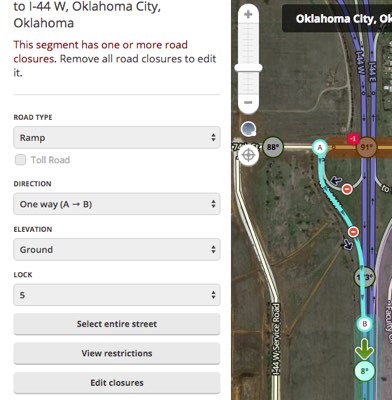
The message in the first attachment should read: These segments have one or more road closures. Remove all road closures to edit them.
And, you will also get this same message as shown in attachment 1 if you highlight a road segment closed and then simul-select any other non-closed road.
Multiple other SMs/CMs confirmed the same behavior in our out of your home editing area.
I confirm I experienced the same behavior inside my driving area area, as well as my managed area.
Sent using Tapatalk for Android 4.4.2
Live users (even with the layer on) cannot be seen in WME at the moment.
Confirmed in Chrome and Firefox - no scripts and confirmed with other editors.
Seems to have also broken the ‘Live User View Overlay’ and ‘HardHats’ extensions so they no longer show anything.
Yup, because there is a bug preventing WME from seeing any live users so those scripts aren’t able to recognize and function properly.
Still no live users showing as of this morning.
Over the last days I really gave my best to get accustomed to the experimental road layer. But I get really annoyed by the inconsistent display of recent edit updates, particularly in the driving direction.
I edited this area 10 minutes ago, making all these segments twoway (it was basemap before):
As you see, all segments (except the primary) are displayed either oneway or unknown. If I click on any segment, its properties are correctly displayed:
If I zoom out, the segments are displayed correctly on other zoom levels, but when I come back the the same zoom, the display is again wrong. Reloading WME or even the whole the browser doesn’t help. After some minutes, the segment display is updated properly.
In other words, if I want to do some serious editing, I am currently forced to use the “old” road layer (where this is not a problem at all).
All extensions were off.
Thank goodness I’m not the only person facing this on my Chrome. On the beta WME no problems.
Sent from my ASUS_Z00AD using Tapatalk
I’ve also encountered this. I’ve attributed it to loading/save issues. I’m HOPING that once the experiential layer is the primary layer, it will get higher preferences on the server, and these kind of sync errors will abate.
Anyone else notice problems with ‘StreetView’ being intermittent and very difficult to invoke?
Yup, got that problem on Chrome. Moving the lens a little forces the StreetView iframe to reload at the correct position.
Might be extension-related, but it doesn’t bother me enough to actually try to pinpoint the exact reason.
I found zooming in or out helps.
Anyone else notice the occurrence of “ghost shapes” when confirming PURs for new places? Those persist at any given zoom level, even when reloading the layers. The only thing that “excorcises” them is reloading the tab.
+1
Do you use scripts?
If the answer is yes, did you checked it after you disabled all of them?
Sent from my Nexus 5 using Tapatalk
I live in the countryside of Brazil and I frequently have to create long segments (from 5 up to 40km-long ones) connecting two existing roads. I start the new segment connecting to the first road, then I draw until I reach the second road, which is always a couple of visible screens away. The finishing end always connects correctly to the road, but the initial point is always disconnected. I have to go back to the starting point again and move it a little bit so that it connects to the first road. In the WME beta, as I connect the ending poing, it always gives me an alert that the other end is disconnected. It never happens when I create small segments: I always get both ends connected (so I actually know how to do it!). It only happens to long segments, when they span through more than one visible screen.
Bug Report:
When viewing this UR, I noted that the turn symbol (I assume U-Turn) in the route was inaccessible to my browser. Confirmed by another editor also.
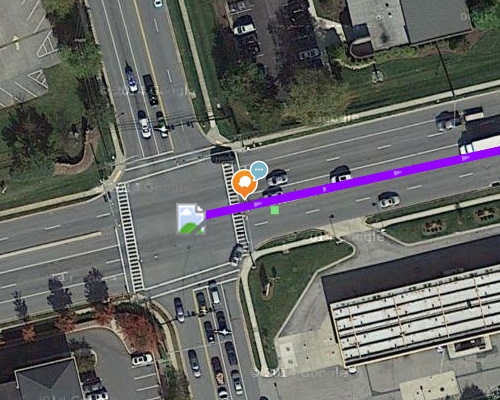
Running WME in Chrome 43.0 on OS X 10.10, with no scripts.