I love Waze. Used it on so many commutes from the Chicago suburbs to O’Hare on a daily basis. I have 2 suggestions (the other one being “lane suggestions like Google Maps”) but I’ll stick to one on this thread. I have been in this situation several times, where the road is wide open to my destination, I’m traveling 5-10 MPH above the speed limit, and my ETA keeps getting worse as I approach my destination. I was thinking that since I was traveling faster than the limit, my ETA should get better, but I finally figured that it’s probably based solely on the speed of others on the same road. The “others” were typically traveling about 20-25 MPH over the speed limit, but I am not that bold. If this is true, can there be an ETA setting on Waze that allows the user to select what speed they normally travel? It might be a little more complex for a driver like me since I am very strict on lower speed limits in neighborhoods and cities, but on the open road I inch-up to 5-10 above the limit. Some people might like to have it based completely on advertised limits. It would have to be based on the worst available current speeds, whether the “adjusted” posted speed limit, or the current rate of travel by other drivers that are slowing down for construction, weather, etcetera. Let me know what you think.
Hi there,
Waze routes based on a combination of mostly real-time data and historical data. In your case, I cannot pick out exactly what the issue is without seeing the drive on the app first hand but I have a guess as to what it might be. It could be that historical data on your route has shown slowdowns or slower speeds at certain times of the day. It could also be that there was traffic earlier in the day and that it is just starting to recover back to normal speeds.
So unfortunately there is no way to provide an ETA based on the fixed speed limit signs. I will say that especially on highways and major roads, the speed data does not show 20+ mph over the posted signage. We usually speeds maybe a couple mph over the posted speed. If it is really becoming an issue, in which your ETA is becoming way off, let us know here and we can see if there is another issue going on.
And as far as your other suggestion, all I can say is soon 
I hope this helps. Let us know if yo have any questions!
Joe
I’m not sure you’re following me, exactly. For instance, when I start a route to O’Hare, it may give me an ETA of 9:30. Then I start driving 65 MPH on a 55 MPH freeway. I notice as I’m driving, my ETA changes to 9:31, then 5 minutes later 9:32, and so on. I also observe that I am literally the slowest one on the freeway for my route, which is 90% freeway. How can Waze make an estimate based on current traffic and then slowly get worse as I travel faster than the speed limit? Like I said, though, it was completely normal for drivers to be 20 over the limit. I’m sure some of them must have been using Waze. And then, why would this be hard to program? The speed limits are all known (or getting there), and the other part of the equation is the slower of the current flow of traffic or the actual speed limit.
I’m actually from that area, so I know it pretty well. The reason the idea isn’t exactly practical, is because Waze is a commuter app based on Real-Time Data to give you the fastest route to your destination. If Waze used the fixed speed limits on highways or slower than actual data speeds, it would not be giving you the best route.
The big factors here are when you leave and from where you begin your route. For example,on I-294 from about Willow Rd to Dempster you can get different routing times depending on when you are driving through. Keep in mind these are average historical speeds:
Here is what it looks like at 9:00AM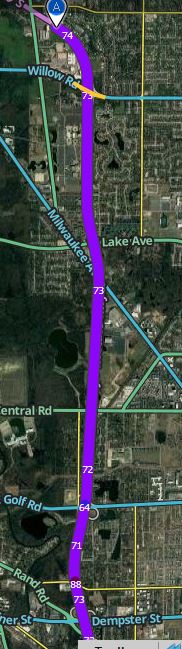
and here is what it looks like around 5:30PM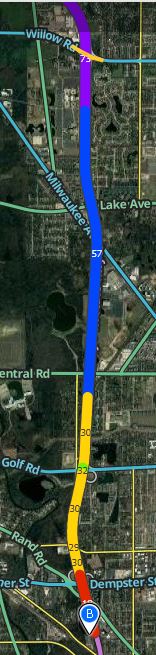
You can see in the morning, the speed data shows an average of about 70mph while in the afternoon, it goes from 55 all the way to 30mph. So for the morning thats about 10mph over the speed limit, since it is 60mph up until you reach O’hare. In the image below, you will see the average go down to 65mph where the 55mph signs begin:
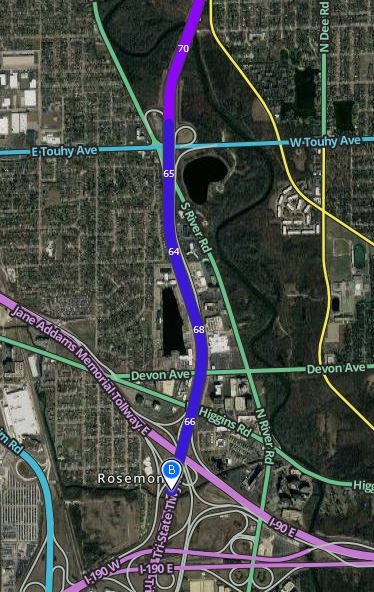
So for your case, if you were driving around 9am, it could be that the ETA is going up slowly simply because the average speed is higher than what you are driving.
We also are only volunteer map editors. We do not have the ability to change the routing algorithm in Waze, although you will be hard pressed to find someone at Waze who would want to change the routing algorithm to use slower than actual speeds in Waze.
I hope this helps you understand the reasoning for whats going on. If you want to see the historical speed data for the roads you drive, I can also show you those as well. If you are still confused or have questions do not hesitate to ask!
Joe
Thanks, Joe. Since you’re from here, you know that people driving the speed limit put themselves at risk. Haha. It’s sad. I had to deal with being the slow guy on I-90 going 65 in the 55 zone. I would stay right and just let everyone pass. Then, the month after I retire, they raise the limit to 70! So frustrating. Oh well. And, I just think it would be a nice feature to be able to set your preferences so the ETA would actually be useful.
Thanks for volunteering, by the way.
Yeah there are lots of crazy drivers around here, for sure! It would be nice to have different options like that, I think they just dont have the resources to invest in something like that right now.
Anyway,
Feel free to let us know if you have any other issues anytime!