It seems 99.9% of my edits have been declined, including some I know are absolutely accurate. Do I need to edit farmers fields for a while before I’m taken seriously or am I just doing something really wrong?
I want to help, but it’s very discouraging when I add a few parking lots, fix the parking lot roads, and then see all of my work is gone the next time I log in.
First off, have you read your PMs here in the forum? There should be a message there from the CT State Manager JAllen…
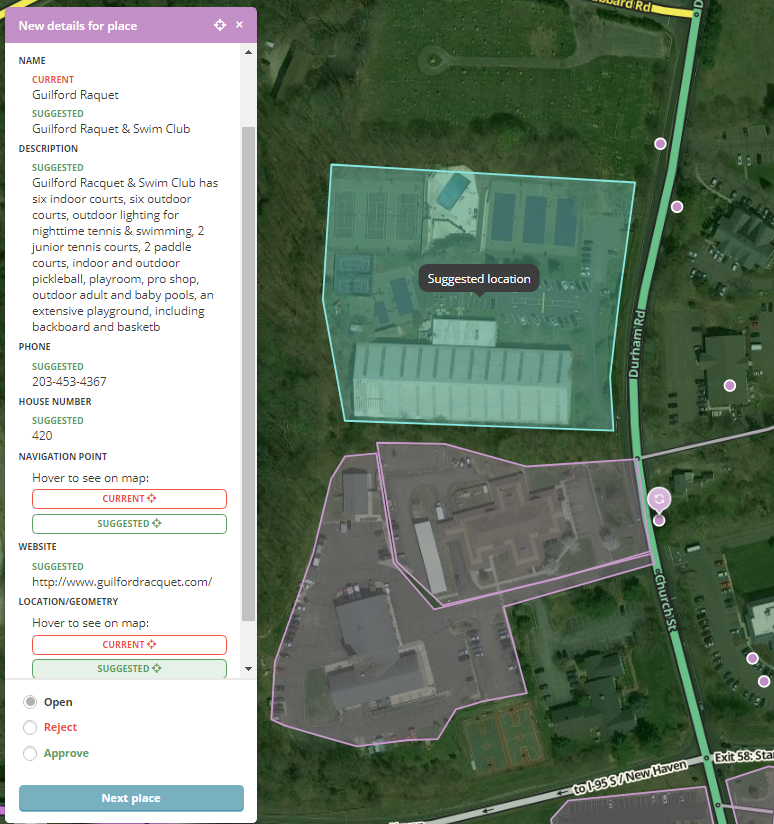
While your edits may be “accurate” you are not following the Waze editing standards. The approval process is either “Accept” or “Reject” - we can’t take part of your edit (see the screen shot below). Let’s take a look at one you clearly put some effort into & I’ll go into detail. Name: Guilford Raquet -> Guilford Raquet & Swim Club
Confirmed by looking at their website - GOOD Description:
Too many character, cut off at the end - BAD
Copy & Pasted from their website - COPYRIGHT VIOLATION - see Using External Sources in the Wazeopedia. You can not copy information from any source. Phone: 203-453-4367
Should be formatted as (203) 453-4367 - CAUTION (but not a deal breaker - this would usually get approved & then corrected Website:http://www.guilfordracquet.com/
Should be formatted as guilfordracquet.com - CAUTION (but not a deal breaker - this would usually get approved & then corrected House Number:* Confirmed by looking at their website - GOOD Location/Geometry & Navigation Point: These go hand-in-hand
Conversion to Area Place - BAD A facility like this doesn’t met the criteria to be mapped as an area place* Adjusting Navigation Point (target) - CAUTION This one is a bit tricky. If this place met the criteria to be an Area Place, then this is correct. HOWEVER, since it does not, moving the navigation point is wrong - with point places, it’s best to click on it to get the big bubble, then drag the entire bubble to where it should be. As long as no one has moved the navigation point, then it will move along with the bubble. Once someone has moved the navigation point, there is no way to reset it. So with point places, it’s best to move the entire marker (as one unit) and only adjust the navigation point if necessary.
Since we only have “Accept” and “Reject”, this has to be rejected. We can’t just select the parts of the edit that are good. Take another swing at the edit and you’ll get it.
As for parking lots…
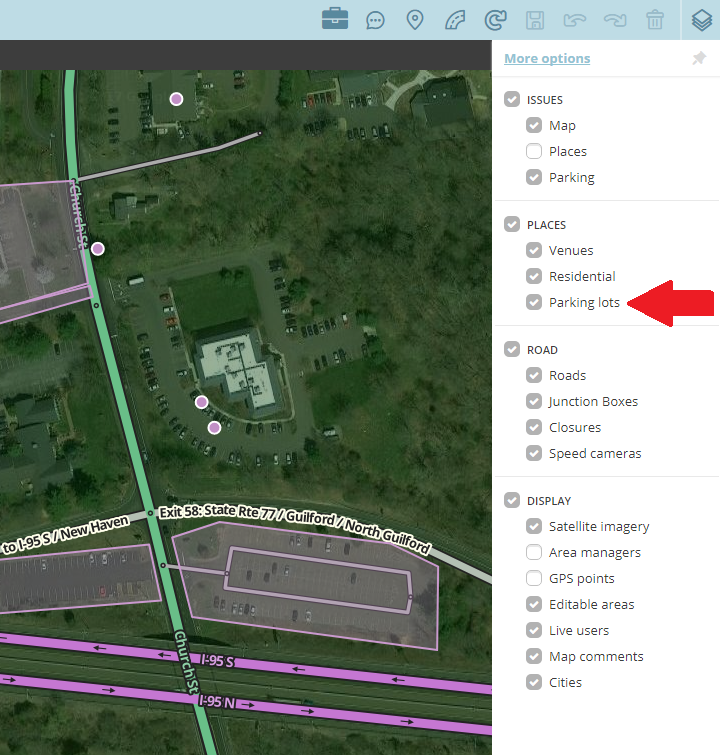
Lots should be named (info in Wazeopedia)* Parking Lots at stores are typically restricted to customers & should be mapped as such (i.e. not “Public”). A public lot is one where you can park your car (free or paid) and go anywhere you want to go (i.e. you can’t park at McDonalds and walk across the street to Burger King) * The two Park & Ride locations just south of the Raquet Club are already mapped (and have been for years) - you dropped two new parking lots on top of them.
The PM you should have received has links to the CT Section of Wazeopedia, General Editing Info, etc, etc. There’s a wealth of info out there about how to edit, and what the guidelines are. This forum (or the GHO) is also a great place to get help & ask specific questions.
Now I have to dig into the CT DOT Maps, SCRCOG GIS Data & the Town of Guilford GIS Data because I think Durham Rd & Church St aren’t mapped properly (I think there’s at least one segment named incorrectly).
Thank you for the very informative response. Much appreciated.
Weird… I don’t see the parking lot features of those lots on Church St. The one on the West side of the road does not even have a parking lot road into it.
D’oh! I guess because they are the same color as the areas, I never thought the layer was off, nor did I realize parking lots were their own layer. Yep, I see them now… sorry.
I attempted my Guilford Raquet & Swim Club edit again… I think I followed the rules correctly this time and I know I left out all of the BAD edits. I do need my PLR connected to Church Street, please.
Worth noting about website addresses: Sometimes the “www” is required at the beginning of the web address… all depends how the DNS is setup. Normally, with or without the “www”, you will get to the same site, but occasionally, it might not. http://www.yes-www.org/why-use-www/
.
That PLR is iffy at best… Putting the marker at the end of the driveway works just as well.
That website hardly seems reputable… It appears to be one person’s opinion site. The primary responsibility lies with the website owner to properly configure their DNS entries & configure their hosts to respond to both forms (redirect or not). Additionally, many modern web browsers automatically try the www. version if the non-www. version is not available. Only put the www on the Waze link if absolutely needed.