Hi @HighNTC
I’ve made some adjustments here and the issue will be resolved within two or three days. Please clear your search history in the Waze app and wait until then before trying a new search.
We’re here if you need anything else, cheers.
Hi @HighNTC
I’ve made some adjustments here and the issue will be resolved within two or three days. Please clear your search history in the Waze app and wait until then before trying a new search.
We’re here if you need anything else, cheers.
A new access to Riacho Grande in São Bernardo do Campo was opened some time ago. Could an editor please add it to the map, as it is of great importance for the drivers traveling through there?
Are you referring to this news article?
Is the new access here?
Thank you
Yes, that’s the one 
Good afternoon!
I need to adjust the address of this development:
https://ul.waze.com/ul?venue_id=205325852.2053520668.39472601&overview=yes&utm_campaign=default&utm_source=waze_website&utm_medium=lm_share_location
Altitude Jardins by Artefacto
Where it is:
R. da Consolação, 2662 - São Paulo
Where it should be:
Alameda Jaú, 1990 - Jardim Paulista - São Paulo
It’s the same block, but it will have a different entrance now.
Thanks, Gabriel
Hello, @gabrielsecco!
I’ve adjusted the address for Altitude Jardins by Atefacto to Al. Jaú, 1990, São Paulo, São Paulo; changed the entry point to the correct street; and linked the Google Maps place Altitude Jardins.
Could you please check if everything is correct?
Additionally, it would be helpful to add more information about the area (if available), such as a phone number, website, operating hours, among others. I’ve sent you a private message to help with any questions regarding these and other changes to the location. If you prefer, you can also send your questions here.
Lastly, a tip: when submitting a request, send the permalink (PL) of the location instead of the LiveMap link.
This makes it easier for other editors to find the location.
To learn more about the permalink, visit Permalink (Wazeopedia).
If you need any further help, just get in touch!
Hello, editors!
I’m a Waze user and I noticed an error in the pin location for the address R. Alfred Niederbichler, 905 - Anhanguera, Praia Grande - SP.
Maps/Waze is directing drivers to a closed street before the canal, but the house is located after the canal**, as I noted in my edit suggestion.
https://waze.com/pt-BR/editor?env=row&lat=-24.01774&lon=-46.49397&zoomLevel=19&mapUpdateRequest=24648799
Unfortunately, as I’m only level 1 (or 2), I can’t adjust it directly.
If possible, I’m requesting a correction to the pin location so that it reflects the correct entrance to the property, which is after the canal, where traffic is permitted.
Thanks for your help, everyone!
Welcome to discuss! Take the opportunity to introduce yourself to the editors in your region at this link
Copy and paste the link of the location you indicated; it makes it easier for the editors in the region.
See you soon.
I’ve requested the correction on Google Maps, but I can’t guarantee they will accept my edit =/. However, I’ve already made the correction in Waze, and you’ll need to clear your app’s search history and wait for 72 hours. After that period, search for the address again and you’ll see that the problem has been resolved.
*Update: The Maps edit was accepted.
I still don’t really know how to get the link.
Great, thanks for the help.
I’ll check out your recommendations and follow up with the missing information.
Best, Gabriel
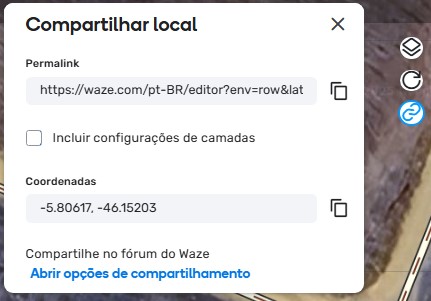
Whenever you select something in the editor, you can copy the link.
In the top right corner, there are these three buttons. Select what you want, click on the third one from top to bottom, and a box will open. The permalink (PL) is the link you copy.
Consider joining a mentorship program. A more experienced editor will help you. Sign up using this form. I’m not a mentor, but I can help with some things. It wasn’t long ago that I had the same questions. However, someone with a role in your editing region is the most suitable.
See you soon.
Access created. It will be active on the map within three days.
I frequently encounter similar cases, especially in coastal areas; because of this, I try to find a way to make it as accurate as possible for the user in a way that doesn’t cause much impact.
In some cases, I continue with the numbering in ascending order and add those that don’t follow the order as “Residencial Place”.
Perfect! By doing this you avoid breaking the interpolation in the segment 
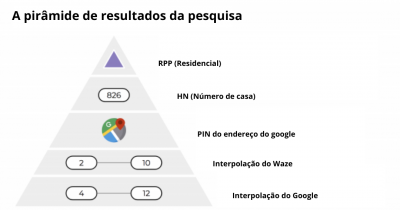
It’s always good to remember the “pyramid” of priorities:
And every now and then re-read the topic about the subject.
Yes, in this case, the user was right; his house is in the city’s system and follows the official standard numbering, the interpolation works perfectly.
What I did was correctly number the official addresses; when only a few official ones are out of order, I go in and create the place.
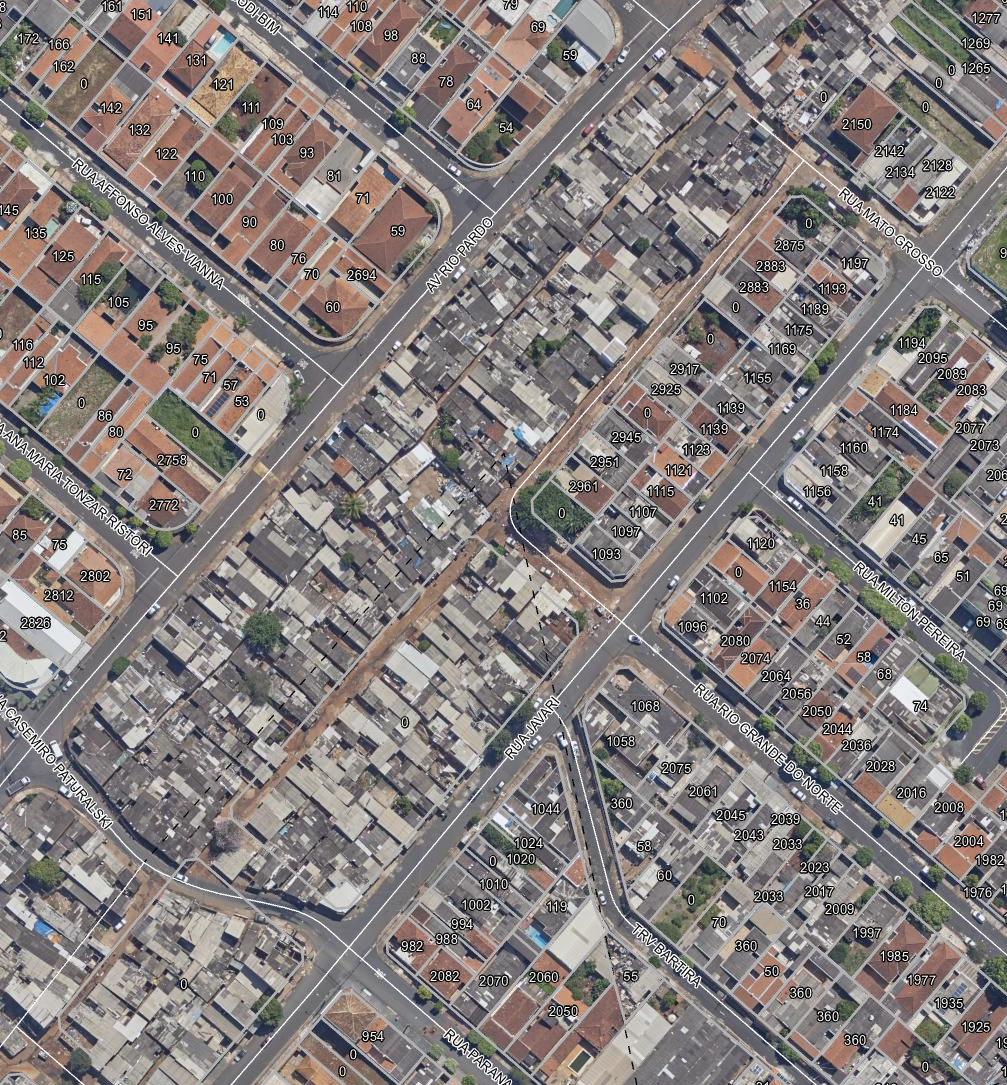
The main problem there is that basically all the numbers on the median of this part of the avenue are wrong; they used a range from 3000~5000 and up. Plus, since it’s a median, the even/odd numbering is on both sides.
In this case, there’s not much you can do, as Waze can’t work miracles hehehe. In cases of completely disorganized numbering, the thing to do is force the numbering and that’s that…
Hello Esdras, good afternoon, how are you?
The address is wrong again, can you check it?
Edair Nunes
Hi there, how’s it going!?
I’ve further forced Waze to route to the correct location for the house number mentioned.
As for Google Maps, someone created or moved the location to the wrong side of the road 
I’ve requested a correction there as well, but I can’t guarantee they’ll accept it, as we unfortunately don’t have control over Maps.
Regarding Waze, I’ve done everything possible. Clear the app’s search history, wait 72 hours, and search for the address again, and the issue should be fixed. Cheers.
Just as a reminder, according to the Wazeopedia article mentioned above:
IMPORTANT: It is recommended to avoid using forced numbers, as this practice disables interpolation/extrapolation of missing numbers on the segment. In cases where it is necessary to add the numbering for a specific house that has out-of-order numbering or is on the inverted side (even on the odd side or odd on the even side), it is recommended to include a Residential Place (RPP) with the full address (street, number, and city).