The app created the UR in Israel, but I can only see it if I switch WME from “Israel only” to “World”, and it’s impossible to edit the map of Israel there.
Got it. Will be fixed in the next release.
Hi Vinkoy !!
Consultation and suggestion.!
It may be possible to set the speed I want to show on screen?
Add for example 45Km / h and 75 km / h?
Greetings and thanks for this great tool !!!
Fernando P
“napauy”
Sorry but, why 0KM (black) button?
I don’t understand utility
Good job! very useful apps, works great in France!
napauy, user-defined speed values will be available in the next release.
yanosh1, this button can be used for example to indicate the end of the speed restricted zone or like a note for yourself. There was a suggestion to make this button to send predefined custom text (added in my todo for the future versions).
Hi, looks good!
For no external reason at all, the red circle appears (sometime with info: “WSLB enabled”) and disappears …
The app doesn’t exit when I close Waze, even if its checked in options …
S3 - Android 4.3 (for some days I guess … going to S7 / 6.0)
DenKuzco, you most likely didn’t enable Waze SLB service. Please follow to your phone settings -> Accessibility. Then choose Waze SLB and enable the service.
I’ve just published new version Waze SLB 0.40b!
Release notes for v0.40b:
- User interface is adapted to different screen resolutions (fixed FullHD issue).
- Added server selection (World, USA&Canada, Israel).
- Added user-defined speed limit values.
For USA/Israel users: I wasn’t able to verify if it works correctly on your servers. Please let me know if you have any issues.
Thanks!
Verified it works good from USA&Canada Server. My only request would be that in the USA typical speeds that we see are auto-populated (15,20,25,30,35,40,45,50,55,60,65,70,75,80,85) MPH and the speed limit symbol is a rectangle instead of a circle. Works great though!
Verified as well, the main window now covers the whole screen (full-HD in my case). But the numbers are huge and barely fit inside the shields, much larger than in your 1st post example.
The magic button still does not match the speedometer area.
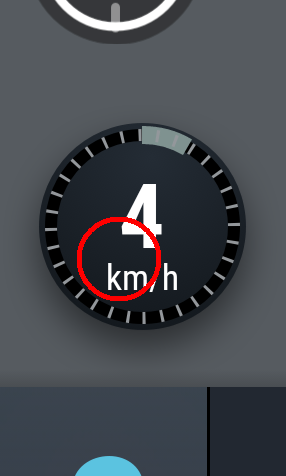
User-defined speeds keep remembered, but the main window still displays just the default set of values. The black bottom-right shield accepts just numbers or minus character, but throws them upon saving and finally only “-” is being displayed. (Users are questioning this shield, maybe a usual “End of SL” shield would be more intuitive?) 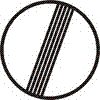
Making URs in USA. This is great! I agree with roadtechie on USA-specific settings, and I also see the tiny red button like on foxitrot’s image, but it’s shifted a bit down and to the left for me. Would be nice to have that bigger
Sent from my LG-H811 using Tapatalk
roadtechie, add in todo, I’ll do it after the bug fixing in the current version.
foxitrot, Kartografer, will be fixed in the first place.
foxitrot, I’m going to change the button to something, but haven’t still decided how to do it that it was convenient for all. Will it be a static text like “End of SL” or user defined text or something else.
Please let me know if you have the best idea for this button.
And also I’m wondering, whether it is necessary to add choice option of KMH/MPH? Currently, there is only digits are displayed in UR without kmh or mph. So, adding this option just adds kmh or mph in the text of UR, without any new functionality. I believe it is not really important, but if someone finds it useful, please explain me what’s the point.
Thanks for the feedback!
Temporary workaround: close and open Waze SLB again, the values will be updated according to the last changes.
The application is very good everything works fine reports are instant in the editor, the only thing I did not like is the buttons are very large could improve the appearance of the application, that of rest I really liked the application
The app now works correctly on the Israel server. I really enjoyed to report SL with just two clicks!
Indeed, reporting in Israel is correct now, though, as previously mentioned, bigger button needed.
Also, unfortunately, the app crashed several times. In few occasions it recovered and reappeared again. In other cases manual restart of app was needed.
kizeus, could you please share your screenshot with the buttons if you have screen resolution other than fullHD?
crayzee, please make sure you enabled Waze SLB service. In the configuration form tap on “Enable Waze SLB button” then choose Waze SLB and enable service.
The crashes occurred while wslb service was enabled
I’m donwloading and trying…
Great app but it has a few issues on my phone (Honor 7 with Android 6.0).
- As mentioned before, the speed buttons are a bit too big. In the previous version they were too small but now they barely fit in my screen (1920x1080). I prefer having them a bit smaller so they don’t cover the notification bar.
- The red circle at the bottom left does not fit around the speedometer, also mentioned a few posts back. Would be nice if it would fit just around the speedometer.
- I have enabled the service but half of the time it does not start with Waze and sometimes it starts when I open or close another app. It’s completely unreliable so I have now disabled the ‘autostart with Waze’ function. This also happened on the previous version.
Looking forward to the next version, keep up the good work.