Area place adjustment gets multiple nodes under same node

Is this a…:
Performance issue
Steps to reproduce this issue:
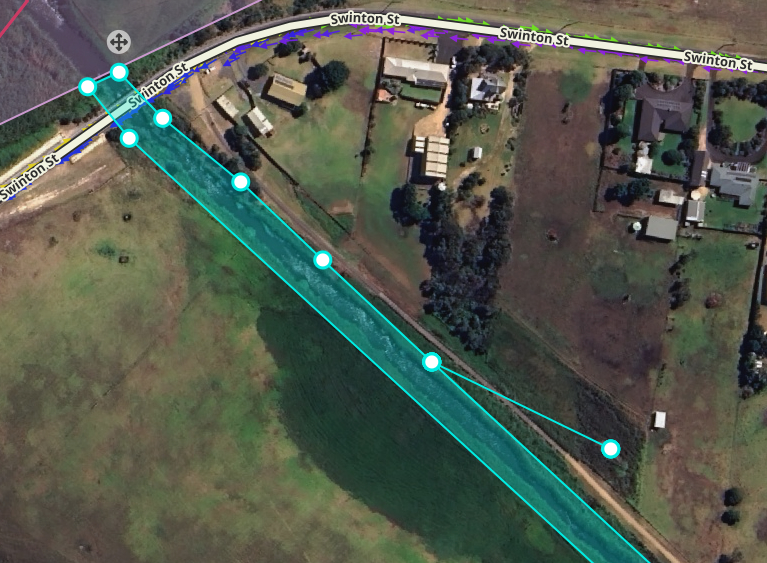
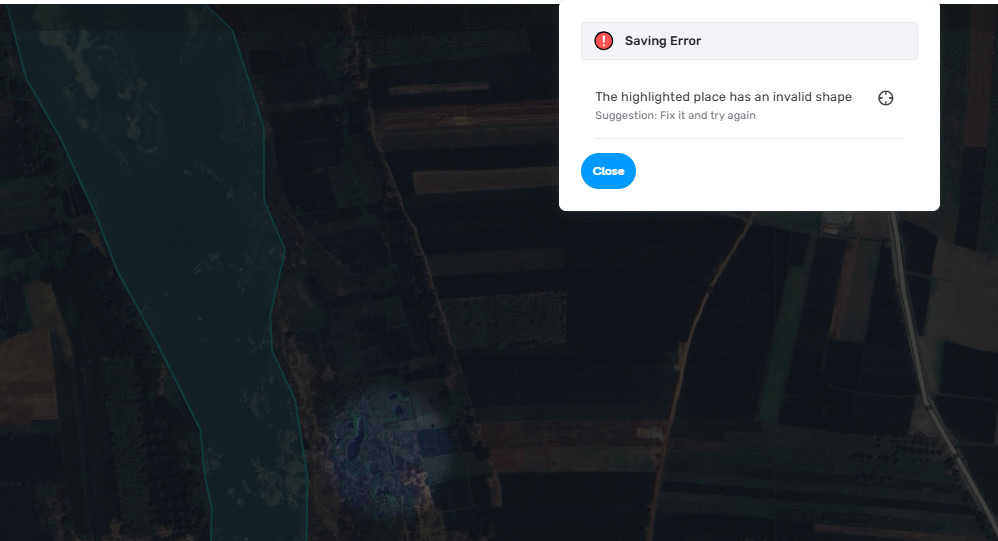
While mapping rivers or big parking lots if a new node is being used to expand the area then the error “invalid shape” comes up during save and then it is very difficult to identify under which node the duplication is taking place.

For India, we use rivers as area places to denote presence of bridges so we need to adjust area all the time and recently it has become very difficult.

Environment where the bug occurs…:
ROW
Permalink:
https://waze.com/en-GB/editor?env=row&lat=30.41931&lon=77.78282&marker=true&zoomLevel=17
Browser name and version:
Edge Version 141.0.3537.71 (Official build) (64-bit)
Are you using scripts? Please detail which ones.:
WM Toolbox, India Tools, Speedhelper

1 Like

I got this many times too, but never found the energy to investigate. Thanks for taking the time :upside_down_face:

2 Likes

Can concur that I have been getting similar behaviour for the past few weeks, not only with Area places, but often also with area MNs.

1 Like

Hi @McLarenMCL38,

Thank you for your input!
I see this issue when drawing areas with the shift key; otherwise, I don’t get this error. Is it reproducible for you with all scripts and extensions turned off?
Meanwhile, I’ll also test it with WM Toolbox, India Tools and Speedhelper turned on.

Best regards,
Olesya

1 Like

@YanisKyr @DarkestWays if you manage to spot any other patterns, I’ll appreciate it if you could share that. :slight_smile:

1 Like

I’ve experienced this error when modifying existing area places but not when drawing new places. Happens with scripts and extensions off.

1 Like

Doesn’t happen always.

With shift or without shift - happens.

Reported after testing without scripts, inprivate mode and toggle each script.

I even adjusted mouse sensitivity but that’s not the cause.

1 Like

Agree with this and have seen same behaviour.

As in OP this is mostly happening to large area adjustments either the river has shifted or parking lots etc have expanded.

1 Like

@McLarenMCL38 I have tested it further and can confirm that node multiplication happens regardless of the drawing method, but haven’t yet figured when exactly it’s considered invalid. I will report this issue internally so it can be investigated by the team.

Best regards,
Olesya

5 Likes

Is this a…:
Standard bug
Steps to reproduce this issue:
Expected to happen: Draw and modify school zone and save without issues when there is no overlapping geometry.

Actually Happened: Occasionally when saving a modified school zone, there is a save error for Permanent Hazard must have valid Geometry.

Steps to reproduce:
1- Draw a school zone
2- Save initially with prefilled info and some shape that it allowed saving
3- Begin modifying shape and try to save, occasionally getting Error
4- Undo geometry edits and try saving successfully before modifying some more

Tested in Production and Beta environments, same results in both

Video of demonstration:

Error starts to occur at the 00:55 mark, previous saves worked

Environment where the bug occurs…:
NA
Permalink:
https://waze.com/en-US/editor?env=usa&lat=40.84015&lon=-74.24339&zoomLevel=19&permanentHazards=466726
Browser name and version:
Chrome Version 141.0.7390.66
Are you using scripts? Please detail which ones.:
Scripts disabled to record bug video

5 Likes

@Olesya-Staff The only pattern I could recognise is that it happens when editing existing area polygons (notes, places, features, etc), often when creating a new geo-node.

For e.g., when creating this river polygon, there was no issue adjusting edges or creating new nodes. Though after saving it, reloading map features, then editing it to adjust its edges, this bug appeared again. Seems to create 2-3 additional nodes.

1 Like

Hi @DarkestWays,

Thanks a lot for your response!
By

do you mean the node multiplication or the invalid shape error?

When it comes to the node multiplication, I do get it quite a lot as well, it’s the latter that I haven’t been able to find a consistent pattern for.

1 Like

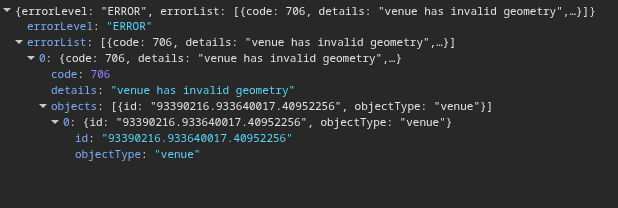
When trying to save a polygon with ‘hidden’ node multiplication, the error upon save is “invalid shape”.

1 Like

Thank you @DarkestWays, I’ll keep digging into it then,

1 Like

I was able to reproduce with the river polygon linked above. I have yet to confirm this behaviour, though it seems like hidden/stacked node duplication tend to happen close to the drag handle.

Upon trying to save this polygon, error is as below:


Data sent to server:

{"actions":{"_subActions":[{"name":"UPDATE_FEATURE_GEOMETRY","_objectType":"venue","action":"UPDATE","attributes":{"geometry":{"type":"Polygon","coordinates":[[[142.471254011914,-38.400195848427],[142.470814129638,-38.399859523811],[142.470256230158,-38.399729197602],[142.469939729501,-38.399422299472],[142.470122119708,-38.39883372407],[142.470213314816,-38.398518413847],[142.470481535716,-38.398194693922],[142.470535179898,-38.397681784058],[142.470631739422,-38.397400102504],[142.470379611777,-38.397215117005],[142.470138212964,-38.397067969112],[142.469993373683,-38.396849348831],[142.469703695103,-38.396908208202],[142.469499847216,-38.396912412441],[142.469644686506,-38.397152053659],[142.469778796956,-38.397055356421],[142.469789525796,-38.397210912784],[142.469859263224,-38.397286588731],[142.469725152774,-38.397458961427],[142.469934365076,-38.397568270729],[142.469993373683,-38.397715417604],[142.469875356479,-38.397845747444],[142.469617943747,-38.397984503573],[142.468909820739,-38.397761677331],[142.468153417965,-38.397093203571],[142.467852990722,-38.396500400401],[142.46731652909,-38.395794076254],[142.467337986752,-38.395386257627],[142.467198511886,-38.395125588845],[142.467348715592,-38.395045706288],[142.467917343903,-38.395377848971],[142.468158742716,-38.395318988354],[142.468325039668,-38.395041501942],[142.468480607798,-38.395121384502],[142.468357226179,-38.395377848971],[142.468416234776,-38.395529204624],[142.469118973537,-38.395878162284],[142.469365736766,-38.396042129759],[142.4694944828,-38.396252343927],[142.469768068125,-38.396441536155],[142.470165035059,-38.396769468178],[142.470792671967,-38.397210912784],[142.470776578712,-38.39745475722],[142.470964333343,-38.398119018925],[142.471141359135,-38.398182081428],[142.471275469585,-38.398089589738],[142.47128083401,-38.397412715134],[142.471532961654,-38.396445740421],[142.471618792338,-38.395197062637],[142.471715351861,-38.394213240709],[142.471860191151,-38.393548943119],[142.471747538372,-38.393313494406],[142.471892377662,-38.392375896393],[142.471913835333,-38.392127830311],[142.471565148165,-38.391741013705],[142.471468588632,-38.391522377317],[142.471119901464,-38.391064079665],[142.470170399475,-38.39041657161],[142.469912907406,-38.390269409881],[142.469687601847,-38.390059178319],[142.467756411357,-38.387527942356],[142.466082712963,-38.38597636022],[142.465095660047,-38.384874674648],[142.464773794965,-38.384672837305],[142.463218113738,-38.384193471357],[142.458905121669,-38.383882302287],[142.458089730129,-38.383764562289],[142.452435633528,-38.380518226876],[142.4510516137,-38.379660362613],[142.448337218181,-38.377667050486],[142.441516479655,-38.372767670061],[142.441293836477,-38.372551074604],[142.441462855301,-38.37249010166],[142.441696227311,-38.372683566242],[142.44211529731,-38.372951329203],[142.442555199414,-38.373279372287],[142.443139940808,-38.373708348065],[142.444100191466,-38.374074237827],[142.443139940808,-38.373708348065],[142.444100191466,-38.374074237827],[142.443139940808,-38.373708348065],[142.444100191466,-38.374074237827],[142.443139940808,-38.373708348065],[142.443139940808,-38.373708348065],[142.443139940808,-38.373708348065],[142.449849984066,-38.378566991453],[142.451373478782,-38.379694004541],[142.457971712934,-38.383587951934],[142.458894392829,-38.383772972296],[142.463218113738,-38.384050501951],[142.464172980144,-38.38432803054],[142.465127846558,-38.384698067003],[142.466071984132,-38.385698837955],[142.466544052916,-38.386195013376],[142.467928072743,-38.387498508858],[142.469751974869,-38.389819513607],[142.469945093916,-38.390097020045],[142.470481535725,-38.390408162377],[142.471254011914,-38.39095476053],[142.471936077295,-38.391542034309],[142.472133776476,-38.391736809164],[142.472359082034,-38.391888172439],[142.472295473471,-38.392122255497],[142.472243925535,-38.392325483229],[142.472177436435,-38.392689858576],[142.472172032356,-38.39289166446],[142.472161323348,-38.393160754753],[142.47216900217,-38.393380847318],[142.47208851607,-38.394150251974],[142.472029487641,-38.39445296356],[142.471927524029,-38.394991113353],[142.471863170848,-38.39559233753],[142.471736809541,-38.39718568745],[142.471575876996,-38.398152652266],[142.471296927265,-38.398514209702],[142.47114672356,-38.398943031292],[142.471747538372,-38.399817483124],[142.471254011914,-38.400195848427]]]},"id":"93390216.933640017.40952256"}}],"name":"DESCARTES_SERIALIZATION"}}

2 Likes

Just happened again.

Just FYI while a solution is found, I now save every 10-15 edits of this type and if I get this error or something like what @DarkestWays showed us above 3 undo’s will allow me to save and not lose all work.

2 Likes

Hey @Olesya-Staff

Has there been any progress on this bug? :folded_hands:

One of the things I noticed, in addition to my findings above, is that the node duplication tends to happen when dragging existing nodes.

Hi @DarkestWays,

Sorry for the late follow-up. We haven’t gotten too far in terms of resolution unfortunately… Whenever there is an update, I’ll make sure to let you know.

1 Like