Waze have introduced new system for automatically locking segments based on how ‘busy’ they are.
As our map is becoming reasonably mature now, the purpose of this feature is to protect the high value roads from malicious or accidental editing that breaks important routes for users. It is already being used successfully in Italy and France.
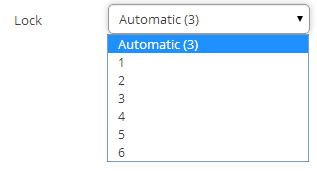
When you select a segment and look at the Lock field, you’ll see that some will have Automatic(x). This means the segment has been automatically locked at rank x. Click on the dropdown list, as you’ll also see the Automatic(x) as one of the options.
We’ve asked Waze to limit this to a maximum of 3* in the UK, so the majority of Area Managers will be unaffected. High rank editors will be able to reduce the locks of specific segments on request, via the usual sub-forum.
[*this maximum was later raised to 4, to reflect the increasing maturity of our map]
If you have any questions or concerns, please post below.
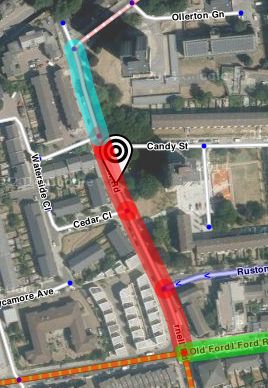
Also, the just-a-minute-ago updated version of Colour Highlights extension now shows segments with automatic locks on them with a dotted red highlight.
Like it, seems to be working well in areas I look after. Some ‘Street’ types now locked to 3 where they were 1 before. Could use these as a guide for road-type reviews of basic ‘street’ type roads I’m thinking too. If a street is auto-3, perhaps consider upping it to primary-street.
An NB for this: If a segment currently auto-locked to L3 or L2 is split by adding a node, the resulting segments are all downgraded to auto-lock level 1.
We’ve now been using Automatic Locks in the UK for 6 months and they appear to be working very nicely. The only two initial concerns mentioned - that we would be unable to downlock auto-locked segments and that manually-locked segments would revert to auto-locked - have not been a problem. In the meantime, we think the system has protected many roads that otherwise might not have been considered worth locking.
In light of how well it has worked so far, and in the absence of any complaints, we are going to ask Waze to raise the cap on automatic locks to 4.
I’ll explain how the system works, so you can understand what will change. Waze automatically classifies segments into 5 bands based on how heavily used they are. Because we currently have a cap of 3 on auto-locking, segments in the top 3 bands will be auto-locked at 3. When we increase the cap to 4, segments in the top 2 bands will then get auto-locked to 4. Segments in the third band will stay at 3 and those in the fourth band will stay at 2.
I believe this will also have an important and beneficial effect on the locking levels in London, as I mention HERE.
As before, if you have any questions or concerns, please post below.
I’m wondering if we should ask Waze to change all our unlocked roads to Automatic locks. This would not make much difference to most editors, but will allow roads to become locked higher when they get busier.
Maybe even something more sophisticated like set to Automatic if it’s higher than the manual lock (except Freeway and Major Highway). For example lock “2” on a Primary Street could become “Automatic(3)” if it was super busy. This would mean a few higher locks, but only when they really need it.
There are two down-sides I can think of, however:
Splitting a segment in to two can cause the automatic lock to reset to 1
A manually locked road will have some reason behind it (e.g. usual mapping), whereas automatic locks only mean that it is a busy road. Changing, say, lock “2” for “Automatic(2)” loses that flag that it was intentionally locked for some reason. Admittedly, there’s no record of what that reason was, so maybe it doesn’t matter. But there is a subtle difference between the two, even if the resulting protection is the same.
Given that there seem to be no objections (were you all asleep? :lol: ), we have now asked Waze to increase the maximum automatic lock in the UK to 4. They haven’t answered yet - not even to say “soon”.
In the meantime, when you are locking segments, can you try - where possible - to set auto-locks. So if you were going to lock a segment to 3 and it’s auto-level is 3, make sure you choose auto(3). This will help ensure that segments whose lock level should be changed by auto-locking will be changed.
There is a very useful highlight available in WME Toolbox - “Manual locks less/greater/equal”.
Red indicates segments locked below their automatic lock level. These should be up-locked to auto.
Cyan indicates segments locked at the same level as the automatic value. These should be changed to auto, in case the automatic system later needs to upgrade them.
Green is segments locked above their auto level. This is far less important, as the segments have normally been manually and deliberately locked to that level.
How long before segments become self-aware and start acting as one? We won’t see it coming y’know. It’ll be like that film, The Happening, only more realistic.
I’ve heard that, in the “early” days, segments did lead a life of their own - they would adjust their positions based on accumulated GPS tracks. :o Well before my time, though.
Anyway, just to update you all - the new cap of 4 for automatic segment locking is now live.
I have found that some roundabouts seem to display inconsistencies on lock levels.
Some segments will have and auto lock suggestion of 3 or 4 whilst the other segments get an auto lock suggestion of 1!
What approach would be best in these conditions?
Set auto lock to the highest and then lock the lower suggested to the higher level?
These are probably due to the roundabout being edited. If you have 2 segments auto-locked at, say, 3 and you delete the junction between them, the new auto-lock level is 1. Also, if you split an auto(3) segment by attaching another segment to the middle, the 2 new segments are - again - auto(1). This has been reported to HQ, but they haven’t acknowledged it.
Your suggested approach is right for roundabouts - and for any other road (i.e. a number of segments making 1 road) with no major connections and where editing has interfered with the auto-locks. Set the auto-lock to the highest of the bunch, then manually increase the lock of the rest of the segments to match that auto-lock.
Yes, I suspect that may be the case as the higher locks are on the more frequently used sections.
Auto lock is obviously ignorant of roundabout structures!