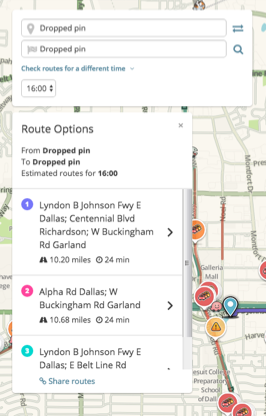
I routinely travel back and forth between 2109 W Buckingham Rd, Garland, TX 75042 and Lincoln Centre, Dallas, TX 75244. I have the ‘Avoid Freeways’ option set, yet the app gives me three routes that all involve the use of the LBJ Freeway. Not only that, it’s having me hit LBJ freeway so that it can take me to another freeway. Both of these freeways are frequently parking lots and always dangerous at the times that I travel.
The much simpler route avoids the freeways entirely, but requires that I ignore all of the Waze directions for the first couple miles until I can finally pick the route I actually want to take.
The route I use and recommend is to take Harvest Hill to Preston. Take Preston north to Spring Valley and then take Sping Valley east. This same road will turn into Centennial and then Buckingham dropping me right at my end-point.
The reason nobody answered is probably because you had posted in the global forum section. I moved your thread to the US and TX sub-sections, you will probably have more luck there as you will have local editors look at your issue.
I’ll take a look soon. Avoid Freeways or Avoid Tolls is not an absolute setting. If it’s still the fastest route by many minutes, Waze is going to offer it. I’ll review the route shortly and get back to you.
Thank you! Please let me know if I can be of any assistance… Do you know if Waze calculates routes on actual speeds or just speed limits if the actual speed exceeds the posted speed limit?
Haven’t dug into it yet…we’re volunteer editors and it’s the holidays so I’m not around that much. Will look when I can. Waze always looks for the fastest route and if you start a route on a Freeway and have Avoid Freeway selected, it wouldn’t know what to do so the values can’t be absolute. Avoiding freeways in some parts of the country/world may result in a 3 hour trip instead of a 45 minute trip so Waze feels it’s important to show/offer those routes regardless of those settings.
I’m not starting on a Freeway… it just chooses three routes that all use the freeway as if there aren’t at least 5 different ways from here to avoid it. I don’t mind that it would show the freeway as an alternative, but it really should give me options without it.
Thank you for taking a look at it when you can. At this point I wish there were a blacklist option so that I could tell it to never use 635 or 75 regardless of settings.
Yeah, unfortunately, it defeats the purpose of Waze choosing the best route it can find for you if you can tell it routes you always want to avoid and again, if you have that option and then start a route on one of those roads, Waze wouldn’t be able to help you.
Looking at this route as you provided, avoiding highways would take an extra 3 minutes using LBJ to Centennial to W Buckingham (Waze-selected route).
I understand why Waze might display a freeway route against my preferences if we’re talking about a serious time difference. (Serious can be debated, but I would think that would be at least a 30 minute difference.) In this case you’re saying there is only a 3 minute difference… that’s just standard variability regardless of route taken. It certainly doesn’t seem appropriate in this case to override stated user preferences.
Unfortunately, that’s how Waze works and they have certain thresholds set on the back-end to override user preferences to offer what they believe is a faster route.
For some reason the ‘road type’ for the freeway is set as a ‘minor highway’ in the map editor while the city street (Preston) is set as a ‘major highway’. Why would these be set like this? Could this be causing Waze to choose incorrectly?
I agree. I wish there was an option to avoid freeways if traveling less than x miles, or use them if it saves more than y miles. It is always trying to put us on the freeway, even though we prefer to drive more slowly (having slower reflexes), and avoiding the freeway is safer for us.