I have a few users in my area who edit very rarely, and they still make mistakes, but we don’t want to block them either if they are responsive enough in PMs etc…
In many cases I forget about them since they are almost never active, and I miss their latest edits and mistakes when they start to edit again, only to find them because of UR’s much later.
Example profile:

[EDIT] I was looking for a script to check for a change in the amounts of edits or daily activity and notify me when a value has changed, found a solution, check the post below.
I found a solution for this:
Distill Web Monitor
- Go to the user’s profile that you want to monitor for activity
- Click the extension’s icon at the top right of Chrome
- Click “select parts of a page” in the extension’s menu
- Select the value to watch (eg. click the total number of edits “div.user-stats-value”)
- Click “Save selection” at the lower right
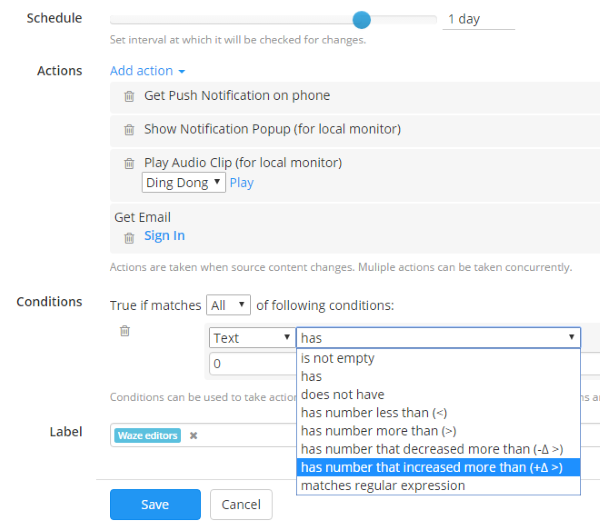
- In the new window, setup how often the tool should check for changes and how it should notify you
- Click save
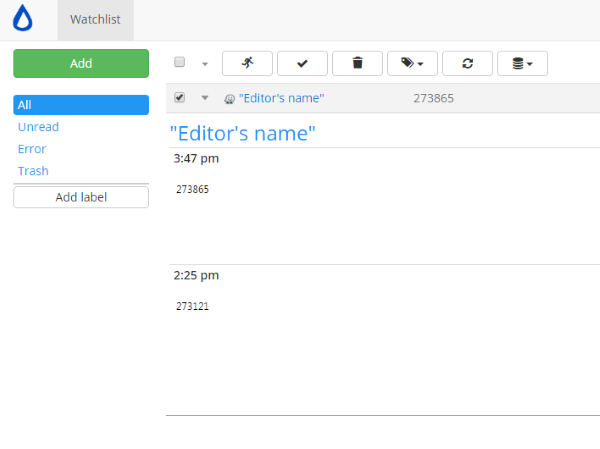
You will get a notification whenever someone you’ve added on your watch list has increased his edits. It also provides you with an edit count history starting when you first enabled the monitoring, making it easier for you to track someone who is rarely active by getting alerted when they use WME again.
Easy to setup and offers conditional alerts too:
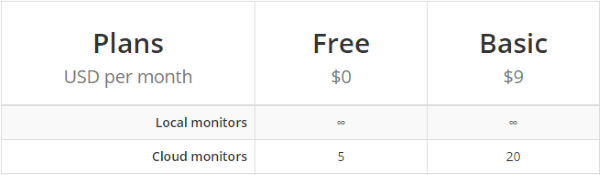
The extension features unlimited and free checks as long as you use the extension locally on your browser and not their cloud services.
1 Like
Note that changing the last two letters of the link for the Chrome download changes the language. 
Also available for Firefox.
Homepage for the service.
I use it but hadn’t though of using it this way. Thanks!
1 Like
I’ve found another way this can be used, besides monitoring editor activity you can also watch segments and be alerted if they are modified. (Only works if 1 segment is selected only)
Steps
- Click the segment you want to watch
- Refresh WME so that the current URL is its permalink with segment ID (I find short URL is better)
For example: https://www.waze.com/editor/?env=row&lon=6.13584&lat=46.23628&zoom=5&mode=0&segments=178453360
- Click on the Distill Web Monitor extention
- Under “Add Monitor” to the left, select “Select parts of a page”
- Select the “Updated by” field

- Save and setup your checking intervals and/or conditions
If the segment is modified you will get an alert:

Unfortunately if the segment ID is altered by deletion or a split you will not get alerted, but your watchlist will show that there was a problem while checking. So if you notice it you can still click the permalink and go check what was changed at those coordinates.

I’m guessing that the same could be done for any item on WME which can be opened directly via permalink, like places.
Of course if you don’t want someone to touch something on WME, the best way remains to use locks. But sometimes there is no good reason to put a high lock on something or simply another editor with your rank or above will decide to make a change despite your set lock. This can help you be notified about it.
Excellent tool. They could add something of the sort in the mentor panel that comes along.