This post is intended as a simple five-minute guide on how to check one.network closures for time restrictions before applying a blanket 24hr closure. It is not comprehensive by any means, but should cover best-case scenarios for most councils. No condescension is intended here either; instead this is more advice for those that may not be familiar with permit conditions, e.g. new area managers and/or Level 3 editors.
If you’re not sure what NCT conditions or TTRO permits are, or have never even heard these terms before, then this post should be helpful to you.
Some closures get added (incorrectly) based solely on the date and time that one.network says, without checking the accompanying permit conditions of the TTRO. This results in closures being applied for the wrong times and/or days, which results in incorrect navigation for Wazers, an influx of URs, and therefore extra work for area managers.
Firstly, let’s answer two basic things:
Q: What is a TTRO?
A: Temporary Traffic Regulation Order - Councils have to issue these to alter how a road is used. This may be closing a road, changing a speed limit temporarily, removing a one-way restriction, etc. Exceptions apply for emergency works, however these still have to be notified even if this isn’t done at the time (this is why a UR may report a road as closed with nothing showing on one.network).
Q: What is an NCT?
A: National Condition Text - These are official conditions specified by the Permit Scheme National Conditions as part of the statutory guidance for highway authorities (e.g. county councils) issued by the UK government. You can find the complete guide to these here if you fancy some bedtime reading.
Now on to the main point of this post:
When looking at closures on one.network, generally it will state a date range in the main title of popups, e.g. “20 May 09:30 - 27 May 23:59”. Now, on first glance you may apply a closure based purely on this, however quite often this can be incorrect. There are two main ‘road closure’ popups on one.network: one is red, one is blue.
Blue popups are a simple bare-minimum road closure notification published by the local authority, and are usually shown when clicking the ‘no entry’ icons. These may contain a link to a TTRO notification (usually a pdf/doc) and will be called something along the lines of “TTRO Memo” or “Early Warning Notice”. Different councils word them differently, but it’ll be something along these lines if they decided to include one.
Red popups display specific details related to the works permit for that closure and details of the contractor carrying out the work (local authority, Openreach, etc). On one.network, these will be displayed when clicking markers for “Roadworks”, “Traffic restrictions”, etc.
Upon clicking a no-entry icon (blue popup) you’ll be presented with something similar to this: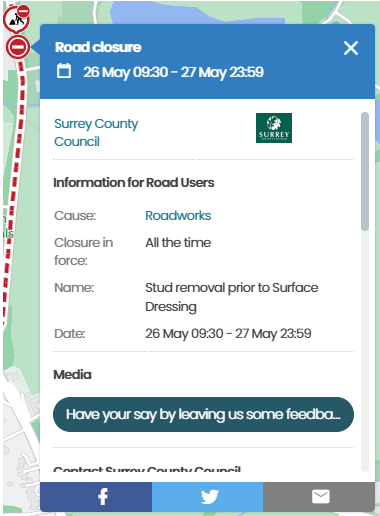
Note the initial lack of any useful information in this popup. However, if you scroll down, you’ll usually find a Works Ref line with a load of letters/numbers. Click on this link and it will move you to the relevant associated works on the map (e.g. roadworks):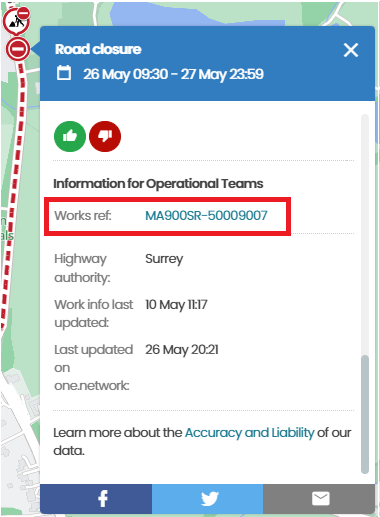
Sometimes this isn’t a clickable link, so make sure you have the relevant layers on the one.network menu enabled by clicking the three lines next to the search box. This will get the red markers to show up on the road in question that you can then click to open the relevant red popup.
Once a red popup opens, you can scroll down to find the permit conditions section. The one we’re interested in is NCT02a. Do not use NCT02b for closure times, as this is just for specifying what hours the contractors are working on site (usually applicable in residential roads).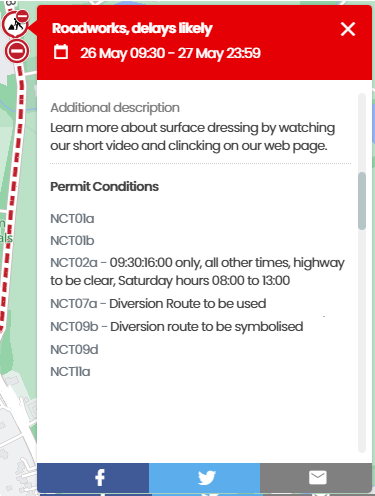
NCT02a defines the times and days that the closure is allowed to be in force, and may or may not be accompanied by wording such as “all other times highway to be clear”. It may even be as simple as “Mon-Fri 09:30-15:30, Sat-Sun 10:00-15:00”. These are the times the road closure can be in place. Note how these can differ significantly to the main title of the popup!
In the case of the documents attached to the blue popups, this will open a document that will contain something along the lines of this example: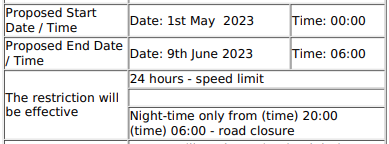
As mentioned above, each council will have their own format and layout for these documents, but the information will be normally be in there somewhere.
If there is no NCT02a/time restriction mentioned in the permit conditions or TTRO document, then you can usually presume the closure is in place for the advertised duration of the works.
There may also be more than one contractor working on a road at a time, so check each marker on the road to ensure your closure covers all of the works taking place.
I hope this was somewhat helpful to anyone that wasn’t aware of these 
Edit: Clarified some terminology