Still being new, I am not sure about this UR relating to postcodes.
Would a senior editor please have a look and let me know how best to deal - specifically because in the WIKI I found information that it is possible to alter the map to better represent postcodes in some cases.
I think the reporter has used an invalid postcode and just by luck it has sent him to the middle of the W12 area. You can check postcodes on the Royal Mail website. Enter the postcode without a space between the two parts.
If the post code is really under a flyover then they have lucked out because I believe Waze only gets a longitude and latitude location for the postcode but not an elevation.
I do not think this is a case of Waze routing to an invalid postcode. If you check with Google maps, the location for “W12” is nowhere near the report location, so I’m pretty sure this is not what happened - they described being routed to the flyover above their destination. Despite the user saying they navigated to “w12 6sr”, I don’t believe this is what they did. There’s a little green dot showing the user position just to the SW of the actual UR. That suggests they were parked in the little access road there. I believe they navigated to a named location, whose postcode happens to be W12 6SR.
For background on postcodes, have a look here. It looks like W12 6SR is not yet searchable in Google, so it hasn’t yet made it’s way through the chain from LA->Royal Mail->Google. There’s nothing you can do to make that happen any quicker.
I do see that there are several places very close to the A40 that might be routed to, but have no access roads. If you add them to the map, there’s a much better chance of anyone routing to a location aorund here getting a better result. In particular, you should map the access road with the green dot and the access road coming SW off of St. Marks Road between the railway line & the flyover.
The other thing you can do, if you can get the reporter to tell you what place he was navigating to, is add that place to Waze and make sure it’s closer to another routable segment than the A40.
No you are right, it’s nowhere near W12 because it’s in W10 :D. I think the reporter routed to W10 6SR, this does indeed take you to the flyover above the green dot.
W10 6SR would seem to be the big square building and if you look on Google Maps you will see the postcode pointer on the south side of that building. As iainhouse pointed out to correct the routing you need to have a road closer to that point than the point is to the A40 flyover.
If you look on streetview there is a road that runs almost underneath the flyover off Bramley Road, this would certainly route closer to the postcode than the flyover but would take you in the wrong entrance so may generate another UR’s. I’m not mad on routing a road through the building but hopefully iainhouse may have a better idea.
Unfortunately, I don’t. The location for W10 6SR is definitely closer to the flyover. However, accidentally routing to the flyover instead of the road underneath is a pretty big mistake. I agree that the best thing will be to draw in the access road with a dog-leg going “in” to the building.
As this is out of my editing area, I can’t see the UR. However, there’s access to the square building, John Brown, here. Perhaps its access road should be put on the map and the building added as a place point. It looks as though there is some sort of tarmacced surface running down the west side of the building too. Although you wouldn’t normally bother with that, if it might help waze navigate to the right elevation in the area, I don’t think it would hurt to add it.
I’m not sure there is, to me it appears to stop about level with the edge of the flyover. There appears to be a building site under there, it may depened on what has happened with that.
Bramley’s Big Adventure claims to be 136 Bramley Road and under the A40, says its address is W10 6TJ but tells customers to navigate to W10 6SS, which google takes as being just south of the A40.
John Brown claims to be 136-142 Bramley Road and says its postcode is W10 6SR which navigates to just north of the A40
:lol: It will be where their architect thought best and where the planners would allow.
I can see you added their entrance road but now you need to add another road on the end of it and take it straight through the middle of the building so that it becomes the closest road to the postcode. Then ask for it to be looked at L5 or 6.
You’ll also need to ask for that section of Bramley Road to be downlocked to L1 for you to connect the side road to be connected.
Personally I’d run the access road down the west side of the building rather than through it, becasue it does look as though there may be a tarmacced surface there, but that is a finer point and it may be best to run it through the building.
TheMkLightning - I concur, if you mean run it down the EAST side of the building… which I have now done. This should be plenty close enough to get the route to hit it but I will keep an eye on this for my “development” when it hits the live map.
First off, Evonic has added the PLR for John Brown Media. Having looked again at the Google point for W10 6SR, I’m still concerned that it might not be close enough - particularly in view of what I will say next - so I’ve “kinked” it a bit further so it ends directly on the Google location for the postcode.
The next think I look at was Bramley’s Big Adventure. I understand why they tell you to use the “wrong” postcode for Satnav on their website: the building is directly underneath the flyover and the postcode location is bang in the middle! You can see the entrance here and the next “click” north shows the building.
I’ve added the access road for the drop-off point at the front of their building and created a point place for BBA. There’s no point using an area, as it’s going to look strange parked across the A40! The presence of this new access road is why I needed to adjust the access for JBM.
The last thing I’ve done is added a couple more access roads/parking lot roads near the flyover. This whole exercise suggests to me a useful little side-project for whoever feels like taking it on. There must be other locations close to or under the Westway Flyover that cause similar confusion. It might be a good idea to scan along the flyover at high zoom, adding any access roads you can see so that Waze has a better chance of navigating sensibly to those locations.
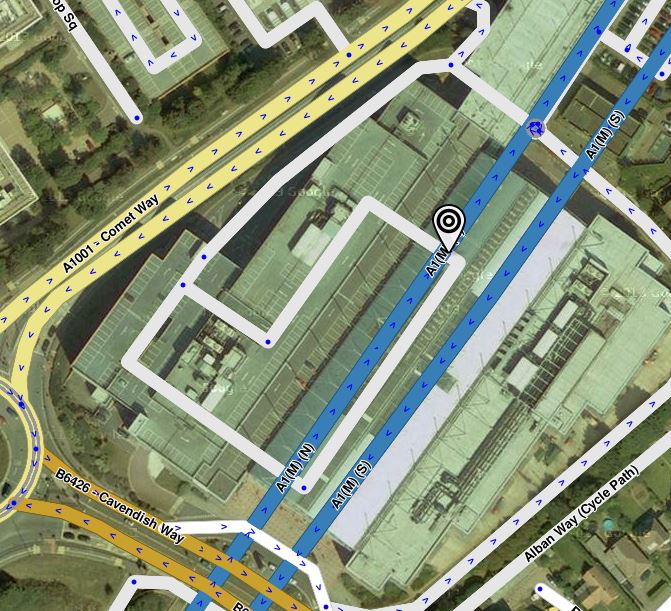
It’s not just the A40 flyover, I just picked up a UR with a similar but opposite problem. The Galleria shopping Centre in Hatfield is built over the A1M motorway but unfortunately whoever added the place area marker left the stopping point in it’s default location which was right above the motorway. Wazers were directed into the tunnel then told they had reached their location, :lol: the fix was easy, just moved the stopping point over to the car park entrance.
However fixing the postcode is not so easy. AL10 0XR is almost on top of the northbound carriageway (at max zoom it is slightly off the road), I have extended the car park road to go through the postcode point but if that doesn’t work I’m wondering if the only option is to shift the motorway. Anyone got any other thoughts?
That is what I was hoping someone would say, give me a few days and I’ll check for other destinations along the tunnel line (I don’t think there are any) and will then post in the unlock forum for it to be shifted as necessary.


 give me a few days and I’ll check for other destinations along the tunnel line (I don’t think there are any) and will then post in the unlock forum for it to be shifted as necessary.