I had Waze running this morning while I took my daughter to the airport, and to my surprise waze told me to take 96th Ave. instead of Pena Blvd. I thought perhaps there was a traffic issue on the usual route so I followed Waze, driving several miles north on 96th (two lanes through the middle of nowhere) before being told to turn right on a street called Queen-something— not sure and I can’t find it on a map now. but there was a big sign with flashing lights right at the turn onto this street saying that it was a restricted area, authorized vehicles only, all vehicles subject to search.
Naturally I had to immediately turn around and retrace my steps back to 470 and Pena Blvd.
Fortunately we were not running late and I could spare the 10 extra minutes this little side trip cost us, but it was really irritating to have Waze direct me to a street I was not permitted to drive on. Can this be fixed please?
Hello Secondfyddle,
To help us troubleshoot can you tell us exactly how you did your search? What exactly did you search for and how did you perform the search in the app? The how part being, did you start to type a destination and then pick a result that appeared as you typed or did you type in a full destination and then tap the search icon and then click on a result in one of the search results tabs? This is important as it will tell us if the result was from the Waze map or another source.
I have seen a few people get routed to the north end of the airport there because of bad searches, there is a fire department on the north side that Google Maps has labeled as KDEN, and there are airline hangers on the north side too that people mistaken choose thinking that they are the area that you would drop someone off for that airline.
Josh
I typed in “airport” and selected “Denver International Airport.” But shouldn’t Waze avoid a restricted street no matter what destination or how the search was done?
Waze will go on restricted streets if the destination is on a street that is marked as private (restricted) on the map.
Do me a favor, do your search again, and on the screen that has the GO button, scroll down to the bottom and tell me if you see a Created By (username) and a Last edited by (User name).
It should look like this
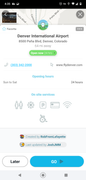
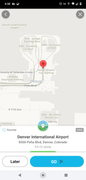
And just curious, are you using Waze for Android Auto or something else other than the app for the phone?
I am using the Waze app on an iPhone.
Denver International Airport shows up exactly as that in my recent searches and trips so I know I didn’t put in anything weird or incorrect as my destination this morning.
I don’t see any names or created by on the Go button screen. Sorry, I can’t figure out how to post the screenshot.
If you didn’t see a created by on that screen that means that the result you got was not from Waze. It’s really hard to troubleshoot something that isn’t on the Waze map.
To post a screenshot I took a screenshot on my phone and transferred it to my computer and then uploaded it to a free site and then posted the link it gave me here. I used https://postimages.org/ because it was free and easy and it gave the code to just copy and paste in here.
The next thing I need you to do is to delete any search info you have for DIA. Make sure it’s not in your favorites also. Next type in DEN and then tap the search icon and have a look in the Places or Search Results tab. See if any of the results in those tabs gives you the same screen and info that I posted in the screenshots and then tap GO and look at the route it gives you. If it still has you going to the north end of the airport that means there is still bad stored data in the app.
If you continue to get a route that is not correct you may want to try clearing the app cache in your phone. As a last resort you can try resetting your app by doing a search for ##@resetapp