This is not necessarily specific to Louisiana, but I wanted to make everyone aware of these things while doing cleanup and Functional Classification.
Plugins/Scripts
I strongly suggest that each Waze editor get the following Plugins (which work best in Chrome):
WME Color Highlights
WME Toolbox
WME Validator
Junction Node Fixer
These utilities will help you to identify problems, such as extra junctions, reverse connectivity and self-connectivity, disconnected roads, closed loops, etc. Junction node fixer allows you to use the Q key to fix bad junctions without changing the turn permissions on that junction.
Gas Stations
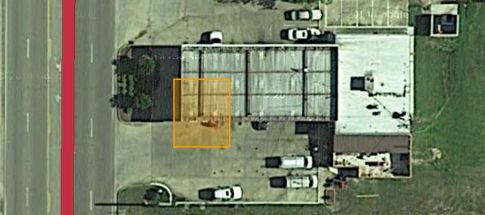
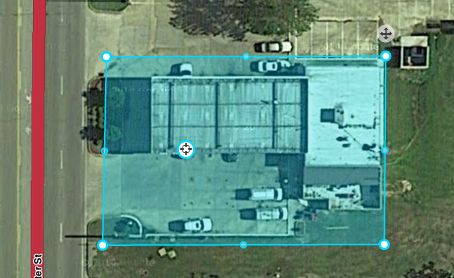
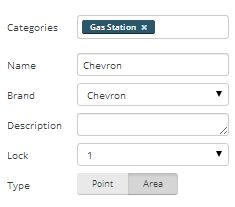
During general cleanup, look for gas stations that have been imported, but never edited. They may or may not be in the right place. Either way, correct the location and stretch the Area Place to cover the entire property of the gas station. Don’t drag the edges of the landmark all the way to the street. Imported stations have their name in ALL CAPS. Fix that to mixed case.
Unnamed Streets
Using Color Highlights, look for unnamed segments. In 99% of cases of unnamed segments, they should be set as a type other than Street, or removed from the map. If they’re an apartment complex or trailer park, or run through a plant or factory behind gates, they should be set to Private Street. If they’re a parking lot, they should be set to Parking Lot type. If they’re a cowpath running through a field, they should probably be deleted, or at least set to Dirt Road. Alleys should be set to Parking Lot type. Remember that any road set as Street type is included in routing, so if you don’t want people to be routed through a segment, change the type or get rid of it completely. In cases where they appear to be legitimate streets, dig a little deeper…use the streetview function and see if the street is there. If so, try to see a street sign and give that street a name.
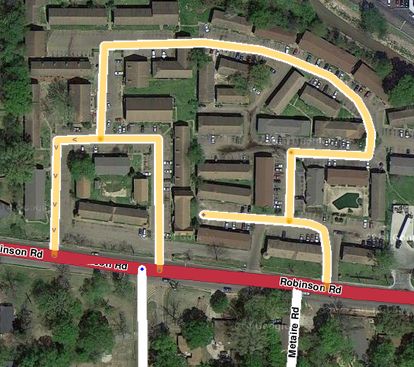 Apartment complex with Street type.
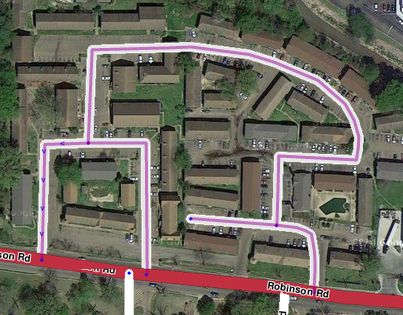 Apartment complex fixed with Private Street type. (note that I have the Private Street set to show in purple in Color Highlights)
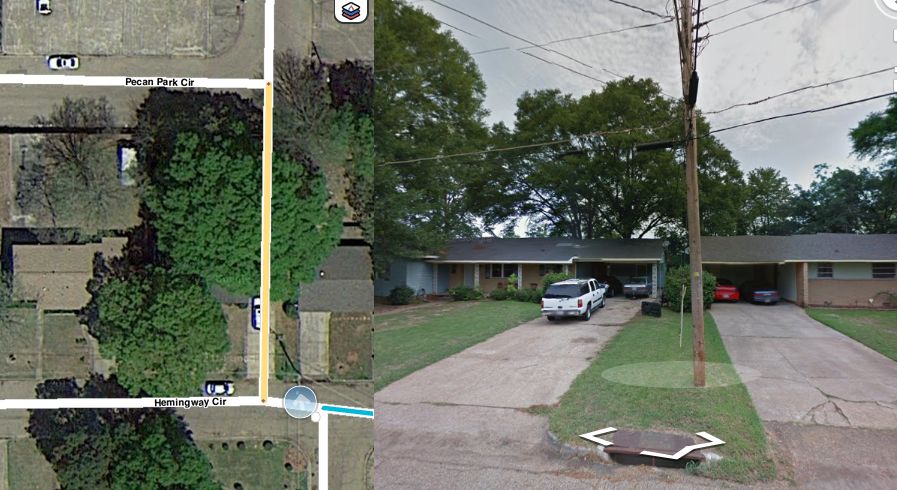 In this case, the street appears to exist from the aerials, but when I opened up Streetview to try to find out the name, it turns out that it runs up someone’s driveway and through their house. Delete.
One place where unnamed streets are allowed is At Grade Connectors. These should be unnamed in most cases.
Places (Landmarks)
If you come across Area-Places that aren’t allowed in the guidelines, but still may be helpful in searches, change them to a Point-Place so they don’t clutter the client map. I’ve yet to find a Parking Lot in Louisiana that meets the guidelines to be marked on the map as a Place. If you find any, remove them.
State Highways
Louisiana State Highways are named using the LA-## naming convention. If you come across any State Hwy ## or State Rte ##, correct them. If the road is split on the Waze map, make sure that the cardinal direction is included after the highway name (LA-23 N). Keep in mind that spacing is important. No space before or after the - and a space before the cardinal direction.
Parking Lot roads
Read the Parking Lot guidelines before mapping any parking lots. Parking Lot roads are a good thing, but if there are too many of them, they make the client map unreadable and don’t add value to the map.
Read the Guidleines before editing!
More information can be found in the Wiki. Be sure you’ve read and studied the Wiki thoroughly before editing the map. If you have questions, contact me, or any other area manager (list found in the Louisiana Wiki and we’ll be glad to help. Editors who go rogue and damage the map will be prohibited from editing. The goal is to add value to the map when editing, not take it away.
That’s it for now. I’ll post more as I come across them. Have fun!