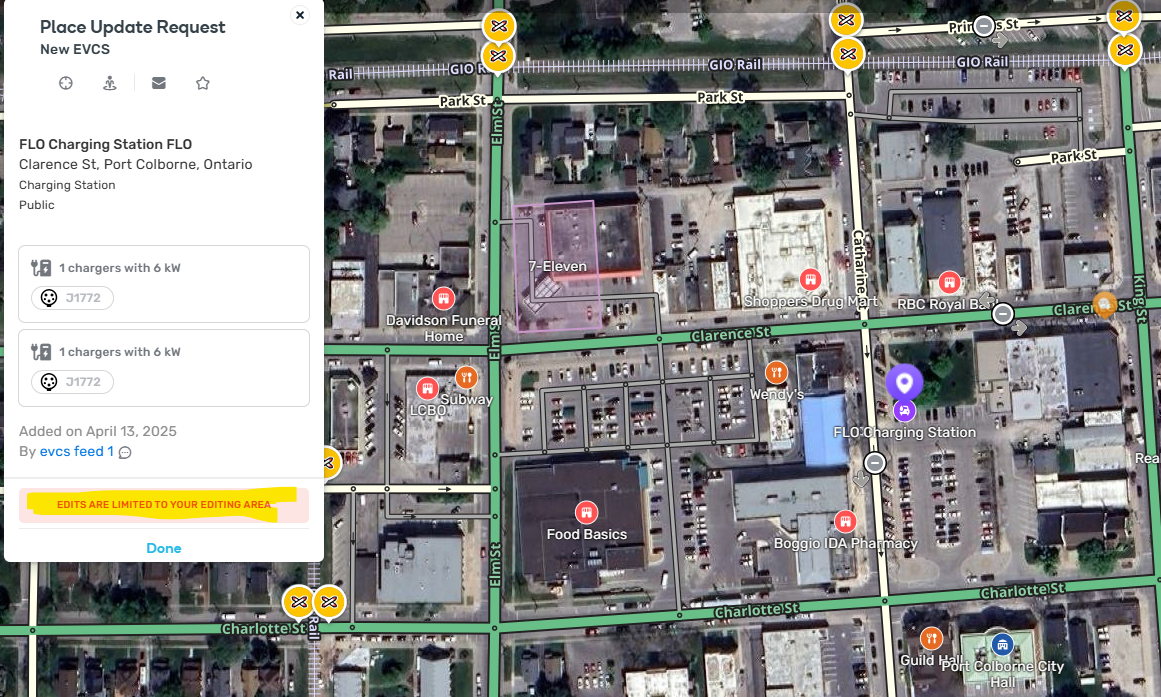
Hello! You’re getting that error because you haven’t driven with Waze open in that immediate area. As a Level 1 editor you’re limited to a smaller area to edit.
Is there something you want to change with that FLO Charging Station in particular?
Hi @HoldenBarn - welcome to the Waze editing community!
That “editing is limited to your editing area” message can definitely be frustrating—but don’t let it stop you from making an impact on the map.
This error you are seeing normally happens because you are generally only allowed to edit in areas you recently have driven in.
| Your editable area includes: | ||
|---|---|---|
| 1. | Roads you’ve driven recently. | |
| 2. | Areas extending a certain distance around those roads—distance increases with your editor rank. | |
| 3. | Any area where you’re an Area Manager, regardless of driving history.  | |
| • | To visualize your editable area, switch on the Editable Area layer in WME: all roads within that zone are available for editing if no other locks apply.  |
Driving areas expire after 90 days. If you haven’t driven through a spot recently, it might fall outside your current editable range. Turning on the “Editable Area” layer can help confirm this.
Also - I notice you are trying to edit/process a place update request for an EV charger - these ones (Especially ones from feeds like the one you are posting above) - are generally managed by higher level editors in the area, so even if you do drive there recently, you may still have issues managing that specific place update.
I would encourage you to help add and manage other places though in areas you have driven recently - have you noticed, for example, that a place is missing in the map? You can try to help add that. Have you noticed a parking lot is not mapped correctly for a location you recently drove to? That might be a great place to start working on map edits in your local area.
Also - try joining our Canada discord server to chat with other editors and learn more! Waze Canada
Happy editing & driving!
-htristan