Egypt WME- Useful Tools & Scripts
You will need to empower your browser to ease your editing process.
Below are Topmost important tools and scripts, after many tests and editing, everything in your hands. However, your preferred browser, I totally suggest Google Chrome. Fast and reliable for editing.
Always remember if you install and activate all scripts it will make your browser laggy and eat your rams, after many uses and tests, I recommend installing all the tools and scripts below but activate from #1 to #13**, later you can enable and disable scripts as your editing process needs.**
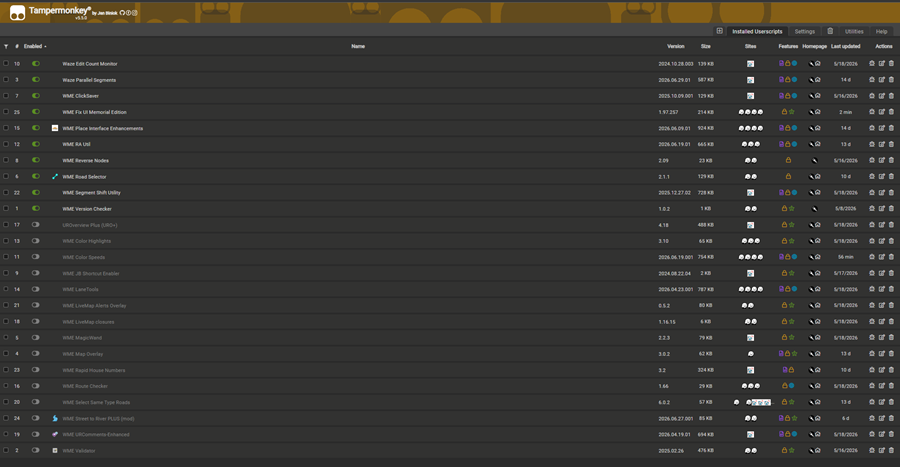
Steps from 1 to 16 must be installed
-
WME Toolbox: any editing tool provided by Waze to enhance and ease your editing.
A) Chrome. Download link no need to seek any permission, it is working fine.
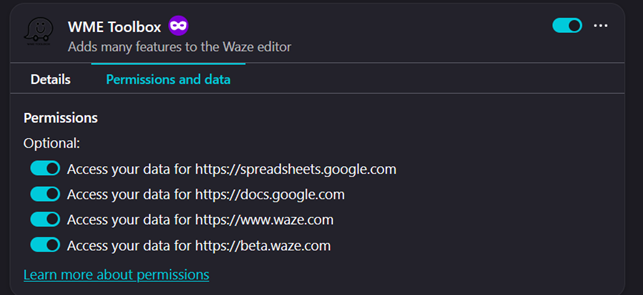
B) Firefox Download link For fire fox It is the only available working toolbox I found among all editions available, once you install it, automatic update will be working fine. You must have all those permissions to work fine with you. -
Map Overlays: Provides an easy way to change the satellite images displayed in Google My Map and Waze Map Editor.
A) Chrome: Download link After installing, you’ll need to pin it to your Chrome toolbar
B) Firefox: Download link it is a script you will need Tampermonkey extension to have it installed -
Tamper Monkey & Greasy fork
A) Greasy fork is like a store for scripts free of charge containing hundreds of scripts for many uses for all online websites. Here we seek only WME Scripts.
B) Tamper Monkey is a browser extension work as a tool will enable you to have the scripts installed to work in your WME, you can add it from here- Chrome >> Download link
- Firefox >> Download link
- Tampermonkey Home page >> link
-
Waze Edit Count Monitor: Displays your daily edit count in the WME toolbar. Warns if you might be throttled. Extended with additional statistics including session time and map tracking. Download link
-
Waze Parallel Segments: Splits two-way segments into parallel one-way carriageways. Supports both left-hand and right-hand traffic in countries. Download Link
-
WME Click Saver: Various UI changes to make editing faster and easier. Download Link
-
WME Fix UI Memorial Edition: Allows alterations to the WME UI to fix things screwed up or ignored by Waze. Download link
-
WME Place Interface Enhancements: Very effective to build and enhance places. Download link
-
WME RA Util (Round-about): Providing basic utility for RA adjustment without the need to delete & recreate. Download link
-
WME Reverse Nodes: Serves to reverse the nodes A and B of a segment, to better manage restrictions on multiples segments. Download link
-
WME Road Selector: Makes selection of multiple roads based on given condition. Download link
-
WME Segment Shift Utility: Utility for shifting street segments in WME without disconnecting nodes. Download link
-
WME Version Checker: Checks for new WME versions and alerts if updated Download link
-
WME Validator: This script validates a map area in Waze Map Editor, highlights issues and generates a very detailed report with wiki references and solutions. Download link
A) Chrome: you have to download the script if not working you need to add chrome extention of WME Validator Download link
B) Firefox: Install only the script, it is working fine. -
WME Route Checker: Allows editors to check the route between two segments. Download link
-
WME Rapid House Numbers: A House Number script with its controls in the House Number mini editor. It injects the next value in a sequence into each new HN. All house number formats are supported. Download link
Steps below are optional but also important and useful to install them.
-
UROverview Plus (URO+): Adds a whole bunch of features to WME, which someday I may get around to documenting properly… Download link
-
WME Color Highlights: Adds colors to road segments to show their status Download link
-
WME Color Speeds: Adds colors to road segments to show their speed Download link
-
WME JB Shortcut Enabler: Enables the “Add a new junction box” keyboard shortcut at L3 Download link
-
WME LiveMap Alerts Overlay: Overlay alerts from the Waze LiveMap Download link
-
WME MagicWand: The very same thing as same tool in graphic editor: select “similar” colored area and create landmark out of it + Clone, Orthogonalize, Rotate and Resize for landmarks Download link
-
WME Select Same Type Roads: This script adds functionality to select and modify roads Download link
-
WME Street to River PLUS (mod): Converts an unsaved WME street segment into a river/forest/canal/other area polygon landmark. Download link
-
URComments-Enhanced (URC-E): handle WME update requests more quickly and efficiently. Also adds many UR filtering options, ability to change the markers, and more! Download link