Interesting. If I turn on EV options, I then see “EV Charging” as a button at the top if I tap on the “Where to?” search bar. It then tells me what’s nearby and what connectors they have. Are you not seeing that?
Martin
[Edit: I have Android Release 4.94.03 and am on the beta channel.]
I have the same version, but do not have the button you mentioned. Some while ago I also lost the ability to select petrol or diesel as the preferred fuel so I think something has gone wrong with my waze app.
Using Android Phone…
The toggle to enable to feature is in Vehicle Details > Electric Vehicles > Turn-on EV Features
When I toggle it on, the button doesn’t appear until I close and reopen the app.
When I toggle it off, button remains until I close and reopen the app.
The button appears instead of Fuel… that’s going to be annoying, a car can be both petrol AND plug in electric and so the user can need both,
A few EV Charger related issues:
I have just found out about the need to re-start the app to change. Mine is now working.
It has been confirmed that the EV feature has been turned on in Alpha and Beta all over the world. It is only the Production version that is held until we get to 50%
Waze have offered some help in processing the remaining EV PUR’s which, after a lot of thought, we have now accepted. A team of “agents” will now be briefed about how we are doing this in the UK and should start to assist in the near future. I hope to let you know when this starts. Please keep a lookout for any new ones added which you think are incorrect, as I am sure it will take a while for these helpers to adjust from working on US ones (which they have been doing for a while now) to the UK ones.
Hi Ian,
Thanks for that information - explains why my brother-in-law can’t see it.
As for progressing the numbers, do we have a breakdown of how we’re doing on “Public” chargers? Given that those are the only ones that will be surfaced for the time being, shouldn’t we be concentrating on those (if we aren’t already) rather than checking the ones in e.g. hotel car parks which you won’t be able to search for anyway? I would think that if we’re nearly there on the Public ones they should switch it on, but what do I know!!
Regards
Martin
The “request” from HQ was that we processed 50% of the list so that the feature could be announced and turned on. There was no mention of which ones were needed first. Personally, I have just been clearing a county at a time, not worrying about what type they were. We are currently at a total of 38% done, so I would suspect that is only about 25% Public ones. A long way to go yet. Hopefully with the new help, who will be concentrating on public ones, we will get there soon and then be able to finish the rest in a more leisurely way. 
ubitricity points, I see them on roads with:
- Permit holders only Monday to Saturday 8am to 6.30pm
- Permit holders or Pay by Phone Monday to Saturday 8am to 6.30pm
- Roads with no parking restrictions evident
To clarify, these should be Public? I’m thinking they should be since they meet the description “EVCS that are available to the general public… on-street parking (incl. partial timed restrictions)”. Looking for clarificaiton because there’s a lot of them like that. If so, is that Problem or are we missing a drop-down for this scenario?
I understand Permit holders only at any time can stay as Restricted - “EVCS that are available to the general public, but with limitations, such as… permit holders at all times”
Yes, these should be set to Public with the permit time noted in the description. It was exactly these locations that had us change our policy on mapping 24 February.
Edit: A recent drive added a new area to work on so no longer need a temporary additional area
Would someone with the necessary permissions for https://wazeopedia.waze.com/wiki/UnitedKingdom/Electric_Vehicle_Charging_Station please add:
Hubsta has merged with Mer and is now branded as such
[Rebranding finished 31st May 2022]
Regarding this, I’ve just had a PUR from a non-beta user to add a picture to an EVCS I approved on the 6th May. So it appears that the place points may be live even if the app features aren’t.
I have seen an increasing number of users trying to attach (completely incorrect) pictures to EV points. I assume, as you say, these are even now “findable” in the production app.
There seems to be a new column in the spreadsheet called “Username”, which seems to have other people’s email addresses, does that column serve any value, most cases the username will be whoever has updated the PUR. That change in layout causes the spreadsheet to be too wide for my screen without it moving across for the comments column. If it’s needed there, any chance we can resize some of the other stuff (Country, Latitude, No. Connectors three good candidates) so that the size fits on typical monitors
Can I get some clarity on this because I have some free time to do some more today. There was nothing on the wiki about navigation points so I’ve set hundreds.
What do you mean ‘actual place point location’? By not setting a navigation point, how will Waze choose which segment to navigate users to when there are multiple options?
Actual place location… the location of the charger unit, what else can I mean :?:
EVCS are point locations in their nature, except of course a small number of hubs being built. It is not written in the wiki as common sense would expect Waze to direct you to the charger location within a street or car park and not the entrance for users to still then have to search. If the EVCS mapping is closer to the wrong segment it can be moved closer to the correct segment, assuming you are mapping segments to ensure Waze provides correct routing. If it is still closer to the wrong segment then a navigation point would be beneficial.
Example - EVCS moved closer to the relevant segment without navigation point - https://www.waze.com/en-GB/editor/?env=row&lon=-4.06733&lat=52.40534&zoomLevel=20&venues=233243148.-1962339207.27797381
This is not unique to EVCS, navigation points are not generally required for Point Places as the PP itself should be set at the location we want waze to route to.
If you have an example your are unsure of then you should provide a permalink so others can see the issue.
A lot of EVCS are located within car parks or private areas that would need PLR or PRs to route to, but in many cases the road they would need connecting to are L4+, this would entail a lot of requests to the L4+ team, I did a few, but I don’t think that was tenable as there was just too many of them.
I think the problem was the original text “It should be noted that you shouldn’t be setting a navigation point for EVCS”. Now there’s clarification of “If it is still closer to the wrong segment then a navigation point would be beneficial” helps resolve my concerns with the original text, as there are some cases (pretty much the exception rather than the rule, but there are some) where the navigation point is essential to prevent mis-routing to the wrong location. Maybe the OP also felt the same?
I’m puzzled by this in all honesty because right from the start I’ve been adding place points to the doorway of the place and then setting an appropriate navigation point, usually at the entrance to the car park if there is one. I recall reading posts from ianhouse about this. I believe this is good practice.
I wouldn’t put a place point for a pub, for example, on the entrance to the car park. Regardless of the fact it would route correctly, it looks wrong from a mapping point of view and other editors are likely to come along and move it.
Surely the whole point of a navigation point is that we can set the correct point we want users to be routed to, which enables us to put the place point on the building or entrance.
If for 4.5 years I’ve been wrong I may as well hang up my mouse and call it a day.
Either way, try treating fellow editors with a bit of respect and leave out the belittling remarks.
Small milestone…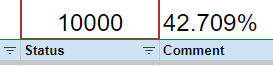
Can I ask if address’s are being checked? I’m seeing a lot of approved locations with incorrect streets and cities.
For me, if I can tell it has the wrong street name or city name, I’ll update it, but if I’m not confident I leave it unchanged to what the original feed says it is.